All-In-One Security 5.4.5: meet the new onboarding wizard
We’ve heard you: setting up a security plugin shouldn’t require a computer science degree.
Over the past year, we’ve listened to countless users tell us that while All-In-One Security (AIOS) is packed with powerful features, knowing where to start can feel overwhelming. Terms like “brute force protection” and “6G firewall” aren’t exactly everyday language for most website owners. And with dozens of settings spread across multiple tabs, even experienced users have told us they’ve resorted to creating their own bookmark systems just to find the features they use most.
AIOS 5.4.5 (Free) and AIOS Premium 1.0.9, we’re changing that. Say hello to the new onboarding wizard.
Security setup, without the guesswork
Section titled Security setup, without the guessworkAIOS has always been one of the most comprehensive security plugins available for WordPress. But comprehensive can also mean complex, and we’ve heard directly from users that this complexity has been a barrier.
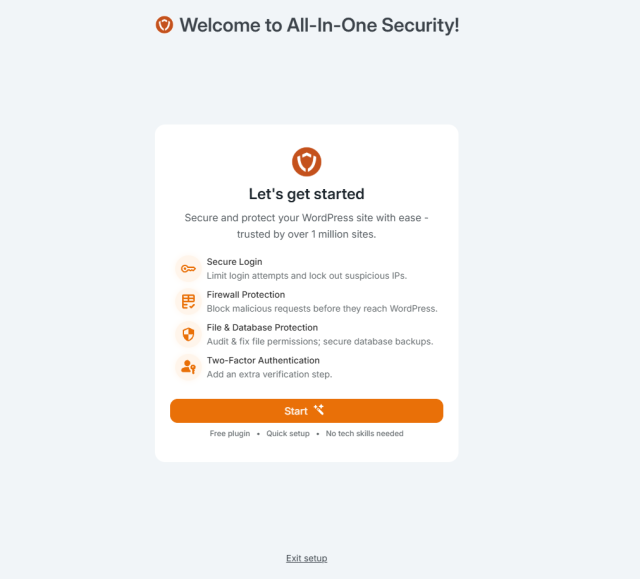
The new onboarding wizard tackles this head-on. Instead of dropping you into a dashboard full of options and hoping you figure out what matters, the wizard walks you through a focused, step-by-step setup that gets your site protected in minutes.
Here’s what the wizard helps you configure:
Login Protection – Stop attackers from guessing their way into your site. The wizard enables login lockdown (blocking IP addresses after failed attempts) and helps you set up Two-Factor Authentication for your admin account right from the start.
Firewall Basics – No need to understand what “6G blacklist rules” means. The wizard enables proven firewall protections that block common attack patterns, with simple toggles and plain-English explanations for each option.
File & Database Security – Prevent attackers from editing your theme and plugin files through the WordPress dashboard, and protect your site from clickjacking and content theft.
Spam Prevention – Automatically detect and block comment spam bots before they clutter your site.
Each setting comes with a brief explanation of what it does and why it matters. Toggle it on, toggle it off. You’re in control, but you’re not left guessing.
Built around real user feedback
Section titled Built around real user feedbackThis isn’t a feature we dreamed up in isolation. The onboarding wizard is a direct response to what users have been telling us for months:
- That the sheer number of options felt intimidating
- That technical terminology made it hard to know what to enable
- That they wanted guidance on what settings actually matter for basic protection
The wizard addresses all of this. It’s designed for the site owner who wants solid security without becoming a security expert. Enable the recommended settings, set up 2FA, and you’re done, your site is protected with a strong security baseline.
For users who want more control, every setting configured by the wizard can still be fine-tuned later in the full AIOS dashboard.
Who will see the onboarding wizard?
Section titled Who will see the onboarding wizard?We know existing users have already invested time configuring AIOS to their needs. The last thing we want is to interrupt that.
- New installations will see the wizard automatically after activation
- Existing installations updating to 5.4.5 will not see the wizard
Your current setup remains exactly as you left it. No pop-ups, no interruptions, no changes to your existing configuration.
If you’re a new user and prefer to configure everything manually, you can skip the wizard at any time.
What else is new in AIOS 5.4.5?
Section titled What else is new in AIOS 5.4.5?This release also includes several improvements under the hood:
- UpdraftCentral integration – New reporting functions for users managing multiple sites through UpdraftCentral
- Logged-in users tracking – Fixed an issue affecting the accuracy of logged-in user monitoring
- PHP Rules tab – Resolved UI scrolling issues that made navigation difficult
- Brute force compatibility – Fixed an issue where brute force prevention could interfere with UpdraftCentral commands
Update now
Section titled Update nowAIOS 5.4.5 is available now in the WordPress plugin directory.
If you’re new to All In One Security, we hope this wizard makes your first experience dramatically simpler. And if you’ve been with us for a while, thank you. Your feedback is what made this feature possible, and we’ll continue improving based on what you tell us.
Change Log
Section titled Change LogFEATURE: Added Onboarding Wizard for guided first-time setup
FEATURE: New reporting functions for UpdraftCentral
FIX: Fixed logged-in users tracking issue
FIX: Resolved UI scrolling issues on PHP Rules tab
FIX: Fixed brute force prevention interfering with UpdraftCentral commands
Want to take your site security a step further?
If you’re looking for deeper protection, AIOS Premium adds features like malware scanning, scheduled scans, and advanced monitoring to help you stay ahead of threats.
About the author

Alexandru Bucsa
Alex is our All-In-One Security Product Manager. With more than six years of WordPress experience, he listens closely to what users need and works hard to make AIOS even better. Drawing on his background in forensic investigations, Alex loves diving into problems to understand their causes and find practical fixes that truly help our community.
Categories
AIOS
Get every feature and fix ever implemented plus access to future releases by subscribing to AIOS Premium.
From just $70 for the year.
More stories
-

WP-Optimize 4.5.0: more control, smarter performance tuning
More control over caching and performance tuning, plus fixes that improve everyday reliability.
-

WP-Optimize 4.4.0: new onboarding wizard for first-time users
WP-Optimize 4.4.0 introduces a new onboarding wizard to simplify setup for first-time users, along with several fixes and small stability improvements.
-

Finally, eCommerce analytics that make sense
Get meaningful eCommerce insights without the noise. The latest Burst Statistics Pro update adds sales analytics for WooCommerce and Easy Digital Downloads.
-

IDrive now supported in UpdraftPlus as S3 storage
UpdraftPlus now supports IDrive as an S3-compatible backup storage option. Discover what this means and why IDrive is a great storage option.
