Best WordPress theme for construction companies
If you run a construction business, your website doesn’t need to win design awards. It needs to work. It should show your projects clearly, load quickly on a phone at a job site, and be simple enough to update without calling a developer every time you finish a new build.
I’ve tested a lot of WordPress themes over the years – some great, some frustrating, and plenty that looked good in demos but fell apart in real use. For construction companies, the priorities are different. You need something solid, fast, and practical. A theme that supports your work rather than getting in the way of it.
In this guide, I’ll walk you through the best WordPress themes for construction businesses, both free and premium and explain which types of companies they suit best.
Key takeaways
Section titled Key takeaways- Speed wins work. Many clients view construction websites on mobile data while on-site. If your portfolio takes too long to load, they’ll move on before they ever see your work.
- Choose a theme that fits your type of business. Architects and designers benefit from visually polished themes, while contractors and builders usually need clear services, strong calls to action, and fast access to contact details.
- Decide how much control you really want. Niche construction themes get you online quickly with minimal setup, while flexible themes give you more freedom but require more hands-on editing.
- Ease of updates matters more than you think. If your site is hard to update, it will get neglected. The best theme is one you can realistically keep up to date as projects change.
My methodology
Section titled My methodologyTo make sure this list is genuinely useful, I didn’t just pick the most popular theme names and call it a day. I tested each theme against a set of practical criteria that actually matter for construction businesses. I know most owners don’t have time to wrestle with clunky software, so everything here was judged on how it performs in the real world.
- Speed & performance: Does the code load quickly? This is crucial for SEO and user experience, especially for image-heavy portfolios
- Ease of use: Can a non-tech-savvy business owner change text and images without hiring a developer?
- Design quality: Does it look professional and trustworthy, or does it look like a generic blog?
I also looked at how well each theme works alongside essential tools like backup, security, and performance plugins. A good theme shouldn’t need excessive tweaking just to achieve decent speed scores or basic stability. The strongest options are the ones that work smoothly with optimisation tools and CDNs, rather than fighting against them.
Best WordPress themes for construction companies
Section titled Best WordPress themes for construction companiesHere are my top recommendations, starting with the heavy hitters and moving into agile, free options.
1. Divi
Section titled 1. DiviPremium | Speed: 8.5 | Ease: 10 | Design: 10 | Overall Score: 9.8/10
Ideal use case: This is perfect for construction owners who have a specific vision for their brand and want the freedom to tweak every pixel. It is also great if you plan to scale your website later, perhaps adding an e-commerce section to sell supplies.
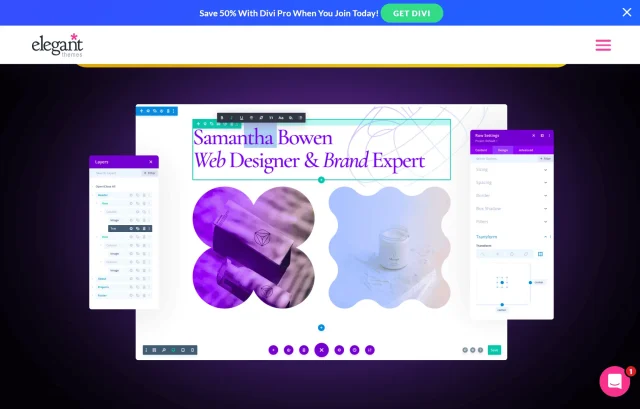
If you want complete control without touching a single line of code, Divi is one of the most popular premium themes due to its visual builder. It isn’t just a theme; it is a complete website building platform that replaces the standard WordPress post editor with a vastly superior visual editor.
Key features
- Visual drag-and-drop builder: Allows you to see exactly what your page looks like as you edit it, replacing the standard block editor.
- Construction layout pack: Comes with a specific importable pack that includes pre-built pages for “Projects,” “Services,” and “About Us.”
- Global elements: Change a color or font once, and it updates across the entire site which is a massive time saver.
- Marketing tools: Built-in split testing to see which homepage headline gets you more quote requests.
Pros
- Incredible visual builder makes editing intuitive
- Hundreds of pre-made templates, including specific construction niches
- One-time purchase option available (lifetime access)
- Excellent 24/7 support documentation
Cons
- It can be “heavy” on code, so you need good hosting to keep it fast
- The learning curve for the builder is short but necessary
Final verdict
Divi is the power drill of WordPress themes. It’s versatile, powerful, and essential. It earns the top spot because it solves the biggest problem for construction companies: the inability to easily update the site. With Divi, you don’t need to call a web guy every time you finish a project; you just drag, drop, and publish. If you want a site that looks like you paid an agency $10,000 for it, Divi is the way to go.
2. Astra
Section titled 2. AstraFreemium | Speed: 10 | Ease: 9 | Design: 9 | Overall Score: 9.6/10]
Ideal use case: Ideal for businesses that prioritize SEO rankings and user experience over flashy animations. If you want a site that just works, loads fast for clients on slow mobile connections, and captures leads efficiently, Astra Pro is your best bet.

Astra is synonymous with speed. It is one of the most lightweight themes on the market, meaning your site will load nearly instantly. For a construction company, where potential clients might be browsing your portfolio on a 4G connection at a job site, this speed is a massive advantage.
Key features
- Lightweight Code: Less than 50KB on the frontend, ensuring lightning-fast load times.
- Page Builder Integration: Works seamlessly with Elementor, Beaver Builder, and Gutenberg.
- Construction Starter Template: A professionally designed, importable site structure specifically for the trade.
- Header/Footer Builder: Advanced controls to prominently display your phone number and “Get a Quote” button.
Pros
- Unmatched loading speeds
- Huge library of starter templates
- Works with almost any
- WordPress plugin
- Very affordable annual pricing
Cons
- The free version is somewhat limited in design options
- Relies on third-party page builders (like Elementor) for the interior page layouts
Final verdict
Astra is a lightweight but incredibly strong theme. For a construction company, speed is money. If a potential client is looking for a contractor on their phone and your site takes 5 seconds to load, they are going to the next result. Astra ensures you stay visible and fast, making it the best choice for SEO-conscious business owners.
Don’t build without a safety net
You wouldn’t step on a job site without a hard hat. UpdraftPlus backs up your blueprints, portfolios, and client data automatically, so a server crash never demolishes your business.
3. BuildPress by ProteusThemes
Section titled 3. BuildPress by ProteusThemesPremium | Speed: 9 | Ease: 8.5 | Design: 9.5 | Overall Score: 9.2/10
Ideal use case: Perfect for general contractors, renovators, and landscaping companies who need a site up and running in 24 hours. You don’t need to tweak the design much because it already looks exactly like a construction site should.
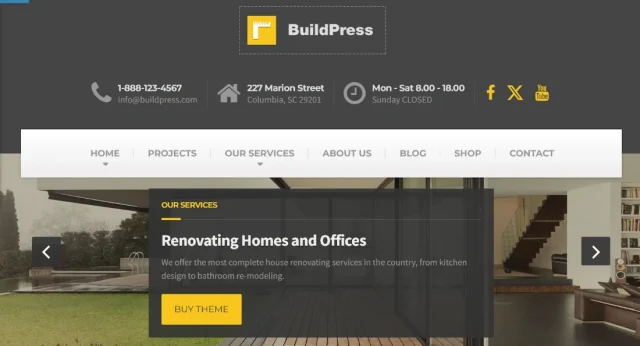
While Divi and Astra are multipurpose, BuildPress was built explicitly for the construction industry. The developers researched what actual construction companies need and baked it right into the theme. This focus makes it arguably the best wordpress theme for construction company owners who want a “plug and play” solution.
Key features
Cost Calculator: A built-in tool that allows clients to estimate project costs directly on your site.
Industrial Design Language: Uses fonts, icons, and layouts specifically curated for the construction trade.
RTL & Translation Ready: excellent for companies operating in multilingual regions or international markets.
Essential Grid Plugin: Included for free to create stunning masonry grids of your project portfolios.
Pros
Niche-specific design requires very little customization
Includes essential plugins like Essential Grid for portfolios
One-click demo import is very smooth
Coding is clean and developer-friendly
Cons
Less flexible than Divi if you want to change the layout drastically
Updates are less frequent than major multipurpose themes
Final verdict
BuildPress is a ready to go theme and serves its purpose perfectly. While other themes require you to build the “construction look” from scratch, BuildPress hands it to you on a silver platter.
4. Avada
Section titled 4. AvadaPremium | Speed: 8 | Ease: 8 | Design: 9.5 | Overall Score: 9.0/10
Ideal use case: Best for larger construction firms or architectural agencies that have a lot of content, high-resolution images, and a need for a very corporate, established look. It handles complex data well.
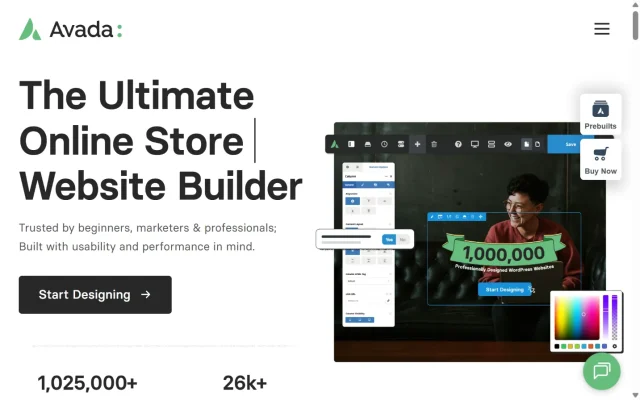
Avada is the #1 selling theme of all time on ThemeForest, and for good reason. It comes with the “Fusion Builder,” which is a powerful tool for creating complex layouts. For construction companies, Avada offers robust portfolio tools to showcase your past projects in stunning detail.
Key features
- Fusion builder: A proprietary page builder that allows for complex, multi-column layouts.
- Avada construction demo: A pre-built website featuring bold typography and industry-standard yellow/black accents.
- Dynamic content: Designated areas for safety certifications, client testimonials, and team member bios.
- Fusion Core: Adds elements like sliders, toggle boxes, and animated counters (e.g., “Projects completed: 500+”).
Pros
- Packed with features; you won’t need many extra plugins
- Very professional, high-end design aesthetic
- Great control over mobile responsiveness
- Huge user community and support forum
Cons
- Can feel overwhelming due to the sheer number of options
- The backend can be a bit cluttered for a novice
Final verdict
Avada is the heavy machinery of this list. It has a steeper learning curve than Astra, but once you know how to operate it, it can do absolutely anything. If your company bids on large government or commercial contracts, Avada provides the level of corporate polish and detail that instills confidence in high-value stakeholders.
5. TheGem
Section titled 5. TheGemPremium | Speed: 8.5 | Ease: 8 | Design: 10 | Overall Score: 8.8/10
Ideal use case: Architects, luxury home builders, and interior designers. If your selling point is “beauty” and “design,” and you need a website that acts as a digital brochure for high-end work, this is it.
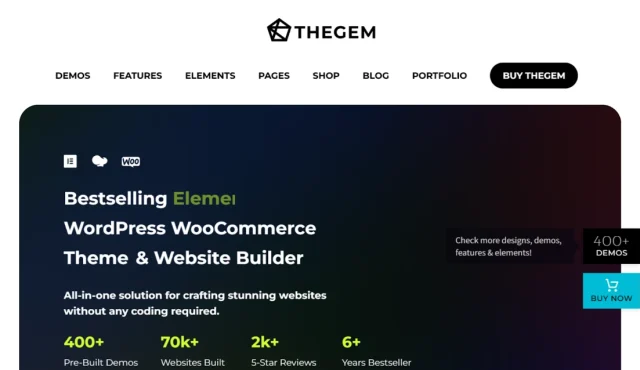
TheGem labels itself as a “creative multi-purpose” theme, but its construction demo is one of the most visually impressive I have seen. It focuses heavily on high-performance visuals, making it ideal if your work is very aesthetic, such as high-end residential renovations or interior design.
Key features
- 400+ Creative templates: Includes sleek, modern layouts specifically for construction and architecture.
- Retina ready: Optimized for high-resolution displays, ensuring architectural renderings look crisp.
- High performance: Surprisingly fast load times despite being an image-heavy theme.
- Dual builder compatibility: Works with both Elementor and WPBakery Page Builder.
Pros
- Stunning visual design and typography
- Compatible with both Elementor and WPBakery
- High performance despite being image-heavy
- Future-proof design that won’t look dated in a year
Cons
- Might be “too pretty” for a rugged demolition company
- Setup can take time due to the amount of options
Final verdict
TheGem is the “architect” of themes. It’s stylish, precise, and beautiful. While BuildPress is rugged, TheGem is refined. It is the best choice if you are targeting high-ticket residential clients who care deeply about aesthetics. It tells your potential customers that you care about the details, which is a powerful message in the building trade.
6. OceanWP
Section titled 6. OceanWPFree | Speed: 8.5 | Ease: 8 | Design: 8 | Overall Score: 8.4/10
Ideal use case: Construction supply companies, hardware stores, or contractors who sell DIY kits. If you need to sell products (like architectural salvage or branded merchandise) alongside your services, OceanWP is the way to go
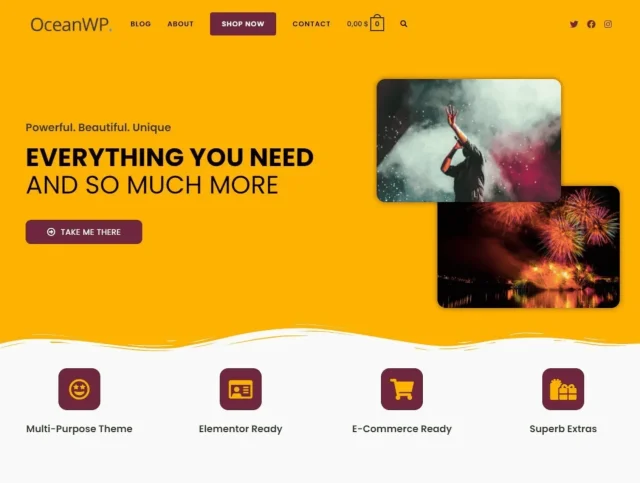
OceanWP is another giant in the free theme space. Where it shines over Astra is its features for e-commerce. If your construction company also sells hardware, leftover materials, or branded merchandise, OceanWP is the way to go.
Key features
- WooCommerce integration: Market-leading features for online stores, even in the free version.
- Native cart popup: Displays a shopping cart popup when items are added, usually a premium feature.
- Elementor widgets: A library of free extension widgets to help build portfolios.
- Mobile responsive: rigorous testing on various screen sizes to ensure store functionality works on phones.
Pros
- Best-in-class e-commerce features for free
- Very mobile-responsive
- Good library of free extensions
- SEO-friendly base code
Cons
- The setup wizard can be a bit pushy about installing recommended plugins
- Too many options can be confusing for a total beginner
Final verdict
OceanWP is the retail storefront of themes. Most construction themes treat e-commerce as an afterthought, but OceanWP puts it front and center. If your business model involves any kind of direct sales to customers, this theme provides the infrastructure you need without the monthly fees of platforms like Shopify.
7. Construction Lite
Section titled 7. Construction LiteFree | Speed: 8 | Ease: 9 | Design: 7.5 | Overall Score: 8.2/10
Ideal use case: Small local construction firms who want a classic website layout without having to learn a page builder. It’s for the business owner who wants to install a theme and have it look like the demo immediately.
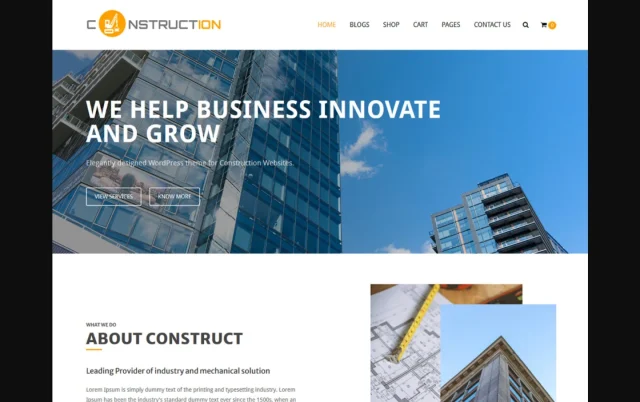
As the name implies, Construction Lite is a dedicated free theme for this niche. Unlike Astra or OceanWP, which are blank canvases, this theme installs with a layout structure specifically designed for builders.
Key features
- Homepage slider: A prominent feature area to cycle through your best completed projects.
- CTA Section: Dedicated area for a “Call to Action” (e.g., “Call us for a Quote”).
- Client Logo Carousel: A scrolling bar to display logos of partners or brands you work with.
- Service Blurbs: Pre-styled columns to list services like “Renovation,” “Plumbing,” and “Electrical.”
Pros
- Purpose-built for construction
- Very easy to set up
- Clean, professional look out of the box
- Works well with standard
- WordPress widgets
Cons
- Customization is limited; your site will look like the demo
- Not as fast as Astra
Final verdict
Construction Lite is a solid, no-nonsense choice. It’s like hiring a subcontractor who knows exactly what to do – you point, they build, job done. It lacks the flexibility of Astra, but it makes up for it by being specifically tailored to your industry. You won’t have to fight with the settings to make it look like a construction site; it already is one.
8. Hestia
Section titled 8. HestiaFree | Speed: 8 | Ease: 9.5 | Design: 8 | Overall Score: 8.0/10
Ideal use case: Solo contractors or consultants who have a small portfolio and want a simple, high-impact brochure site. It works best for businesses that want a narrative flow on a single page.
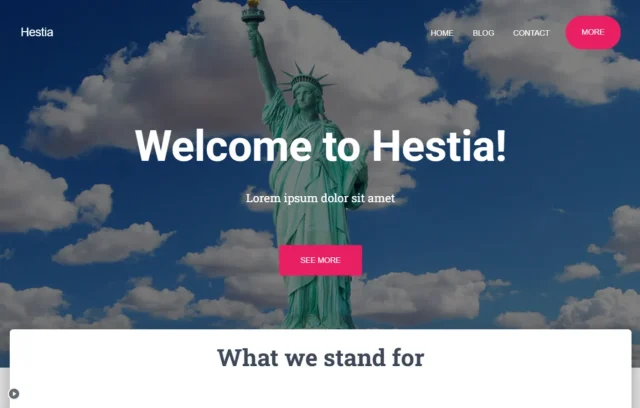
Hestia offers a modern “one-page” design aesthetic. This means users can scroll down a single page to see your About, Services, Portfolio, and Contact info. For a construction company, this narrative flow works very well.
Key features
- Material design: Uses Google’s design language for a clean, modern, app-like appearance.
- One-page layout: Users can scroll down a single page to see About, Services, Portfolio, and Contact info.
- Live customizer: All changes are edited in real-time through the WordPress Customizer.
- Gutenberg ready: Fully compatible with the default WordPress block editor.
Pros
- One-page design is excellent for mobile users
- Very simple setup
- Modern “Material Design” look
- SEO friendly
Cons
- One-page design isn’t great if you have a massive blog or hundreds of projects
- Styling options in the free version are basic
Final verdict
Hestia cuts out the fluff and gets straight to the point. For a local handyman or a specialist consultant, a multi-page site can sometimes be overkill. Hestia offers a streamlined user experience that leads the visitor gently from “Who we are” to “Hire us” in one smooth scroll.
9. GeneratePress
Section titled 9. GeneratePressFree | Speed: 10 | Ease: 8.5 | Design: 7 | Overall Score: 9.5/10
Ideal use case: Tech-savvy business owners or those hiring a developer who want the absolute best performance foundation. It is also perfect for government contracts requiring strict accessibility compliance.
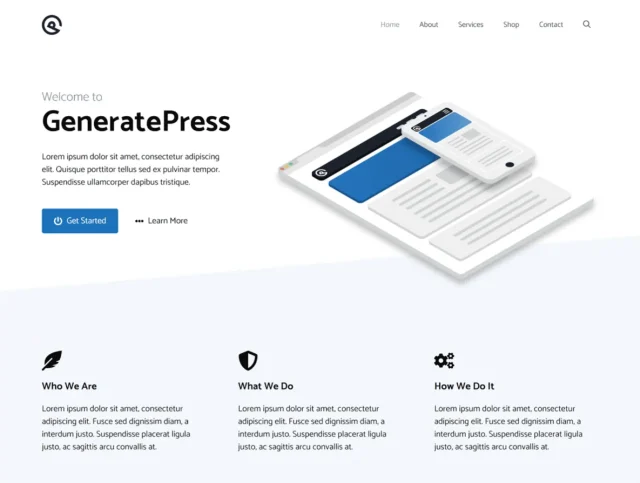
GeneratePress is a favorite among developers because it is incredibly stable and secure. It is strictly performance-focused. It doesn’t come with a “construction” look out of the box, but it gives you the tools to build one that will never crash.
Key features
- Micro-sized code: The installation size is small, making it one of the lightest themes available.
- Accessibility ready: Follows WCAG 2.0 standards, ensuring the site is usable by everyone.
- Plugin compatibility: Coding standards are so high it works with virtually every plugin
- Hooks system: Allows developers to insert code anywhere in the theme without breaking it.
Pros
- The most stable code on the market
- Insanely fast
- Excellent compatibility with plugins
- Great support forum
Cons
- Looks very plain initially; requires work to make it look “construction” styled
- Free version lacks some styling controls
Final verdict
GeneratePress is the reinforced concrete of themes. It’s not flashy on its own, but you can build a skyscraper on top of it, and it will never buckle. If you are tired of themes that crash, conflict with plugins, or slow down your server, GeneratePress is the stability you are looking for. It is the professional’s choice for a long-term, scalable web presence.
Comparison table
Section titled Comparison tableThe security layer your site shouldn’t skip
A premium theme won’t protect your site on its own. AIOS helps lock down your WordPress site with firewall rules, login protection, and proactive security checks – without adding complexity.
Conclusion
Section titled ConclusionChoosing the right WordPress theme is one of the most important decisions you’ll make for your construction website. It affects how professional you look, how quickly your pages load, and how easy it is to update your projects as your business grows.
In 2026, expectations are higher than ever. Clients check websites on their phones before they call. They expect fast loading, clear project galleries, and straightforward contact options. A good theme helps you meet those expectations without adding technical headaches.
Whether you go with something flexible like Divi, performance-focused like Astra, or industry-specific like BuildPress, the key is choosing a theme that fits how you actually run your business, not just how it looks in a demo.
But the theme is only part of the setup. Construction sites are often updated in bursts – you finish a project, upload photos, then leave the site alone for a while. That makes regular backups and basic security especially important. Updates happen, plugins change, and hosting environments evolve. Having automated backups in place means you’re not scrambling if something breaks.
Tools like UpdraftPlus can quietly handle backups in the background, storing secure copies off-site so you always have a way to restore your work if needed. It’s not the most exciting part of running a website, but it’s one of the smartest.
A strong theme gives you the presentation. A simple maintenance setup gives you resilience. Together, that’s what keeps a construction website working long term.
FAQs
Section titled FAQsWhat is the best free WordPress theme for a construction company?
Astra (Free) is the best all-around option due to its speed, lightweight code, and flexibility. However, if you want a theme that is specifically designed for construction out of the box with zero configuration, Construction Light is a fantastic niche-specific choice.
Do I really need a premium theme for my construction business?
Not necessarily. Free themes like Astra or OceanWP are powerful enough for most small businesses to start with. However, premium themes like Divi or BuildPress often come with dedicated support, better documentation, and “one-click” demo content that can save you hours of setup time
What specific features should I look for in a construction theme?
Look for a theme that includes a project portfolio (gallery), a dedicated services section, and a “Request a Quote” form. Some niche themes also include a construction cost calculator, which is a great tool for capturing leads.
Why is mobile responsiveness important for construction websites?
It is critical because your clients are often on the move. Architects, site managers, and homeowners frequently check contractor websites from their smartphones while standing on a job site. If your site doesn’t load correctly on a phone, you will lose the bid.
How do I switch themes without losing my content?
WordPress keeps your content (posts and pages) separate from your design, so your text won’t disappear. However, you might lose widget settings or custom layouts. Always use a plugin like UpdraftPlus to back up your entire site before switching themes so you can revert if something breaks.
How can I show off my past projects effectively?
Choose a theme that supports “Masonry” or “Grid” layouts for portfolios. Themes like TheGem and Avada have specific settings for this. Ensure you compress your images before uploading them so high-quality photos don’t slow down your website speed.
How often should I update my theme?
You should update your theme immediately whenever a new version is released. Developers release updates to patch security holes and fix bugs. Ignoring updates makes your site a target for hackers. Always backup your site (ideally to multiple locations) before hitting the update button.
About the author

Elvira Mishra
Elvira has over four years of experience creating and designing content in WordPress. Her background spans multiple digital disciplines, including marketing, SEO, user experience, and human computer interaction.
Categories
UpdraftPlus
Get all our premium features. Direct site-to-site migration, incremental backups, back up automatically before updates and a whole lot more.
From just $70 for the year.
More stories
-

World Backup Day: if your site disappeared, would you be ready?
Take five minutes to make sure your WordPress site is backed up and ready to restore.
-

Best WordPress themes for law firms
Find a professional WordPress theme for your law firm, whether you need speed, flexibility, or a ready-made legal layout.
-
How to secure a WordPress site (without overcomplicating it)
Learn how to secure your WordPress site with simple steps that protect against attacks, strengthen logins, and keep your data safe.
-
10 best WordPress themes for beauty salons
Here are the best options to help you stand out, look professional, and turn visitors into bookings.
