What is PHP? Beginner-friendly guide for WordPress users (2026)
If you run a WordPress site – even a small blog, you’re already relying on PHP behind the scenes. But what is PHP, and why does it matter to your website?
Many beginners assume PHP is something only developers need to care about. In reality, PHP powers WordPress itself. Every page load, plugin feature and theme template depends on it.
In this guide, I’ll teach you what PHP is, how it works, why it’s still relevant in 2026 and what it means for your WordPress site.
Let’s dive in!
Key takeaways
Section titled Key takeaways- PHP is a server-side programming language used to build dynamic websites
- WordPress is written in PHP
- PHP runs on your hosting server, not in your browser
- Modern PHP versions improve performance and security
- Understanding PHP helps you manage your WordPress site more confidently
What is PHP?
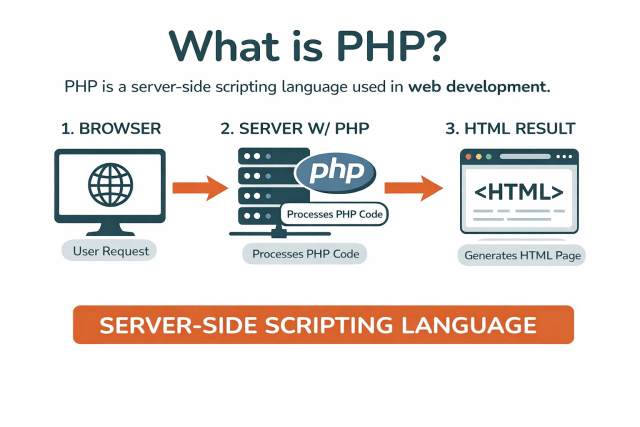
Section titled What is PHP?In simple terms, PHP is the code that builds each WordPress page before your visitor sees it. PHP is a server-side scripting language used to create dynamic websites, and it powers WordPress along with millions of other sites worldwide.
PHP runs on your web hosting server, where it processes instructions and generates the HTML that your browser displays. Unlike static HTML pages, PHP can:
- Retrieve data from a database
- Check whether a user is logged in
- Show different content to different visitors
- Process contact forms
- Handle ecommerce transactions
If you use WordPress, PHP is working behind the scenes every time someone visits your site.
What does PHP stand for?
Section titled What does PHP stand for?PHP originally stood for Personal Home Page.
Today it stands for PHP Hypertext Preprocessor.
It’s a recursive acronym. In simple terms, PHP prepares a web page on the server before sending the finished result to your browser.
How PHP works
Section titled How PHP worksThink of PHP as the “kitchen” of your website. Visitors place an order, PHP prepares the page, and the browser serves the finished result.
Here is a simplified breakdown of how PHP works on a WordPress site:
- A visitor clicks a link
- The browser sends a request to your hosting server
- The server executes PHP code
- PHP queries the database if needed
- PHP generates HTML
- The server sends that HTML back to the browser
Your visitor never sees the PHP code. They only see the final HTML output.
What is PHP used for?
Section titled What is PHP used for?PHP is widely used for:
- Content management systems like WordPress
- Ecommerce platforms like WooCommerce
- Membership systems
- Custom backend dashboards
- API integrations
- Form handling
- Session management
PHP was designed specifically for web development, which is why it works so well with platforms like WordPress.
Why PHP matters for WordPress users
Section titled Why PHP matters for WordPress usersIf you manage a WordPress website, PHP directly impacts:
- Plugin functionality
- Theme compatibility
- Page generation speed
- Security updates
Running an outdated PHP version can lead to:
- White screen errors
- Broken plugins
- Security vulnerabilities
- Slower performance
You can check your current PHP version inside WordPress under Tools → Site Health.
Before changing technical settings like your PHP version, it’s always wise to create a full WordPress backup.
That way, if anything goes wrong, you can restore your site in minutes.
Updating PHP can significantly improve performance and security, but it can also expose compatibility issues with older plugins or themes. Before changing your PHP version, always take a full backup. It’s the difference between a quick rollback and a broken site.
Update PHP safely
Before switching PHP versions, make sure you have a full backup in place. UpdraftPlus Premium can automatically back up your site before updates run, so you can restore your WordPress site quickly if something conflicts.
Is PHP difficult to learn?
Section titled Is PHP difficult to learn?PHP is considered beginner-friendly.
Reasons include:
- Clear syntax
- Extensive documentation
- Immediate browser feedback
- Huge online community support
Many developers start with PHP because it allows quick progress when building websites.
Common misconceptions about PHP
Section titled Common misconceptions about PHPIs PHP similar to HTML?
Section titled Is PHP similar to HTML?No. HTML structures content. PHP processes logic and generates content.
Is PHP the same as Python?
Section titled Is PHP the same as Python?No. They are different programming languages with different ecosystems.
Is PHP written in C or C++?
Section titled Is PHP written in C or C++?PHP is written primarily in C.
What language is closest to PHP?
Section titled What language is closest to PHP?Server-side JavaScript using Node.js and Python with frameworks like Django are closest in use case.
How to check your PHP version in WordPress
Section titled How to check your PHP version in WordPress- Log into your WordPress dashboard
- Go to Tools
- Click Site Health
- Open the Info tab
- Expand Server
- Locate the PHP version number
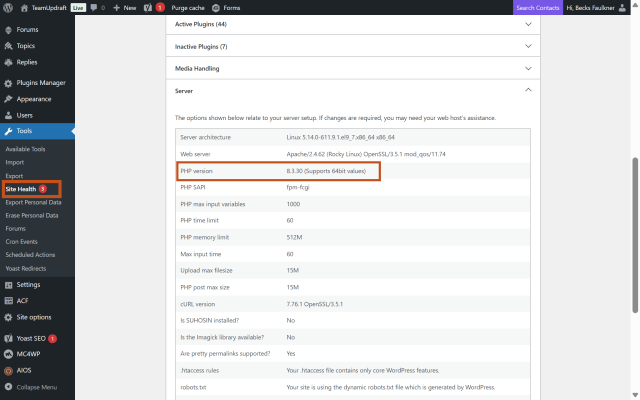
If your host runs an outdated version, contact them to upgrade.
Conclusion
Section titled ConclusionSo what is PHP?
It’s the engine behind WordPress. It powers the themes, plugins and database connections your site depends on.
For WordPress users, understanding PHP helps you:
- Make informed hosting decisions
- Maintain plugin compatibility
- Improve performance
- Strengthen security
Even if you never write PHP code, knowing what runs behind your site gives you more control and confidence.
Protect your WordPress site before updates break it
Whether you’re updating PHP or installing new plugins, unexpected conflicts can happen. UpdraftPlus Premium automatically backs up your site before updates, so you always have a safe restore point if something breaks.
Frequently asked questions
Section titled Frequently asked questionsWhat is PHP and why is it used?
PHP is a server-side scripting language used to create dynamic websites. It processes requests on the server and generates HTML for browsers to display.
Is PHP similar to HTML?
No. HTML structures content while PHP processes logic and database interactions.
What does PHP stand for?
PHP stands for PHP Hypertext Preprocessor.
Is PHP still useful in 2026?
Yes.
PHP is best for content-driven websites with its mature ecosystem. Python provides versatility, particularly for applications integrating data science. Node. js stands out for real-time applications where performance and scalability are crucial
Modern PHP versions, especially PHP 8 and above, introduced:
- Improved performance
- Better memory handling
- Stronger type safety
- Enhanced security features
For WordPress site owners, running an outdated PHP version can negatively affect:
- Site speed
- Plugin compatibility
- Security posture
Can I learn PHP in 3 months?
Yes, you can learn the fundamentals in 3 months with consistent practice.
Within that timeframe, you could:
- Understand variables and arrays
- Use loops and conditional statements
- Connect to a MySQL database
- Modify WordPress themes
- Build simple dynamic pages
Advanced application architecture will take longer, but basic competency is realistic.
Is PHP a dying language?
This question appears frequently in search results.
No, PHP is not dying.
While newer languages gain attention, PHP continues to power:
- WordPress
- Drupal
- Joomla
- Laravel applications
- Large legacy web systems
Technologies embedded in web infrastructure rarely disappear quickly.
Do I need to learn PHP to use WordPress?
No. You can run and manage a WordPress site without writing any PHP.
However, understanding what PHP does helps you troubleshoot issues, choose compatible plugins, and keep your site secure.
About the author

Becks Faulkner
Becks is the SEO Manager at Updraft WP Software Ltd. She has specialised in search engine marketing for over 11 years. Her background spans various industries, with a primary focus in financial and tech sectors. She is driven by her passion for enhancing organic visibility with holistic SEO strategies.
Categories
UpdraftPlus
Get all our premium features. Direct site-to-site migration, incremental backups, back up automatically before updates and a whole lot more.
From just $70 for the year.
More stories
-

World Backup Day: if your site disappeared, would you be ready?
Take five minutes to make sure your WordPress site is backed up and ready to restore.
-

Best WordPress themes for law firms
Find a professional WordPress theme for your law firm, whether you need speed, flexibility, or a ready-made legal layout.
-

How to secure a WordPress site (without overcomplicating it)
Learn how to secure your WordPress site with simple steps that protect against attacks, strengthen logins, and keep your data safe.
-
10 best WordPress themes for beauty salons
Here are the best options to help you stand out, look professional, and turn visitors into bookings.
