WP-Optimize 4.4.0: new onboarding wizard for first-time users
Getting started with WP-Optimize just got easier. With the release of WP-Optimize 4.4.0, we’re introducing a new onboarding wizard, a feature many users have asked for to make initial setup quicker and more straightforward.
For first-time installations of WP-Optimize (free or Premium), the new wizard guides you through a step-by-step setup, helping you configure the most important features without digging through settings.
A simpler way to get started
Section titled A simpler way to get startedWP-Optimize is powerful, but we know that for new users, knowing where to begin hasn’t always been obvious. The new onboarding wizard is designed to solve exactly that.
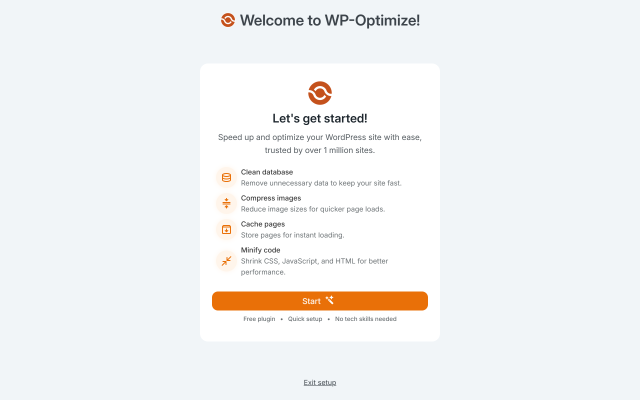
When you activate WP-Optimize on a fresh install, the wizard will:
- Guide you through the key setup steps in a clear, structured flow
- Help you understand which features matter most at the start
- Reduce the time it takes to get WP-Optimize working effectively
The goal here is simple: less guesswork, fewer clicks, and a smoother first experience.
This is a change driven directly by user feedback, and it’s something we’ll continue to refine over time.
Important: who will see the onboarding wizard?
Section titled Important: who will see the onboarding wizard?One thing worth calling out clearly:
- Only new WP-Optimize users will see the onboarding wizard
- If you’re updating an existing installation, the wizard will not appear
This means current users can update to 4.4.0 without worrying about interruptions, pop-ups, or changes to how they already use the plugin.
What else is new in WP-Optimize 4.4.0?
Section titled What else is new in WP-Optimize 4.4.0?Alongside the onboarding wizard, this release also includes a number of fixes and small improvements to keep things running smoothly:
- Ensured older cache-purging cron jobs are scheduled correctly
- Fixed a potential fatal error in the
WPO_Page_Optimizerclass - Resolved an issue affecting the ability to disable the caching menu in the admin bar
- Updated file permissions for
wpo-plugins-tables-list.jsonto be compliant with SOC-2 automated auditing
These updates are mostly behind the scenes, but they help improve stability and reliability across a wider range of setups.
Update now
Section titled Update nowWP-Optimize 4.4.0 is available now via the WordPress plugin directory. As always, we recommend keeping your plugins up to date to benefit from the latest improvements and fixes.
If you’re new to WP-Optimize, we hope the onboarding wizard makes your first experience simpler and more straightforward. And if you’ve been with us for a while, thanks for continuing to help shape the plugin through your feedback.
Change Log
Section titled Change LogFEATURE: Added Onboarding Wizard
FIX: Ensured old cache purging cron job is scheduled successfully
FIX: Fixed a potential fatal error in the WPO_Page_Optimizer class
TWEAK: Fixed the ability to disable caching menu in admin bar
TWEAK: Updated file permissions for wpo-plugins-tables-list.json
About the author

Becks Faulkner
Becks is the SEO Manager at Updraft WP Software Ltd. She has specialised in search engine marketing for over 11 years. Her background spans various industries, with a primary focus in financial and tech sectors. She is driven by her passion for enhancing organic visibility with holistic SEO strategies.
Categories
WP-Optimize
Get every feature and fix ever implemented plus access to future releases by subscribing to WP-Optimize Premium.
From just $49 for the year.
More stories
-

WP-Optimize 4.5.0: more control, smarter performance tuning
More control over caching and performance tuning, plus fixes that improve everyday reliability.
-

All-In-One Security 5.4.5: meet the new onboarding wizard
Set up essential WordPress security in minutes with the new AIOS onboarding wizard.
-

Finally, eCommerce analytics that make sense
Get meaningful eCommerce insights without the noise. The latest Burst Statistics Pro update adds sales analytics for WooCommerce and Easy Digital Downloads.
-

IDrive now supported in UpdraftPlus as S3 storage
UpdraftPlus now supports IDrive as an S3-compatible backup storage option. Discover what this means and why IDrive is a great storage option.
