WP-Optimize 4.7.0: See Your Site’s Performance at a Glance

Keeping your WordPress site optimised is much easier when you can quickly see what’s working and where you might need to take action.
WP-Optimize 4.7.0 introduces a new dashboard overview that brings key information from across WP-Optimize into one place. You can see the status of your cache, images, minification and database optimisation, check the savings you’ve made and jump straight to the areas you want to manage.
We’ve also improved how WP-Optimize handles sites with large numbers of database tables, made several caching and performance improvements, and included a range of fixes to make the plugin more reliable across different WordPress setups.
Here’s what’s new.
Feature highlights
Section titled Feature highlightsSee your site optimisation at a glance
Section titled See your site optimisation at a glanceOne of the biggest changes in WP-Optimize 4.7.0 is the new dashboard overview.
Instead of visiting different areas of the plugin to check what’s enabled, you can now get a quick overview of your main optimisation modules from one place, including:
- Cache
- Images
- Minification
- Database
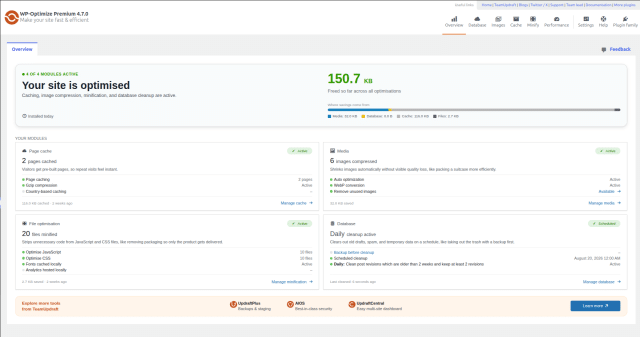
The dashboard shows whether each area is active, relevant savings and quick links to manage your settings.
This makes it easier to see how WP-Optimize is working across your site and quickly get to the areas that need your attention.
2. Smoother database management on sites with lots of tables
Section titled 2. Smoother database management on sites with lots of tablesSites can accumulate a large number of database tables over time, particularly when they use lots of plugins or have been running for several years.
WP-Optimize 4.7.0 now loads database tables in batches when there are too many to process in a single request.
For larger databases, this reduces the amount of information that needs to be loaded at once and helps WP-Optimize handle the database table list more reliably.
What else is new in WP-Optimize 4.7.0?
Section titled What else is new in WP-Optimize 4.7.0?Alongside the headline features, this release includes a range of improvements across caching, database optimisation, images and the WP-Optimize interface.
Caching and performance improvements
Section titled Caching and performance improvementsWe’ve made several changes to improve the reliability of caching and make common cache management tasks work more smoothly:
- Browser cache settings have been updated for better compatibility.
- Browser cache and GZIP detection have been improved.
- Purge Page Cache and Purge Minify Cache functionality in the WordPress admin bar has been improved.
- An issue affecting the removal of cache settings and related cron events when WP-Optimize was deactivated and reactivated has been fixed.
- WP-Optimize will now preserve the original cached HTML if removing the LCP observer script fails, rather than returning an empty string.
- WooCommerce shop and product URLs will no longer be preloaded when user caching and Coming Soon mode are enabled.
Database improvements
Section titled Database improvementsWe’ve also made several fixes and improvements to database optimisation:
- Missing optimisations have been added to the automatic optimisation cron.
- The wp_e_submissions_actions_log table is now correctly associated with its plugin.
- Premium: The Index Post Meta Table power tweak now correctly indexes postmeta tables across all subsites in a Multisite network and tracks when it was last run for each site.
Image and multisite improvements
Section titled Image and multisite improvementsThis release fixes an issue where registered image sizes weren’t appearing correctly on Multisite installations.
We’ve also changed how locally hosted Gravatars are handled. If you disable Show avatars, WP-Optimize will no longer continue hosting Gravatars locally in the background.
A smoother experience across WP-Optimize
Section titled A smoother experience across WP-OptimizeA number of smaller UI and usability improvements are also included:
- Premium: We’ve improved the user experience for Unused CSS Removal.
- The Minify status tab now has a more consistent interface, with duplicate tooltips removed.
- Admin bar menu permission issues have been fixed.
- Extra spacing has been removed from the Wipe settings section.
Behind-the-scenes improvements
Section titled Behind-the-scenes improvementsWP-Optimize 4.7.0 also includes several technical fixes and refactors that improve compatibility and maintainability behind the scenes.
These include improvements to handling URLs with query parameters, support for data- attributes on older WordPress versions, fixes for a WP_CACHE constant warning in the debug log and refactoring of page builder compatibility and WebP conversion code.
Premium Auto LCP has also been updated so its gzip cache variant is written using a temporary file and rename process, matching the way the HTML cache file is patched.
Update WP-Optimize
Section titled Update WP-OptimizeWP-Optimize 4.7.0 will be available from your WordPress dashboard.
To update, go to Plugins > Installed Plugins and select Update now next to WP-Optimize.
Keeping WP-Optimize up to date gives you access to the latest optimisation features, fixes and compatibility improvements.
See where your site can improve. Then take it further.
The new WP-Optimize dashboard makes it easier to understand your website’s performance and identify opportunities for improvement. With WP-Optimize Premium, you can act on those insights using advanced caching, flexible database clean-ups, image optimisation tools and more.
Changelog
Section titled Changelog- FEATURE: Dashboard overview showing a summary of all WP-Optimize modules (cache, images, minification, and database), including active status, savings, and quick links to manage each area.
- FEATURE: Load tables in batches when there are too many tables to load in a single request
- FIX: Added missing optimizations for auto optimizations cron
- FIX: Fix removal of cache settings and related cron events on plugin deactivation and reactivation
- FIX: Fixed inconsistent UI in the Minify status tab, and removed duplicate tooltips
- FIX: Fixed the association of the wp_e_submissions_actions_log table with its plugin
- FIX: LCP – Preserve original cached HTML when removing the LCP observer script fails instead of returning an empty string
- FIX: PHPStan issues WPO_WP_Kses_Compatibility class
- FIX: Permissions issues for adminbar menu items
- FIX: Registered image sizes not showing on multisite
- FIX: Removed extra spacing in the Wipe settings section
- FIX: WP_CACHE constant warning in debug.log
- FIX: WP_Optimize_Utils::get_file_path() does not handle URLs with query parameters
- REFACTOR: WPO_Page_Builder_Compatibility class
- REFACTOR: WPO_Webp_Convert_Image_Task class
- TWEAK: Added data- attributes support for older wordpress versions
- TWEAK: Cache – Browser cache settings updated for better compatibility
- TWEAK: Cache – Improved browser cache detection
- TWEAK: Disabling Show avatars no longer leaves gravatars hosted locally in the background.
- TWEAK: Improved GZIP detection
- TWEAK: Improved the Purge Page Cache and Purge Minify Cache admin bar functionality
- TWEAK: Premium – Improved UX for Unused CSS Removal
- TWEAK: Premium – Index Post Meta Table power tweak now correctly indexes all subsites postmeta tables in a Multisite network and tracks last-run status per site.
- TWEAK: Premium Auto LCP writes the gzip cache variant atomically via a temporary file and rename, matching how the HTML cache file is patched.
- TWEAK: Prevent preloading WooCommerce shop/product URLs when user caching, and Coming Soon mode are enabled
- TWEAK: Rename as_type to asset_type in the LCP beacon request for clarity
About the author

Becks Faulkner
Becks is the Performance Marketing Manager at Updraft WP Software Ltd, with more than 15 years of marketing experience and over 11 years specialising in SEO. She works across TeamUpdraft’s WordPress products, focusing on content strategy and organic growth. Her experience spans both the financial and technology sectors, helping businesses improve their visibility in search.
Categories
WP-Optimize
Get every feature and fix ever implemented plus access to future releases by subscribing to WP-Optimize Premium.
From just $49 for the year.
More stories
-

TeamUpdraft security incident: What customers need to know
On 18 October 2026, we detected unauthorised access to teamupdraft.com. Read our security notice and the steps customers should take to protect their accounts and connected services.
-

All-In-One Security 5.5.0 brings clearer firewall logs and stronger login protection
All-In-One Security 5.5.0 introduces dedicated firewall audit and debug logs, stronger protection for login lockouts, safer upgrades for larger sites, and a range of usability improvements to help secure and manage your WordPress website.
-

UpdraftPlus reaches 4 million active installations
UpdraftPlus has reached 4 million active installations. Thank you to the site owners, agencies and contributors who helped us get here.
-

UpdraftPlus 1.26.8: Easier setup and stronger security
UpdraftPlus 1.26.8 makes getting started easier with a new onboarding wizard, plus stronger security and more reliable remote backups.
