WordPress 7.0 and AI: my biggest takeaways from WCEU

I went to WCEU (WordCamp Europe) 2026 expecting to hear about plugins, performance and the usual WordPress roadmap discussions.
Instead, one topic dominated almost every conversation: WordPress 7.0 and AI.
Whether it was hallway chats, workshops, keynote sessions or contributor panels, AI was the hot topic.
WordPress 7.0 was released on 20 May 2026, just a couple of weeks before the conference in Krakow.
While the release includes improvements across the platform, it quickly became clear that the AI-related changes were what people were most interested in talking about.
After spending two days listening to contributors, developers, agency owners and the people helping shape the future of WordPress, I came away with a very different perspective on the release.
My biggest takeaway?
WordPress 7.0 isn’t really about AI features alone.
It’s about building the foundations for what comes next.
In this post, I’ll look at what WordPress 7.0 actually introduces, why AI became such a major talking point at WordCamp Europe, and why this could become one of the most important WordPress releases we’ve seen in years.
Why I wanted to write this
Section titled Why I wanted to write thisThere are already plenty of articles covering the WordPress 7.0 release notes.
Rather than repeating those, I wanted to share some of the conversations and ideas that stood out to me while attending WordCamp Europe. In many ways, what people were saying about WordPress 7.0 felt just as interesting as the features themselves.
What is WordPress 7.0?
Section titled What is WordPress 7.0?WordPress 7.0 is a major WordPress release that introduces a number of improvements for users and developers, but the headline feature is undoubtedly the groundwork being laid for AI within WordPress itself.
While there were plenty of improvements across the release, the conversations I heard at WCEU were overwhelmingly focused on AI and what these changes could mean for the future of WordPress.
Some of the most important changes in WordPress 7.0 include:
- A native AI Client
- The new Abilities API
- A Connectors screen for AI providers
- Improvements for developers building AI-powered experiences
- Continued enhancements to the Site Editor and overall user experience
On the surface, that might not sound particularly exciting.
There isn’t a giant “Generate Website” button suddenly appearing in your dashboard.
But after hearing contributors discuss the release, I think that’s actually the point.
Rather than rushing to bolt AI onto WordPress, the project is trying to create a framework that allows AI-powered tools to work together in a more consistent, secure and genuinely useful way.
The biggest surprise: WordPress isn’t adding AI, it’s building AI foundations
Section titled The biggest surprise: WordPress isn’t adding AI, it’s building AI foundationsBefore attending WordCamp Europe, I assumed WordPress 7.0 would be introducing some kind of built-in AI assistant, I mean, didn’t we all?
That’s what pretty much every software platform seems to be doing at the moment.
Instead, the conversations I heard were much more focused on infrastructure.
What struck me was that the discussions weren’t really about AI features at all. They were about the underlying systems needed to help future AI-powered tools work together properly.
The WordPress project isn’t trying to decide what every AI-powered plugin should do.
It’s creating the foundations that allow developers, agencies, plugin companies and site owners to build better AI experiences on top of WordPress.
That distinction is important.
Because the future of WordPress AI probably isn’t one giant chatbot sitting inside wp-admin.
It’s likely to be dozens of specialised tools working together in a way that feels natural.
The feature everyone was talking about: the Abilities API
Section titled The feature everyone was talking about: the Abilities APIOne of the most interesting concepts discussed throughout the conference was the new Abilities API.
If you’ve read the developer documentation, you’ll know the explanation can get fairly technical.
The way it finally clicked for me was this:
The Abilities API allows plugins and tools to declare what they are capable of doing.
Imagine a plugin could tell WordPress:
- I can create a backup
- I can restore a backup
- I can scan for malware
- I can optimise images
- I can clear cache
- I can update settings
Other tools can then discover those abilities and potentially use them in structured workflows.
That might not sound revolutionary at first.
But think about where AI is heading.
Instead of simply asking an AI tool to write content, imagine asking it to audit your website and identify potential issues.
Rather than stopping at recommendations, it could understand which tools are available and guide you through resolving those issues.
Inside WordPress 7.0: hearing from the people who built it
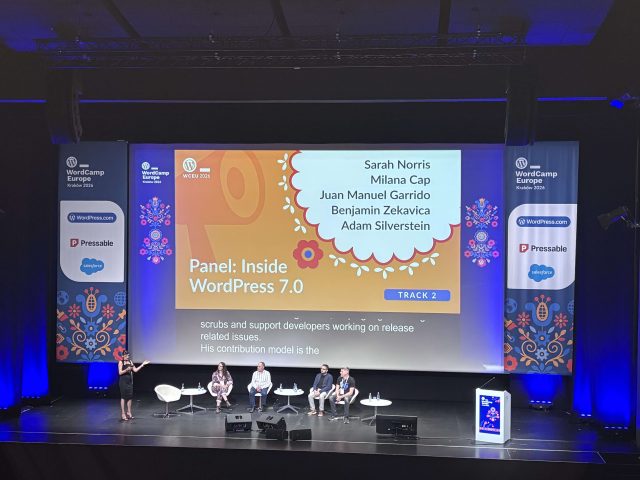
Section titled Inside WordPress 7.0: hearing from the people who built itOne of the sessions I found really valuable was the “Inside WordPress 7.0” panel.
The discussion featured contributors involved in the release, including Juan Manuel Garrido, Adam Silverstein, Benjamin Zekavica, Sarah Norris and Milana Cap.
What I enjoyed most was that it wasn’t simply a feature showcase.
Instead, it pulled back the curtain on how a release of this size actually comes together.
What surprised me was how much of the discussion focused on collaboration and community rather than features. It was a good reminder that releases like this don’t just appear overnight.
Behind every release are hundreds of contributors, countless discussions, testing cycles, disagreements, problem-solving sessions and decisions about where WordPress should go next.
Listening to that process reminded me just how unique WordPress still is.
While many platforms are controlled by a single company making decisions behind closed doors, WordPress remains a community-driven project that has to balance the needs of developers, agencies, businesses, publishers and everyday users.
That’s not always easy.
But it’s one of the reasons WordPress continues to power such a huge portion of the web.
The session that changed how I think about AI
Section titled The session that changed how I think about AITammie Lister explored this topic in a session called Human in the loop means something.
The message was simple.
AI and humans are good at different things.
AI can process huge amounts of information incredibly quickly. It can spot patterns, summarise data and help speed up repetitive tasks.
Humans bring the context. We understand our customers, our businesses and our goals. We can spot when something feels wrong, challenge assumptions and make decisions that go beyond what the data says.
The most successful products won’t be the ones trying to replace people. They’ll be the ones that help people work more effectively.
As someone working in SEO and content, this resonated strongly with me.
AI can help identify content gaps, suggest metadata, analyse trends and speed up research.
But it can’t replace genuine experience.
It can’t attend a conference.
It can’t build real relationships with customers.
It can’t understand your business in the same way you do.
And that’s something worth remembering as AI becomes increasingly integrated into WordPress.
What does WordPress 7.0 mean for site owners?
Section titled What does WordPress 7.0 mean for site owners?For most WordPress users, the obvious question is:
“What does this actually mean for me?”
The honest answer is that much of the impact will arrive gradually.
WordPress 7.0 isn’t suddenly transforming every website overnight.
Instead, it’s making it easier for plugin developers and service providers to create smarter tools.
Over the next few years, I can see AI-powered workflows helping with things like identifying outdated content, spotting technical SEO issues, reviewing accessibility problems, recommending internal links and highlighting potential security concerns before they become bigger problems.
The key difference is that those workflows could become more connected than they are today.
What does WordPress 7.0 mean for plugin companies?
Section titled What does WordPress 7.0 mean for plugin companies?As I listened to discussions around the Abilities API and AI workflows, I couldn’t help thinking about the implications for WordPress plugins.
Take backups as an example.
Today, an AI tool might be able to tell you that updating a plugin carries some risk.
In the future, it could potentially understand that a backup plugin like UpdraftPlus is installed, recognise that it can create backups, and recommend taking one before proceeding.
The same principle could apply to security scans, performance checks, image optimisation and countless other maintenance tasks.
This is where AI starts becoming genuinely useful.
Not because it’s generating content.
But because it’s helping users manage increasingly complex websites more effectively.
AI makes strong website foundations more important, not less
Section titled AI makes strong website foundations more important, not lessOne thing that struck me throughout WCEU was that nobody was suggesting AI removes the need for good website management.
If anything, the opposite is true.
AI can’t compensate for:
- Poor security practices
- Missing backups
- Slow hosting
- Outdated plugins
- Broken site architecture
- Low-quality content
As websites become more connected and more automated, those fundamentals become even more important.
Whether you’re using AI tools or not, your site still needs to be secure.
It still needs reliable backups.
It still needs to load quickly.
It still needs useful content written for real people.
The foundations haven’t changed.
The tools built on top of them are what’s evolving.
AI search was another major talking point
Section titled AI search was another major talking pointAnother discussion at WordCamp Europe centred around AI search and AI-generated referrals.
Several sessions explored how AI assistants are increasingly becoming a new source of traffic.
Rather than typing a query into a search engine, users are asking ChatGPT, Gemini, Claude and other AI tools directly.
That raises an important question for WordPress site owners.
How do you ensure your content is discovered, understood and referenced?
The answer wasn’t particularly revolutionary.
In fact, it sounded very similar to the SEO advice we should all know:
- Create genuinely useful content
- Answer real questions
- Demonstrate expertise
- Provide first-hand experience
- Make your website easy to crawl and understand
- Build trust
The more I listened, the more I realised that AI search may end up rewarding many of the same fundamentals that have always mattered.
Final thoughts
Section titled Final thoughtsBefore heading to WordCamp Europe, I expected the conversation around WordPress 7.0 to be all about AI features.
What I found instead was a community asking much bigger questions. How should AI fit into WordPress? What decisions should humans still make? How do we make these tools genuinely useful rather than just impressive?
Those questions came up again and again throughout the conference.
Yes, WordPress 7.0 brings AI into core. That’s a pretty big milestone in itself. But what stood out to me wasn’t the technology. It was the thought being put into how that technology should be used.
There seemed to be a genuine recognition that AI works best when it helps people rather than replaces them.
Walking away from Kraków, I wasn’t thinking about prompts, models or which AI provider might win. I was thinking about where WordPress could be in five years’ time.
If the conversations at WCEU are anything to go by, WordPress isn’t trying to reinvent itself as an AI platform. It’s trying to remain WordPress while finding sensible ways to use AI where it genuinely adds value.
For me, that’s what made WordPress 7.0 feel important.
Not because it delivered every answer, but because it started asking the right questions.
Frequently asked questions about WordPress 7.0
Section titled Frequently asked questions about WordPress 7.0What’s new in WordPress 7.0?
WordPress 7.0 introduces AI foundations including the AI Client, Abilities API and Connectors screen, alongside ongoing improvements to the editing experience and developer tools.
When was WordPress 7.0 released?
WordPress 7.0 was officially released on 20 May 2026.
Does WordPress 7.0 include AI?
Yes, but not in the form of a built-in chatbot. Instead, WordPress 7.0 introduces infrastructure that allows AI-powered tools and services to integrate more effectively with WordPress.
What is the WordPress Abilities API?
The Abilities API allows plugins and tools to declare what actions they can perform. This creates opportunities for more intelligent workflows and integrations in the future.
Should I update to WordPress 7.0?
As with any major WordPress release, it’s a good idea to test compatibility and take a full backup before updating. Most site owners will benefit from staying on the latest supported version.
Will AI replace WordPress plugins?
No. If anything, WordPress 7.0 could make plugins even more important by giving them a standardised way to interact with AI-powered tools and workflows.
About the author

Becks Faulkner
Becks is the Performance Marketing Manager at Updraft WP Software Ltd, with more than 15 years of marketing experience and over 11 years specialising in SEO. She works across TeamUpdraft’s WordPress products, focusing on content strategy and organic growth. Her experience spans both the financial and technology sectors, helping businesses improve their visibility in search.
Categories
UpdraftPlus
Get all our premium features. Direct site-to-site migration, incremental backups, back up automatically before updates and a whole lot more.
From just $70 for the year.
More stories
-

5 WordPress Web Design Tips to Improve Your Website
Good web design is about more than appearance. Explore practical WordPress web design tips to improve your website's layout, navigation, mobile responsiveness, accessibility and performance, helping you create a better experience for your visitors.
-
Best AI Website Builders Compared
AI website builders can help you design, write and launch a website in minutes. Compare the best AI-powered website builders based on ease of use, features, customisation, pricing and performance to find the right solution for your next project.
-

How incremental backups save time and storage in WordPress
Incremental backups only save the changes made since your last backup, helping you reduce storage usage, speed up backups and lower server load. Learn how they work and why they're an essential part of an efficient WordPress backup strategy.
-
Best WordPress Website Builders Compared
Discover the best WordPress website builders for every skill level. Compare features, ease of use, pricing and performance to choose the right builder for your blog, business or online store.
