Web hosting vs WordPress hosting: What’s the best option?

When you decide to build a website, one of the first decisions you will face is hosting. Many people quickly run into the question of web hosting vs WordPress hosting, and it is not always obvious which one makes more sense for their project.
Choosing the wrong hosting setup can lead to slow loading times, security issues, and unnecessary costs later on. It can also cause problems when your site starts to grow and attract more visitors. If you are still exploring providers, it may also help to look at some of the best hosting companies for WordPress to understand what features different hosts offer.
In this guide, we explain the difference between web hosting and WordPress hosting, how each option works, and how to decide which one is right for your website.
Tip: If you manage multiple client sites or run a development agency, you might also want to explore our guide to the best WordPress hosting for agencies.
Key takeaways
Section titled Key takeaways- Web hosting supports any type of website, while WordPress hosting is built specifically for WordPress sites
- Your hosting choice impacts performance, security, and ongoing maintenance
- General hosting offers more flexibility, control, and often lower costs
- Managed WordPress hosting simplifies setup and maintenance, but can limit flexibility and restrict certain plugins
- You can upgrade or migrate your hosting as your site grows
What is web hosting and WordPress hosting
Section titled What is web hosting and WordPress hostingBefore comparing web hosting vs WordPress hosting, it helps to understand what each service actually does.
General web hosting
Section titled General web hostingGeneral web hosting provides server space where your website files are stored and delivered to visitors.
When you buy a hosting plan, you are renting space on a server that stores your website’s files, images, and code. When someone visits your site, the server sends those files to their browser so the page can load.
General hosting is platform-agnostic. You can use it to run almost any type of website, including:
- WordPress
- Drupal
- Joomla
- custom-coded HTML websites
- ecommerce platforms
- web applications
This flexibility makes general web hosting a popular starting point for many websites.
WordPress hosting
Section titled WordPress hostingWordPress hosting is a hosting environment designed specifically to run WordPress websites efficiently.
WordPress hosting, in contrast, is platform-specific digital real estate. The entire environment is pre-configured and optimized to run only one software ecosystem: WordPress. This infrastructure handles the unique technical demands of WordPress databases and PHP processes. However, this focus on specialization comes with a clear limitation: you cannot easily install or run any other website platform on this same account. It is a locked-in service.
Because the hosting environment is built specifically for WordPress, it often requires less manual setup and ongoing maintenance.
The core differences you need to understand
Section titled The core differences you need to understandBoth services will get your website online, but the experience of managing your site can be very different. The biggest differences between web hosting vs WordPress hosting come down to setup, maintenance, performance optimization, and support requirements.
General web hosting places the control at your disposal. You are responsible for installing the software, managing all server-level configurations, handling security, and keeping everything up to date. For many businesses, this trade-off is often worth it for a business that is completely your own, and to keep things running on your own terms. This is an excellent path if you have the technical skills and desire for complete ownership over your environment.
Managed WordPress hosting takes the opposite approach. The provider handles software installation, automated updates, security, and performance tuning. This makes things easier, but it also means giving up some control, which can limit flexibility and may involve additional paid features.
Here is a quick comparison to help you visualize the differences.
Don’t let poor performance hold your site back
Choosing the right hosting matters, but hosting alone will only take you so far.
WP-Optimize helps keep your site fast with page caching, image compression, and database cleanups, so you can get more from your hosting setup.
The cost of hosting
Section titled The cost of hostingHosting prices can sometimes be confusing because many providers advertise very low introductory rates.
To understand the real cost of hosting, it is important to look beyond the headline price and consider renewal costs, features, and the time required to manage your server.
Introductory pricing vs renewal rates
Section titled Introductory pricing vs renewal ratesMany hosting plans advertise extremely low prices, but these are usually introductory offers that require you to pay several years in advance.
When that initial term ends, the renewal price may increase significantly.
Before choosing a host, always check:
- renewal pricing
- contract length requirements
- additional fees for backups, SSL certificates, or migrations
Managed WordPress hosting plans often have more predictable pricing, although the monthly cost is typically higher.
Factoring in the value of your time
Section titled Factoring in the value of your timeHosting costs are not just about money. Your time also has value.
A cheap hosting plan may save you a few dollars each month, but if you spend hours troubleshooting server issues or managing updates, the real cost can quickly increase.
For businesses and professional websites, reliable hosting often pays for itself by saving time and reducing technical problems.
A closer look at general web hosting
Section titled A closer look at general web hostingChoosing general hosting gives you the greatest technical freedom. You are the sole administrator of your server environment. This allows you to select your own tools, optimize performance on your terms, and ensure you have full access to your own data.
Shared server environments
Section titled Shared server environmentsShared hosting is the most common starting point for small websites.
Your site shares a server with many other websites, which keeps the cost extremely low.
Shared hosting can work well for:
- personal blogs
- small business sites
- low traffic websites
However, because resources are shared, performance can sometimes suffer if another site on the server experiences heavy traffic.
This is often referred to as the “noisy neighbour” effect.
Virtual private servers
Section titled Virtual private serversThe next step up is a virtual private server. You still share a physical machine but your resources are partitioned off and dedicated solely to you. This gives you much more control and stability. It prevents other sites from impacting your performance.
It requires a bit more technical knowledge to manage properly. You often need to configure the server settings via a command line interface.
Dedicated and cloud solutions
Section titled Dedicated and cloud solutionsFor ultimate power, there is dedicated hosting where you rent an entire physical server. These are expensive and require advanced technical skills to maintain. Cloud hosting is a modern alternative where your site is hosted across a network of connected servers. This offers incredible reliability because another server takes over if one fails.
The benefits of general hosting
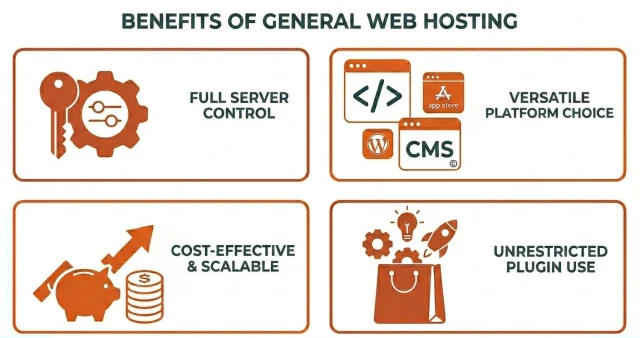
Section titled The benefits of general hosting- Absolute flexibility to run any software application
- Complete root access to your server environment
- Incredibly low introductory pricing for beginners
- Freedom to choose your own caching, backup and security tools
- Ability to host multiple different platforms on one account
- No restrictions on which third-party plugins you can install
The downsides of general hosting
Section titled The downsides of general hosting- You must be proactive about your website maintenance
- You are responsible for updating server software like PHP
- General support teams lack specialized CMS knowledge
- You have to spend time optimizing your server for speed manually
- Basic plans suffer from resource limits and slow load times
- Malware cleanup is entirely your responsibility if you get hacked
- For server level caching you need to activate specific modules such as Memcached.
A deep dive into specialized WordPress hosting
Section titled A deep dive into specialized WordPress hostingWhen people refer to WordPress hosting, they are usually talking about managed WordPress hosting.
These hosting providers design their infrastructure specifically for WordPress, optimizing servers to process PHP and database requests more efficiently.
Server level caching
Section titled Server level cachingMany WordPress hosting providers have server-level caching activated by default.
Caching stores a ready-to-deliver version of your website so that the server does not need to rebuild each page from scratch every time someone visits.
This can significantly improve page loading times without relying heavily on caching plugins.
Enhanced security protocols
Section titled Enhanced security protocolsSecurity is a massive selling point for managed plans. Because WordPress is the most popular website builder in the world, it is a frequent target for hackers. Specialized hosts actively monitor for threats specifically targeting the platform. They block malicious login attempts before they reach your dashboard. They also patch known software vulnerabilities at the server level to keep your data safe.
The benefits of WordPress hosting
Section titled The benefits of WordPress hosting- Saves hours of time on technical configuration and troubleshooting
- Expert support teams can identify plugin conflicts within minutes
- Automatic core updates keep your site secure without manual effort
- Built-in staging environments allow you to test changes safely
- Server-level caching eliminates the need for complex optimization tools
- Enhanced security blocks platform-specific malware and brute force attacks
The drawbacks of WordPress hosting
Section titled The drawbacks of WordPress hosting- Higher monthly costs compared to basic shared plans
- Strict limits on monthly visitor counts and storage space
- Bans on certain plugins that conflict with host features
- Lack of flexibility to run non-WordPress applications
- Overage charges if your site experiences a sudden traffic spike
- Less granular control over basic server settings
How to choose between web hosting vs WordPress hosting
Section titled How to choose between web hosting vs WordPress hostingMaking the final decision does not have to be stressful. Follow this checklist to determine the best path for your specific situation.
- Assess your technical comfort level to see if you can handle server maintenance
- Outline your exact monthly budget for website expenses over the next year
- Estimate how much daily traffic you expect to receive initially
- Decide if you are fully committed to using one platform for the long haul
- Research and compare the customer support reputation of shortlisted providers
- Check the renewal prices to ensure the long-term costs fit your budget
- Verify the physical location of the data centers to ensure they are near your audience
Still feeling a bit stuck? Follow this simple flow-chart logic to decide:
Step 1: Are you using WordPress?
No → Go with general web hosting
Yes → Move to step 2
Step 2: Are you new to WordPress or more experienced?
Beginner → WordPress hosting (less setup, less maintenance)
Comfortable managing your site → General hosting can offer more flexibility and lower costs
Step 3: Do you have time for ongoing maintenance?
Yes (around 2 hours a week) → General hosting is a good fit
No → WordPress hosting can handle updates and maintenance for you
Keep your site safe with automated backups
Don’t let a server glitch or a bad update wipe out your hard work. UpdraftPlus lets you schedule automatic backups and store them safely off-site so you can restore your site in minutes.
Matching your profile to a hosting type
Section titled Matching your profile to a hosting typeIf you are a total beginner building a personal blog on a tight budget, a WordPress hosting is a perfectly fine place to start. You can learn the ropes without a huge financial commitment.
If you are building a business website that will generate revenue, I strongly recommend a general web hosting. The extra flexibility is easily justified by the time saved and the increased reliability.
If you are a web developer who loves tinkering with server settings, a general VPS gives you the granular control you crave.
Conclusion
Section titled ConclusionChoosing between web hosting and WordPress hosting comes down to how much control, convenience, and support you want from your setup.
Traditional web hosting is often more flexible and affordable, while WordPress hosting can save time by handling updates, caching, and maintenance for you. The downside is that some managed hosts place restrictions on plugins, backups, or advanced configurations.
Whichever option you choose, it is important to keep independent control over your backups and website protection. Tools like UpdraftPlus let you automatically back up your WordPress website to Google Drive and other remote storage locations, giving you extra peace of mind beyond your hosting provider.
If you are still comparing providers, our guide to the best WordPress hosting companies can help you choose the right option for your website.
FAQs
Section titled FAQsCan I run a WordPress site on regular web hosting?
Yes. Any server that supports PHP and MySQL can run WordPress. Millions of WordPress sites operate on standard hosting plans. It simply requires more manual setup and ongoing maintenance.
Is managed hosting really worth the extra money?
For many business websites, yes. Managed hosting handles updates, security monitoring, and performance optimization, which saves time and reduces technical issues.
Will my website go offline if I switch providers?
If the migration is done correctly, visitors usually will not notice the change. The website is copied to the new server and your domain settings are updated to point to the new host.
If you’re planning a move, it’s worth following a proper step-by-step process to avoid downtime. You can use our guide on how to migrate your WordPress site to a new host to make sure everything runs smoothly.
Should I buy my domain from my hosting company?
You can, but many website owners prefer to keep their domain registrar separate from their hosting provider. This makes it easier to change hosts later if needed.
Can I switch from web hosting to WordPress hosting later?
Yes. Many website owners start with general hosting and move to managed WordPress hosting as their traffic grows. Many hosts even offer free migration services.
What is the difference between “Shared” and “Managed” WordPress hosting?
This is a common point of confusion. Shared WordPress hosting means your site shares a server with other websites, although the environment is configured for WordPress. Managed WordPress hosting provides a more hands-off experience where the provider handles updates, security, and performance optimizations.
About the author

Elvira Mishra
Elvira has over four years of experience creating and designing content in WordPress. Her background spans multiple digital disciplines, including marketing, SEO, user experience, and human computer interaction.
Categories
UpdraftPlus
Get all our premium features. Direct site-to-site migration, incremental backups, back up automatically before updates and a whole lot more.
From just $70 for the year.
More stories
-

10 Best WordPress Plugins for Agencies in 2026
Discover the best WordPress plugins for agencies, from backups and security to performance optimisation and site management. Explore tools that make managing multiple client websites easier and more efficient.
-

Direct WordPress site-to-site migration: A step-by-step guide
Learn how direct WordPress site-to-site migration works and how to move your website between hosts or domains without manually transferring files.
-

5 WordPress Web Design Tips to Improve Your Website
Good web design is about more than appearance. Explore practical WordPress web design tips to improve your website's layout, navigation, mobile responsiveness, accessibility and performance, helping you create a better experience for your visitors.
-
Best AI Website Builders Compared
AI website builders can help you design, write and launch a website in minutes. Compare the best AI-powered website builders based on ease of use, features, customisation, pricing and performance to find the right solution for your next project.
