What is lazy loading? Meaning, examples and SEO impact
Category Guides and resources
Topics Performance optimization, Tips and tricks, WordPress,

Your website might look great, but if it loads slowly, most visitors won’t stick around long enough to see it.
Page speed plays a huge role in how people experience your site, and how likely they are to convert. Even a one-second delay can make a noticeable difference. According to Portent, conversion rates drop from 40% at one second to 34% at two seconds, and 29% at three.
One simple way to improve load times without cutting back on content is lazy loading.
Instead of loading everything at once, lazy loading only loads what the user sees first, then loads the rest as they scroll.
In this guide, we’ll break down what lazy loading is, how it works, and when it actually makes a difference.
What is Lazy Loading?
Section titled What is Lazy Loading?Lazy loading is a technique that delays loading images, videos, and other content until they’re needed (usually when they come into view on screen).
Instead of loading everything at once, the browser prioritises what the user can see first, then loads the rest as they scroll.
For example, images further down a page won’t load immediately. They only load when you get close to them, which helps the page appear faster.
This means users can start interacting with your site straight away, without waiting for every element to load in the background.
Why lazy loading improves performance
Section titled Why lazy loading improves performanceLazy loading isn’t just about speed, it directly improves how people experience your site.
Here are the main benefits:
Faster initial load times
Section titled Faster initial load timesLazy loading reduces the amount of content that loads upfront, which means your pages appear faster, especially on image-heavy sites.
Lower bandwidth and server usage
Section titled Lower bandwidth and server usageOnly loading what’s needed means less data is transferred. This is particularly helpful for mobile users or anyone on slower connections.
Better Core Web Vitals and SEO
Section titled Better Core Web Vitals and SEOPage speed is a ranking factor, and lazy loading can help improve key metrics like First Contentful Paint (FCP).
When pages load faster, users are more likely to stay, which can also reduce bounce rates and improve overall search performance.
Speed up your site without touching code
WP-Optimize Premium lets you enable lazy loading for images, videos, and iframes in just a few clicks. No manual setup, no risk of breaking your site.
What is eager loading?
Section titled What is eager loading?Eager loading is the opposite of lazy loading.
It loads all page resources at once, including images, scripts, and styles, as soon as the page opens.
This means everything is ready immediately, but it can slow down the initial load, especially on larger or more complex pages.
Why eager loading is less common today
Section titled Why eager loading is less common today- Larger pages: Modern websites use more images, videos, and interactive elements, which increases load time
- Performance impact: Loading everything upfront can hurt Core Web Vitals like FCP and LCP
- Mobile usage: Faster initial load times matter more than ever on mobile devices
Eager loading vs lazy loading
Section titled Eager loading vs lazy loadingBoth approaches have their place, but they work in very different ways.
In most cases, lazy loading is the better option for modern websites, as it improves performance without reducing content.
How lazy loading works
Section titled How lazy loading worksLazy loading works by detecting when content is about to enter the user’s viewport (the visible part of the screen).
Instead of loading everything upfront, elements like images and videos are only loaded when they’re needed.
User interaction
Section titled User interactionLazy loading is usually triggered by scrolling. As the user moves down the page, the browser loads new content just before it becomes visible.
How images are handled
Section titled How images are handledImages often start as lightweight placeholders. When the user scrolls near them, the full image loads in.
Other content types
Section titled Other content typesLazy loading can also be applied to videos, iframes, and scripts, which helps reduce the overall load on the page.
Lazy loading and eager loading are two different methods of resource loading with their own set of pros and cons. However, from today’s tech perspective, Lazy Loading is considered the preferred technique for most modern websites due to its efficiency, performance benefits, and better user experience.
Implementing Lazy Loading
Section titled Implementing Lazy LoadingIn this part, we’re going to show you the different ways to implement Lazy Loading on your website.
Method 1 – Manually implementing Lazy Loading
Section titled Method 1 – Manually implementing Lazy LoadingThe manual way of implementing Lazy Loading is not for everyone. It’s complex, and you should at least have an intermediate coding knowledge.
To do this, you will mostly use HTML and JavaScript. Before you begin, make sure you have access to the theme files of your WordPress site and feel confident to edit HTML and JavaScript.
Here is a detailed guide to help you through the process:
Step 1: Backup your site
Always backup your WordPress site before making any changes to the theme files to avoid losing data if you make an error.
Step 2: Edit the theme’s functions.php file
- Access your WordPress site’s files (using an FTP client or File Manager in your hosting control panel).
- Navigate to /wp-content/themes/your-theme/ and find the
functions.phpfile. - Open functions.php for editing.
Step 3: Add the Lazy Loading script
In functions.php, add a function to enqueue a JavaScript file for Lazy Loading. Here’s a basic example:
function add_lazy_loading_script() {

 wp_enqueue_script(‘lazy-load’, get_template_directory_uri() . ‘/js/lazy-load.js’, array(‘jquery’), null, true);

}

add_action(‘wp_enqueue_scripts’, ‘add_lazy_loading_script’);
This code assumes that you have a JavaScript file named lazy-load.js in a js folder within your theme directory.
Step 4: Create the JavaScript file
- Create a new file named
lazy-load.jsin the js folder of your theme directory. - Add JavaScript to handle the Lazy Loading. Here’s a basic example using IntersectionObserver:
document.addEventListener(“DOMContentLoaded”, function() {

 let lazyImages = [].slice.call(document.querySelectorAll(“img.lazy”));

 if (“IntersectionObserver” in window) {

 let lazyImageObserver = new IntersectionObserver(function(entries, observer) {

 entries.forEach(function(entry) {

 if (entry.isIntersecting) {

 let lazyImage = entry.target;

 lazyImage.src = lazyImage.dataset.src;

 lazyImage.classList.remove(“lazy”);

 lazyImageObserver.unobserve(lazyImage);

 }

 });

 });

 lazyImages.forEach(function(lazyImage) {

 lazyImageObserver.observe(lazyImage);

 });

 }

});
Step 5: Update your image tags in WordPress
Modify your image tags to support Lazy Loading. In your PHP templates or directly in your posts/pages, change your image tags as follows:
<img class=”lazy” src=”placeholder-image.jpg” data-src=”original-image.jpg” alt=”image description”>Replace placeholder-image.jpg with a low-resolution image or a loading graphic, and original-image.jpg with the actual image URL.
Step 6: Test your changes
- If you have a caching plugin installed, make sure to clear your site’s cache.
- Then, go to your website and scroll down to the section where an image is supposed to be lazy-loaded.
- Take a moment to see if the images load smoothly as you scroll.
Notes
- Make sure to always test in a development environment first, before doing it on your live website.
- Consider creating a child theme while doing this. Updates to the theme might overwrite your changes.
- For other content types like videos or iframes, a similar approach can be used where the src attribute is replaced with a data-src attribute and loaded via JavaScript when in the viewport.
This technique is a simple way to incorporate Lazy Loading. If you have more intricate websites or specific requirements, you may want to explore a stronger solution or a plugin.
Method 2 – Using a WordPress plugin to implement Lazy Loading
Section titled Method 2 – Using a WordPress plugin to implement Lazy LoadingThis is the easiest option, as you can use a WordPress plugin to enable lazy loading without touching any code.
There are a few plugins that offer this, but we’ll use WP-Optimize as an example. It’s a WordPress plugin designed to improve site speed and overall performance.
With WP-Optimize, you can enable lazy loading for images, videos, and iframes in just a few clicks. Once enabled, content is only loaded when it becomes visible on screen, helping your pages load faster.
Lazy loading is available as part of the WP-Optimize Premium features.
To enable the feature:
- Open the WP-Optimize > Images tab from your WordPress Admin Dashboard
- Open the Lazy Load Images sub-tab
- From here, you can enable Lazy Loading for both Images and Videos/Iframes
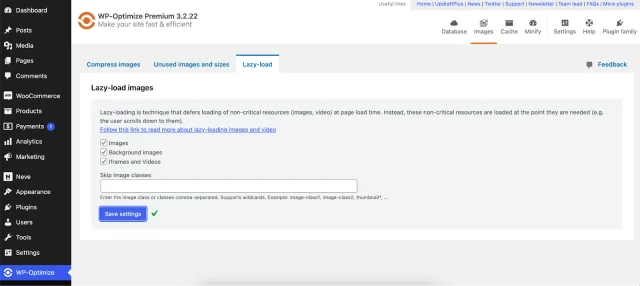
If you need to disable Lazy Loading for certain images, background images, videos, or iframes, just enable it from here. You can also choose to skip certain image classes.
Before and after
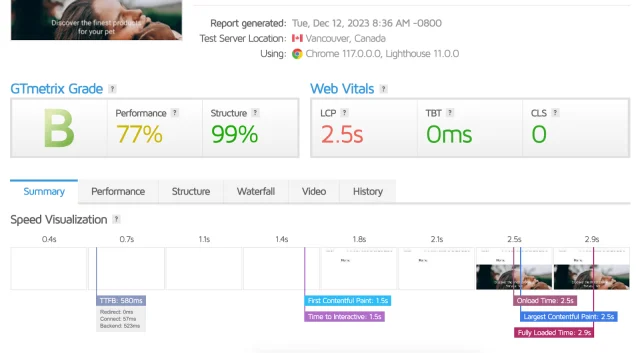
We tested a sample website’s speed before and after implementing Lazy Load. The website was already pretty fast, with a First Contentful Paint (FCP) load time of 1.5 seconds, according to GTMetrix.
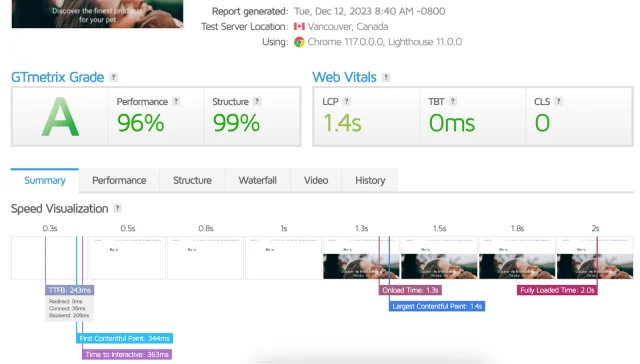
After enabling Lazy Loading, the FCP became 344 ms, which is way faster than what we had before. The results can vary depending on how much content you have on your page, but in most cases your FCP score will improve.
Ready to speed up your page load time?
Section titled Ready to speed up your page load time?Lazy loading is one of the easiest ways to improve page speed without removing content.
By loading only what users see first, it reduces initial load time, improves Core Web Vitals, and creates a smoother experience, especially on mobile.
Just don’t overuse it. Keep important, above-the-fold content loading immediately, and use lazy loading for everything else.
If you’re running a WordPress site, using a performance plugin like WP-Optimize is the fastest and safest way to get started.
Frequently Asked Questions
Section titled Frequently Asked QuestionsWhat is lazy loading in simple terms?
Lazy loading means only loading content when it’s needed. Instead of loading everything at once, your website loads what the user sees first, then loads the rest as they scroll.
Is lazy loading good or bad?
Lazy loading is generally good because it improves page speed and reduces data usage. However, it shouldn’t be used for important content at the top of the page, as this can delay loading and affect user experience.
Does lazy loading affect SEO?
Yes, when implemented correctly. Lazy loading can improve page speed and Core Web Vitals, which are both ranking factors. Just make sure important content still loads quickly.
Should you lazy load all images?
No. Images that appear immediately on page load, such as hero images, should not be lazy loaded, as this can delay rendering and impact performance metrics like Largest Contentful Paint (LCP).
What is the difference between lazy loading and eager loading?
Lazy loading delays loading content until it’s needed, while eager loading loads everything at once. Lazy loading improves initial page speed, while eager loading ensures all content is immediately available.
When should you use lazy loading?
Lazy loading is best used for images, videos, and content that appear further down the page, especially on long or content-heavy pages.
When should you not use lazy loading?
You should avoid lazy loading above-the-fold content, key visuals, or anything critical to the user experience when the page first loads.
Is lazy loading better for mobile?
Yes. Lazy loading is particularly useful for mobile users, as it reduces data usage and helps pages load faster on slower connections.
Does WordPress support lazy loading?
Yes. WordPress has built-in lazy loading for images, and plugins like WP-Optimize can extend this to videos, iframes, and more.
What are the downsides of lazy loading?
Lazy loading can cause slight delays when users scroll, and if implemented incorrectly, it can affect SEO or prevent content from loading properly.
Is lazy loading always better than eager loading?
Not always. Lazy loading is better for performance on content-heavy pages, but eager loading can be useful for small pages or critical content that needs to appear instantly.
About the author

Becks Faulkner
Becks is the Performance Marketing Manager at Updraft WP Software Ltd, with more than 15 years of marketing experience and over 11 years specialising in SEO. She works across TeamUpdraft’s WordPress products, focusing on content strategy and organic growth. Her experience spans both the financial and technology sectors, helping businesses improve their visibility in search.
Categories
WP-Optimize
Get all our premium features. Lazy loading, pre-load key requests, Cloudfare integration. Optimize individual tables, delete unused images and more.
From just $49 for the year.
More stories
-

How incremental backups save time and storage in WordPress
Incremental backups only save the changes made since your last backup, helping you reduce storage usage, speed up backups and lower server load. Learn how they work and why they're an essential part of an efficient WordPress backup strategy.
-

Best WordPress Website Builders Compared
Discover the best WordPress website builders for every skill level. Compare features, ease of use, pricing and performance to choose the right builder for your blog, business or online store.
-

How to Schedule WordPress Backups
Learn how to schedule WordPress backups, choose the right frequency, and keep copies ready when you need to restore your site.
-

Best plugins for affiliate marketers
Build a smarter affiliate site using WordPress plugins for link management, analytics, conversions, speed, security and programme growth.
