How to start a WordPress blog in 2026 (step-by-step)
Starting a blog is something many people think about, but far fewer actually do. Not because they lack ideas, but because the setup feels confusing, technical, or easy to get wrong.
If you’re searching for how to start a WordPress blog, you’re likely looking for a clear, practical guide you can actually follow without second-guessing every step.
Whether you want to start a personal blog, build a professional platform, or create something that could grow into a business, this guide walks you through it from start to finish. If you’re new to WordPress, it may also help to understand how to create a WordPress site before diving into blogging specifically.
By the end, you’ll have your WordPress blog set up, your first post published, and a solid foundation in place to grow confidently.
Key takeaways
Section titled Key takeaways- WordPress gives you full control and flexibility to grow your blog long-term
- You can start a WordPress blog in under an hour with the right setup
- Hosting, themes, and plugins form the foundation of your site
- Publishing your first post is simpler than most beginners expect
- A few key tools can help protect, speed up, and grow your blog over time
Why WordPress is a great platform for starting a blog
Section titled Why WordPress is a great platform for starting a blogWhen learning how to start a blog, the first big decision is choosing the right platform. There are many blogging tools available, but WordPress continues to be the most popular option for bloggers who want flexibility and long-term control.
WordPress gives you full control
Section titled WordPress gives you full controlA self-hosted WordPress site gives you ownership of your content, design, and data. You are not locked into a closed platform or forced to follow restrictive rules. You can move hosts, change designs, or expand your site at any time.
WordPress is open-source and supported by a large global community, which means it’s constantly improving and widely supported.
You can scale without surprise fees
Section titled You can scale without surprise feesOne of the biggest advantages of WordPress is that you can grow your blog without being hit with increasing platform fees. You pay for hosting and your domain, and from there you decide what to add and when.
As your blog grows, you can:
- Add more features without upgrading plans
- Install plugins without paying per feature
- Monetise your blog without sharing revenue
This makes WordPress ideal if you want to start small and scale gradually, without your costs rising simply because your site becomes more successful.
WordPress.org vs hosted platforms
Section titled WordPress.org vs hosted platformsMany people compare WordPress to other popular website builders. Here’s a simple comparison to help you decide.
For most people researching how to start a blog website, WordPress offers the best balance of flexibility, cost control, and growth potential.
A huge ecosystem of themes and plugins
Section titled A huge ecosystem of themes and pluginsWordPress has thousands of themes and plugins that let you customise how your blog looks and works without coding. Whether you want better performance, stronger security, or SEO support, there is almost always a trusted solution available.
This flexibility is one of the biggest reasons WordPress is such a strong long-term blogging platform.
A platform that grows with your goals
Section titled A platform that grows with your goalsWordPress works just as well for a simple personal blog as it does for a high-traffic site with advanced features. You can start with the basics and add performance tools, security features, and SEO improvements when you need them.
That flexibility is what makes WordPress a strong foundation, not just for launching a blog, but for growing one long-term.
How long does it take to start a WordPress blog?
Section titled How long does it take to start a WordPress blog?One of the most common questions when learning how to start a WordPress blog is how long the process actually takes. The good news is that the basic setup is usually quicker than most beginners expect.
In most cases, you can set up a simple WordPress blog in under an hour if you follow a clear step-by-step process.
This usually includes:
- Choosing a domain name and hosting provider
- Installing WordPress
- Selecting and activating a theme
- Creating your essential pages
Writing your first post may take a little longer, but the technical setup itself doesn’t need to be complicated. Once WordPress is installed, you can build and improve your blog gradually over time.
Step one: Choose your blog topic and goals
Section titled Step one: Choose your blog topic and goalsBefore you install WordPress or pick a theme for your blog, it’s worth spending some time on what your blog is actually about and why you’re starting it. This step gives your blog direction and makes every decision after this one easier.
Choose a topic you can stick with
Section titled Choose a topic you can stick withMany people get stuck trying to find the perfect niche. Instead of chasing trends, focus on something you can realistically write about long term.
Good blog topics usually sit at the overlap of:
- Something you care about or have experience in
- Something other people are searching for or interested in
- Something you won’t get bored of after a few months
You don’t need to be an expert to start a blog on WordPress. You just need to be willing to learn and share as you go.
Decide what kind of blog you’re building
Section titled Decide what kind of blog you’re buildingYour goals will shape how you set things up later, from your theme to the plugins you install.
Ask yourself:
- Is this a personal blog or a professional one?
- Do you want to grow an audience or just write for yourself?
- Could this turn into a side project or business in the future?
If you’re unsure, that’s fine. One of the benefits of WordPress is that you can change direction without rebuilding your site.
Set realistic goals early on
Section titled Set realistic goals early onWhen learning how to start a WordPress blog, it’s easy to focus on traffic numbers or monetisation straight away. Early goals should be simple and achievable.
Examples of healthy early goals include:
- Publishing your first five blog posts
- Learning how to format posts properly
- Getting comfortable using the WordPress editor
- Sharing your posts with friends or on social media
Clear goals help you measure progress without pressure.
Avoid common mistakes at this stage
Section titled Avoid common mistakes at this stageTry not to overcomplicate this step. Many blogs fail to launch because people get stuck planning instead of publishing.
Avoid:
- Waiting until everything feels perfect
- Choosing a topic just because it seems profitable
- Comparing your new blog to established sites
Once you have a topic and a rough goal in mind, you’re ready to move on to the technical setup and start building your WordPress blog.
Step two: Get a domain name and hosting
Section titled Step two: Get a domain name and hostingOnce you know what your blog is about, the next step in learning how to start a WordPress blog is setting up a domain name and hosting. These are the foundations of your site and they determine where your blog lives online.
What a domain name is
Your domain name is your blog’s address on the internet. It’s what people type into their browser to find you.
When choosing a domain name:
- Keep it short and easy to remember
- Avoid numbers and hyphens where possible
- Choose something that fits your topic or personal brand
- Don’t overthink it, clarity beats cleverness
If your first choice isn’t available, small variations are usually better than forcing something complicated.
What hosting does
Section titled What hosting doesWeb hosting is where your WordPress blog’s files and database are stored. A good host keeps your site online, loads pages quickly, and helps protect your data.
For beginners starting a blog on WordPress, managed or beginner-friendly hosting makes setup much easier.
Look for hosting that offers:
- One-click WordPress installation
- Good performance and uptime
- Helpful support
- Clear pricing without hidden upgrades
Common WordPress hosting options
Section titled Common WordPress hosting optionsThere are many hosting providers available. These are some commonly used options for starting a WordPress blog.
- Bluehost
Often recommended for beginners, includes simple setup and WordPress installation - SiteGround
Known for strong performance, security features, and good support - IONOS
Offers competitive pricing and integrated domain and hosting bundles
The best choice depends on your budget, location, and how much technical help you want. You can always change hosting later, which is another benefit of WordPress.
How much this usually costs
Section titled How much this usually costsStarting a WordPress blog does not have to be expensive. In most cases, you’ll pay:
- An annual fee for your domain name
- A monthly or yearly hosting fee
Unlike many website builders, WordPress lets you control these costs as your blog grows, rather than forcing you into higher plans just because you need more features.
Connect your domain and hosting
Section titled Connect your domain and hostingMost hosting providers guide you through connecting your domain during setup. Once this is done, your domain will point to your hosting account, and you’ll be ready to install WordPress.
At this point, your blog has a home. Next, we’ll walk through installing WordPress and getting access to your new site for the first time.
Step three: Install WordPress
Section titled Step three: Install WordPressWith your domain and hosting ready, you can now install WordPress. This is the step where your blog actually comes to life. For most people, this part is much easier than expected.
One click WordPress installation
Section titled One click WordPress installationMost WordPress-friendly hosts offer a one click installation option. This handles the technical setup for you and gets your site ready in a few minutes.
The process usually looks like this:
- Log into your hosting control panel
- Choose the WordPress installer
- Select your domain name
- Set a username and password
- Confirm the installation
Once this is complete, WordPress will be installed automatically.
Manual installation option
Section titled Manual installation optionSome hosts still offer a manual installation option, but this is rarely needed for beginners. Manual installs involve creating a database and uploading files, which adds complexity without much benefit at this stage.
If you are new to WordPress, the one click option is the best place to start.
Accessing your WordPress dashboard
Section titled Accessing your WordPress dashboardAfter installation, you can log into your WordPress site by visiting:
This takes you to the WordPress dashboard, which is where you manage everything on your blog, from writing posts to changing your design.
What you’ll see first
Section titled What you’ll see firstWhen you log in for the first time, WordPress includes some default content and settings. Don’t worry about making everything perfect right away.
At this stage, your focus should be:
- Getting familiar with the dashboard
- Knowing where posts, pages, and settings live
- Understanding that everything can be changed later
Installing WordPress is a major milestone. Next, we’ll look at the WordPress dashboard basics so you can confidently move around your site and start building.
Step four: Learn the WordPress dashboard basics
Section titled Step four: Learn the WordPress dashboard basicsNow that WordPress is installed, it’s worth spending a little time getting comfortable with the dashboard. This is the control centre of your site and where you’ll manage everything as you learn how to start a WordPress blog properly.
Understanding the main dashboard areas
Section titled Understanding the main dashboard areasWhen you log in, you’ll see a menu down the left-hand side. These are the areas you’ll use most often.
- Posts are where your blog articles live
- Pages are for static content like your About or Contact page
- Media stores images, videos, and files
- Appearance controls themes, menus, and basic design
- Plugins let you add new features to your site
- Settings control how your site behaves behind the scenes
You don’t need to understand everything at once. Most of your time early on will be spent in Posts, Pages, and Appearance.
Posts vs pages
Section titled Posts vs pagesThis is one of the most common points of confusion for beginners.
- Posts are for blog content and appear in date order
- Pages are for content that doesn’t change often
Your blog articles should always be created as posts. Pages are used for things like your homepage, about page, or privacy policy.
The block editor
Section titled The block editorWordPress uses a block-based editor, sometimes called the block editor. Each piece of content, like text, images, or buttons, is added as a block.
This makes it easier to:
- Format content clearly
- Create readable layouts
- Add images and headings without coding
If you’ve used tools like Google Docs, the editor should feel familiar.
Key settings to check early
Section titled Key settings to check earlyBefore publishing anything, there are a few settings worth reviewing.
- Site title and tagline under General settings
- Permalink structure, usually set to post name
- Timezone and language settings
These small changes help keep your site organised and easier to manage later.
Once you’re comfortable moving around the dashboard, you’re ready to start shaping how your blog looks. Next, we’ll focus on designing your WordPress blog and choosing a theme that fits your goals.
Don’t lose your work before you’ve even started
Set up simple, reliable backups so you can restore your site in minutes if anything goes wrong.
Step five: Design your WordPress blog
Section titled Step five: Design your WordPress blogDesign is about more than making your blog look nice. A good design makes your content easier to read, helps visitors find what they need, and supports your goals as you learn how to start a WordPress blog that people actually want to use
Choosing a WordPress theme
Section titled Choosing a WordPress themeYour theme controls the overall layout and style of your blog. There are thousands of blog themes available, both free and paid.
When choosing a theme, prioritise:
- Clean and readable layouts
- Mobile-friendly design
- Fast loading times
- Simple customisation options
If you’re not sure where to start, this guide to the best WordPress themes walks through popular options and what to look for as a beginner.
If you already know the type of blog you want to create, it can help to look at more specific examples. For instance, these WordPress themes for food blogs focus on showcasing recipes and images clearly, while these themes for fashion bloggers are designed with visual content and styling in mind.
You can always change your theme later, so focus on clarity and usability rather than trying to make everything perfect from the start.
How to install and activate a theme
Section titled How to install and activate a themeSetting a theme is straightforward and doesn’t require technical skills.
To install a theme:
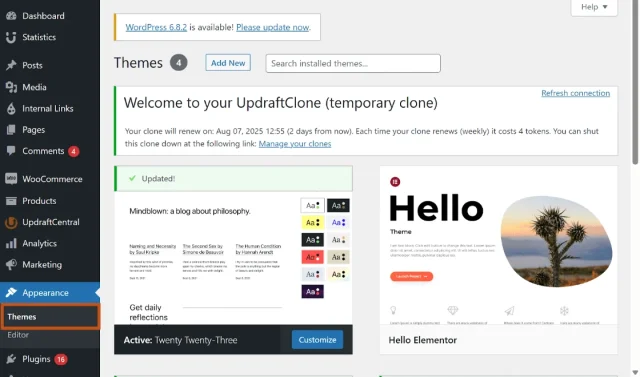
- Go to Appearance in your WordPress dashboard
- Select Themes
- Click Add new
- Browse or search for a theme
- Click Install, then Activate
Once activated, your new theme will instantly apply to your site.
Free vs premium themes
Section titled Free vs premium themesFree themes are a great place to start and are often more than enough for new blogs. Premium themes usually offer more design options and support, but they are not required when you’re just getting started.
Whichever route you choose, it’s important to avoid downloading themes from untrusted sources. Some “free” or nulled themes can contain hidden malware or security risks. If you’re unsure, it’s worth understanding the risks of nulled WordPress themes before installing anything on your site.
If you choose a premium theme, make sure it is:
- Regularly updated
- Well reviewed
- Built for WordPress standards
Customising your blog’s appearance
Section titled Customising your blog’s appearanceAfter activating your theme, you can customise it using the WordPress customiser.
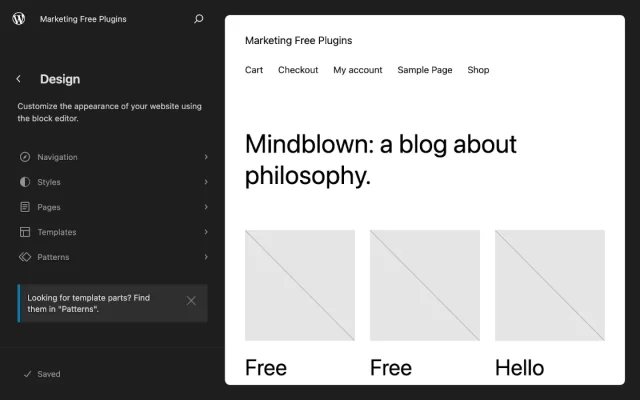
Common adjustments include:
- Updating colours and fonts
- Setting your homepage layout
- Uploading a logo or site icon
- Adjusting header and footer settings
These options are usually found under Appearance, then Customise.
Navigation and menus
Section titled Navigation and menusMenus help visitors move around your site easily. Early on, you usually only need a simple menu.
Typical menu items include:
- Home
- Blog
- About
- Contact
Clear navigation makes your blog easier to use and encourages visitors to explore more of your content.
With your theme chosen and basic design in place, the next step is creating the essential pages your WordPress blog needs before publishing any posts.
Step six: Create essential pages
Section titled Step six: Create essential pagesBefore you start publishing blog posts it’s important to set up a few core pages. These pages help visitors understand who you are, what your blog is about and how to contact you.
About page
Section titled About pageYour About page gives readers context. It doesn’t need to be long or overly polished, especially at the start.
A simple About page usually includes:
- Who you are
- Why you started the blog
- What readers can expect from your content
You can update this page as your blog evolves.
Contact page
Section titled Contact pageA Contact page makes it easy for readers, brands, or collaborators to reach you. Even if you don’t expect messages right away, having this page builds trust.
Your Contact page can include:
- A contact form
- An email address
- Links to relevant social profiles
Privacy policy
Section titled Privacy policyIf your blog collects any data, such as comments, contact form submissions, or analytics, you’ll need a privacy policy.
WordPress can generate a basic privacy policy for you:
- Go to Settings
- Select Privacy
- Create a new privacy policy page
You can edit this later to suit your site and local regulations.
Blog page
Section titled Blog pageYour Blog page is where your posts will live. Some themes create this automatically, while others require you to assign a page manually.
To set a blog page:
- Create a new page called Blog
- Go to Settings
- Select Reading
- Set your homepage and posts page
Once this is done, all your blog posts will appear there automatically.
With your essential pages in place, your site is ready for content. Next, we’ll look at how to write and publish your first blog post on WordPress.
Step seven: Write and publish your first blog post
Section titled Step seven: Write and publish your first blog postThis is the moment most people build up in their heads, but writing your first post is often easier than expected. When learning how to start a WordPress blog, publishing your first post is a key milestone. It turns your site from an idea into something real.
Create a new post
Section titled Create a new postTo start writing:
- Go to Posts in your WordPress dashboard
- Select Add new
- Add a title and start writing in the editor
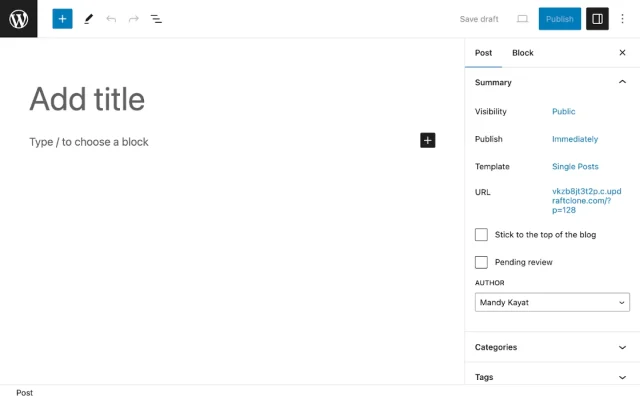
You can save drafts as you go, so there’s no pressure to finish everything in one sitting.
Structure your post for readability
Section titled Structure your post for readabilityClear structure makes your content easier to read and helps people stay on the page.
A simple blog post structure includes:
- A clear introduction that explains what the post is about
- Subheadings to break up sections
- Short paragraphs
- A conclusion or next step for the reader
Don’t worry about writing perfectly, rather focus on being clear and helpful.
Keep your blog fast from day one
Clean up your database and improve load times so your site stays quick as you publish more content.
Use categories and tags
Section titled Use categories and tagsCategories and tags help organise your content.
- Categories are broad topics, such as Travel or Tutorials
- Tags are more specific and optional
Choose one main category per post to keep things tidy.
Add images and media
Section titled Add images and mediaImages help break up text and make posts more engaging.
You can add images by:
- Clicking the plus icon in the editor
- Selecting an Image block
- Uploading or choosing an image from the media library
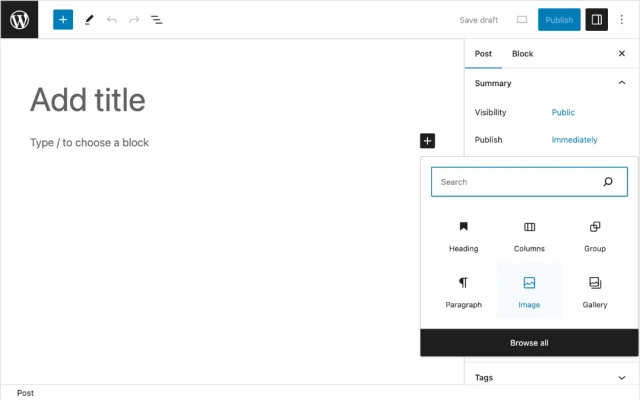
Make sure images are relevant and not too large, as very large files can slow your site down.
Preview and publish
Section titled Preview and publishBefore publishing, use the Preview option to check how your post looks on desktop and mobile.
When you’re ready:
- Click Publish
- Confirm the post details
- Share your post when it’s live
Your first post doesn’t need to be perfect. Publishing regularly and improving over time is far more important than waiting until everything feels flawless.
With your first post live, the next step is putting the right tools in place to support security, performance, and growth.
Step eight: Install essential WordPress plugins
Section titled Step eight: Install essential WordPress pluginsPlugins add functionality to your site without requiring any coding. Choosing the right ones early on helps protect your blog, improve performance, and give you a solid foundation as you learn how to start a WordPress blog properly.
It’s easy to get carried away and install too many plugins, but a smaller number of well-chosen tools will usually result in a faster, more stable, and easier-to-manage site.
Security and backups
Section titled Security and backupsSecurity and backups are often overlooked by new bloggers, but they’re essential from day one. Backups protect your content if something goes wrong, while security tools help prevent unauthorised access and attacks.
Putting the right foundations in place early means you can:
- Recover your site quickly if something breaks
- Protect your content from hacks, errors, or failed updates
- Make changes and updates with confidence
For example, using a backup plugin like UpdraftPlus allows you to restore your site in minutes if anything goes wrong. Pairing this with a security plugin such as All-In-One Security helps protect your blog from common threats as it grows.
When your site is fast, secure, and backed up properly, it’s a lot easier to stay consistent and grow without worrying about losing your work.
Performance and speed
Section titled Performance and speedSite speed plays a big role in both reader experience and search visibility. Slow-loading pages can frustrate visitors, increase bounce rates, and make it less likely people will stick around to read your content.
Performance plugins help keep your site running efficiently by:
- Optimising your database to remove unnecessary data
- Reducing page load by limiting background processes
- Improving overall speed as your content grows
Using a performance tool like WP-Optimize helps keep your site fast and responsive, even as you publish more posts and attract more visitors.
SEO foundations
Section titled SEO foundationsSEO plugins help you optimise your content so search engines can understand and index it more effectively. They guide you through key elements like:
- Writing clear page titles and meta descriptions
- Structuring headings for better readability
- Managing indexing and visibility settings
While SEO plugins don’t replace good content, they make it much easier to follow best practices as you publish and grow your blog.
Popular options include Yoast SEO, Rank Math, and tools like Internal Link Juicer to help strengthen your internal linking.
Plugin best practices
Section titled Plugin best practicesChoosing the right plugins is important, but how you manage them matters just as much. Keeping your setup simple and well-maintained helps your blog stay fast, secure, and reliable.
To keep your blog healthy:
- Only install plugins you genuinely need
- Remove any plugins you’re not using
- Keep all plugins updated regularly
Making smart plugin choices early on creates a strong, stable foundation for your site. Next, we’ll look at how to grow your WordPress blog with SEO, audience building, and simple tracking.
Step nine: How to grow your WordPress blog
Section titled Step nine: How to grow your WordPress blogOnce your blog is live and the foundations are in place, the next step is growth. When people search for how to start a WordPress blog, it’s common to worry about traffic straight away, but growth rarely happens overnight.
In most cases, it builds gradually as you publish more content, learn what works, and stay consistent. That’s completely normal, and it’s how most successful blogs start.
Basic SEO for beginners
Section titled Basic SEO for beginnersSearch engine optimisation (SEO) helps people discover your blog through search engines like Google. The good news is you don’t need advanced knowledge to get started, just a few solid habits.
Focus on:
- Writing helpful content that answers real questions people are searching for
- Using clear headings to structure your posts and make them easy to read
- Linking to related posts on your own site to guide readers and search engines
- Avoiding keyword stuffing and writing naturally instead
Over time, consistently publishing useful, well-structured content helps your blog build visibility and attract steady traffic.
Build an audience beyond search
Section titled Build an audience beyond searchSearch traffic is important, but it shouldn’t be your only focus, especially in the early stages. Building an audience takes time, and reaching people in different ways can help you grow more steadily.
Simple ways to start building an audience include:
- Sharing your posts on social media platforms you already use
- Encouraging readers to comment, reply, or engage with your content
- Starting an email list when you feel ready
It’s better to focus on one or two channels and stay consistent, rather than trying to be everywhere at once.
Be consistent, not perfect
Section titled Be consistent, not perfectConsistency matters more than frequency. Publishing one well-written post every few weeks is far more effective than posting daily for a short period and then stopping completely.
Set a schedule you can realistically maintain, and stick to it. Over time, consistency builds trust with both your readers and search engines.
Track what’s working
Section titled Track what’s workingTracking helps you understand what resonates with your audience, so you can make better decisions as your blog grows.
Early on, focus on:
- Which posts get the most views
- How people are finding your site
- Which topics keep readers engaged
Privacy-friendly analytics plugins like Burst Statistics let you track this directly inside WordPress without adding unnecessary complexity. This makes it easier to understand what’s working without relying on multiple external tools.
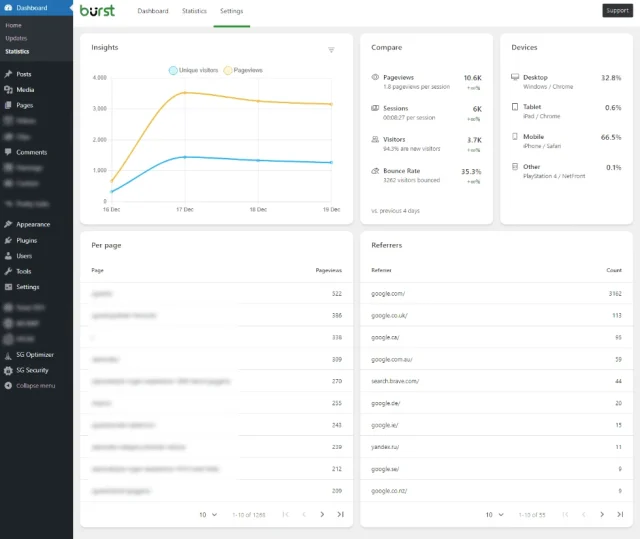
You don’t need to analyse everything. Simple insights are enough to guide what you create next.
Growth takes time, but each post builds on the last. Next, we’ll cover common mistakes new bloggers make and how to avoid them so your blog stays healthy as it grows.
Common mistakes when starting a WordPress blog
Section titled Common mistakes when starting a WordPress blogWhen learning how to start a WordPress blog, it’s easy to fall into a few common traps. Knowing what to avoid can save you time, frustration, and unnecessary work later on.
Waiting too long to publish
Section titled Waiting too long to publishMany new bloggers delay launching because they want everything to be perfect. In reality, your blog improves as you write more and learn along the way.
Publishing early helps you:
- Build confidence
- Learn what works for your audience
- Improve faster through practice
Your first posts won’t define your blog forever, and that’s completely okay.
Installing too many plugins
Section titled Installing too many pluginsPlugins are powerful, but installing too many at once can slow your site down and make it harder to manage.
A good rule of thumb is:
- Start with the essentials
- Add plugins only when you clearly need them
- Remove anything you’re not using
A simpler setup is usually faster, more stable, and easier to maintain.
Ignoring backups and security
Section titled Ignoring backups and securitySkipping backups or security tools can put your entire blog at risk. Even small sites can be affected by errors, updates, or attacks.
Without backups, a single issue could mean losing your content. Putting protection in place early gives you peace of mind as your blog grows.
Comparing yourself to established blogs
Section titled Comparing yourself to established blogsIt’s easy to compare your new blog to sites that have been around for years, but this can be discouraging and unrealistic.
Every successful blog started with zero posts and zero readers. Focus on steady progress instead of comparisons.
Trying to do everything at once
Section titled Trying to do everything at onceSEO, social media, email lists, and monetisation all matter, but not all at the same time.
Instead:
- Focus on publishing helpful content first
- Learn one growth method at a time
- Build sustainable habits you can stick to
Avoiding these mistakes helps you build a stronger, more sustainable blog from the start. Next, we’ll answer some common questions people have about how to start a WordPress blog.
Conclusion
Section titled ConclusionLearning how to start a WordPress blog doesn’t have to be complicated. Once you break it down into clear steps, choosing a topic, setting up hosting, installing WordPress, and publishing your first post becomes far more manageable.
The most important thing to remember is that your blog does not need to be perfect on day one. WordPress gives you the flexibility to grow, change direction, and improve over time without being locked into expensive plans or rigid platforms.
If you focus on creating helpful content, keeping your site secure, and building steady habits, your blog will have a strong foundation to grow on.
Keep your WordPress blog secure, fast, and ready to grow
Starting a blog is exciting, but keeping it running smoothly matters just as much. With reliable backups, strong security, and performance tools in place, you can focus on creating content, not fixing problems.
FAQs about how to start a WordPress blog
Section titled FAQs about how to start a WordPress blogThese are some of the most common questions people ask when learning how to start a WordPress blog. If you’re just getting started, these quick answers should help clear up any remaining doubts and give you the confidence to move forward.
How much does it cost to start a WordPress blog?
Starting a WordPress blog is relatively low cost. In most cases, you’ll only need to pay for:
A domain name
Web hosting
Many people launch a blog for the cost of hosting plus a yearly domain fee. Paid themes and plugins are optional and can be added later as your blog grows.
How long does it take to set up a WordPress blog?
You can set up a basic WordPress blog in under an hour using beginner-friendly hosting with one-click installation.
Choosing a theme, creating pages, and publishing your first post can usually be done in a single day. While growth takes time, the technical setup itself is quick and straightforward.
Do I need technical skills to start a blog on WordPress?
No technical background is required. Most hosting providers offer simple setup processes, and WordPress is designed to be beginner-friendly.
You can customise your site, publish content, and manage plugins without writing any code.
Can I change things later if I make mistakes?
Yes, and this is one of the biggest advantages of WordPress. You can change your theme, edit content, switch plugins, or even move hosting providers without starting over.
This flexibility makes WordPress a great option if you’re learning as you go.
Can I make money from a WordPress blog?
Yes, many bloggers eventually monetise their sites through ads, affiliate links, digital products, or services.
That said, it’s best to focus on creating helpful content and building an audience first. Monetisation tends to work best once you have consistent traffic and a clear direction.
What is the best WordPress theme for a blog?
The best theme depends on your niche and goals, but in general you should look for something that is fast, mobile-friendly, and easy to customise.
If you’re unsure where to start, our guide to the best WordPress themes covers popular options for beginners.
When will my blog start getting traffic?
Most blogs don’t see significant traffic straight away. It can take a few weeks or months for search engines to start recognising and ranking your content.
The key is to stay consistent, focus on helpful content, and give your blog time to grow.
How often should I publish blog posts?
Consistency matters more than frequency. Publishing one high-quality post every few weeks is better than posting daily for a short period and then stopping.
Choose a schedule you can realistically maintain and build from there.
About the author

Elvira Mishra
Elvira has over four years of experience creating and designing content in WordPress. Her background spans multiple digital disciplines, including marketing, SEO, user experience, and human computer interaction.
Categories
UpdraftPlus
Get all our premium features. Direct site-to-site migration, incremental backups, back up automatically before updates and a whole lot more.
From just $70 for the year.
More stories
-

5 WordPress Web Design Tips to Improve Your Website
Good web design is about more than appearance. Explore practical WordPress web design tips to improve your website's layout, navigation, mobile responsiveness, accessibility and performance, helping you create a better experience for your visitors.
-
Best AI Website Builders Compared
AI website builders can help you design, write and launch a website in minutes. Compare the best AI-powered website builders based on ease of use, features, customisation, pricing and performance to find the right solution for your next project.
-
How incremental backups save time and storage in WordPress
Incremental backups only save the changes made since your last backup, helping you reduce storage usage, speed up backups and lower server load. Learn how they work and why they're an essential part of an efficient WordPress backup strategy.
-
Best WordPress Website Builders Compared
Discover the best WordPress website builders for every skill level. Compare features, ease of use, pricing and performance to choose the right builder for your blog, business or online store.
