Best WordPress themes for fashion bloggers
Your blog’s design plays a big role in how your brand is perceived. In fashion, where visuals matter just as much as content, your WordPress theme isn’t just a layout, it shapes how your site looks, loads, and converts. While there are plenty of best WordPress themes lists out there, not all of them are built with fashion content in mind.
A slow or outdated theme can hold your content back, no matter how good your photos are. The right theme should handle high-resolution images, work smoothly on mobile, and make it easy to showcase products or “Shop the Look” content.
Here are the best WordPress themes for fashion bloggers that balance style, performance, and monetisation.
Key takeaways
Section titled Key takeaways- The best fashion themes are built for high-resolution images, with layouts that showcase your content clearly on all devices.
- Look for built-in features that support monetisation, like “Shop the Look” sections, affiliate integrations, and ad placements.
- Speed and mobile performance matter, especially if most of your traffic comes from Instagram or TikTok.
- Always back up your site before switching themes, so you can restore everything quickly if something breaks.
My methodology
Section titled My methodologyTo make this list genuinely useful, I looked at each theme through the lens of what fashion bloggers actually need today. Fashion content is highly visual, heavily mobile-driven, and often tied to affiliate income, brand partnerships, and social traffic. So rather than judging themes on looks alone, I focused on how well they support the way modern fashion blogs work.
Each theme was scored out of 10 using the following criteria:
Visual impact
Section titled Visual impactFashion blogging is image-led, so presentation matters. I looked at how well each theme handled high-resolution photography, portrait and landscape images, gallery layouts, featured sliders, and overall editorial feel.
Speed and performance
Section titled Speed and performanceMost fashion blog traffic comes from mobile, often through Instagram, Pinterest, or TikTok. I prioritised themes with lightweight code and fast loading performance, especially for image-heavy pages.
Customisation
Section titled CustomisationYour blog should reflect your own style, not just the theme demo. I considered how easy it was to change colours, fonts, layouts, and homepage sections without needing custom code or developer support.
Monetisation features
Section titled Monetisation featuresFor many fashion bloggers, the site needs to do more than look good. I looked at how well each theme supports affiliate links, “Shop the Look” content, ad placements, newsletters, and WooCommerce if you plan to sell products later on.
These recommendations are focused specifically on fashion bloggers. If your site is more general, you may be better off with a broader theme round-up instead.
Some things are better vintage. Your backups shouldn’t be.
Your website is valuable. Don’t leave it exposed. Automated backups keep everything stored safely in the cloud, so you can restore your site in minutes if needed.
1. Astra
Section titled 1. AstraFreemium | Visuals: 8/10 | Speed: 10/10 | Customization: 9/10 | Monetization: 9/10 | Overall: 9.0/10
Ideal use case: The performance-obsessed blogger who wants their site to load instantly on mobile devices, boosting SEO rankings.

Astra is often cited as the fastest growing theme in WordPress history, and for good reason. It is incredibly lightweight (less than 50KB on the frontend), which means your high-res outfit photos won’t slow down your site. While it is a multipurpose theme, its “Fashion Lifestyle” starter templates are stunning.
Key features
- Pixel-Perfect Starter Sites: Import a professionally designed fashion blog demo in seconds.
- Header Footer Builder: Drag-and-drop builder to create unique navigation menus.
- WooCommerce Integration: Seamless if you plan to sell your own presets or merch later.
Pros
- Unmatched speed and performance.
- Huge library of pre-built templates.
- Works perfectly with page builders like Elementor and Beaver Builder.
Cons
- The free version is somewhat limited in design options; you really need the Pro version for the “sticky header” and advanced blog layouts.
Verdict
Astra is one of the safest and most reliable choices for a fashion blog. While it doesn’t have the built-in “fashion” styling of some niche themes, its speed and flexibility make up for it.
It’s a strong foundation that won’t slow you down as your site grows, making it a great option if you’re treating your blog as a long-term business rather than just a hobby.
2. Soledad
Section titled 2. SoledadPremium ($59) | Visuals: 10/10 | Speed: 8/10 | Customization: 9/10 | Monetization: 10/10 | Overall: 9.2/10
Ideal use case: The “Magazine” style blogger who posts frequently and wants a busy, content-rich homepage that keeps readers clicking.
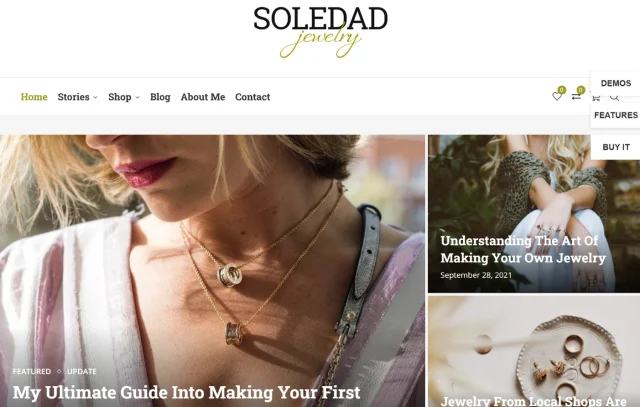
If you want a site that looks like Vogue or Elle right out of the box, Soledad is the heavy hitter. It is a dedicated magazine/blog theme that boasts over 6,000+ home page demos. Yes, you read that right. It is built specifically for content-heavy sites with lots of images.
Key features
- Penci Recipe & Review Plugins: Great if you mix lifestyle/food content with fashion.
- Amp Support: Native support for Accelerated Mobile Pages.
- Euclid & Masonry Layouts: Beautiful ways to display your latest posts.
Pros
- Incredible variety of layouts specifically for bloggers.
- High-performance optimization tools included.
- Dark mode support.
Cons
- Can be overwhelming due to the sheer number of settings (6,000+ demos is a lot to sift through).
Verdict
Soledad is a powerful choice for content-heavy fashion blogs. If you plan to cover multiple categories like beauty, travel, and fashion, it gives you the flexibility to showcase everything clearly from one homepage.
It’s ideal for bloggers who want a more editorial, magazine-style feel without investing in custom development, offering a high-end look straight out of the box.
3. Blossom Fashion
Section titled 3. Blossom FashionFreemium | Visuals: 9/10 | Speed: 7/10 | Customization: 8/10 | Monetization: 10/10 | Overall: 8.5/10
Ideal use case: The “Influencer” blogger. If your primary goal is to convert blog readers into Instagram followers or LiketoKnow.it shoppers, this theme is built for you.
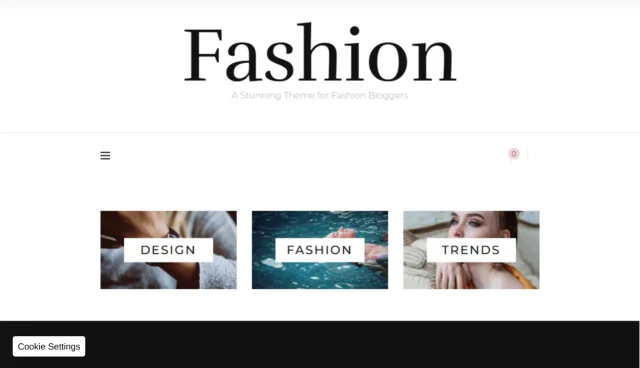
Blossom Fashion is a “chick” theme and I mean that in the best way possible. It is unapologetically feminine, chic, and designed specifically for the lifestyle and fashion niche. It understands that you want your Instagram feed in the footer and a “Shop” widget in the sidebar.
Key features
- Instagram Section: A built-in, beautifully designed Instagram feed to grow your following.
- Advertisement Widget: Dedicated spots to place AdSense or affiliate banners.
- Newsletter Subscription: Prominent widget to capture emails.
Pros
- Very beginner-friendly setup.
- Excellent typography and color schemes for feminine brands.
- “Shop the Look” features in the Pro version.
Cons
- The design is very specific; if you want a brutalist or minimalist male fashion aesthetic, this isn’t it.
Verdict
Blossom Fashion is a great choice for influencers who want a polished, ready-to-use setup. It takes care of things like social feeds and affiliate sections, so you don’t have to piece everything together yourself.
If you’re just starting out and want a site that looks professional straight away, without needing any code, this is one of the easiest options to get up and running.
4. Divi
Section titled 4. DiviPremium ($89/year) | Visuals: 10/10 | Speed: 6/10 | Customization: 10/10 | Monetization: 8/10 | Overall: 8.5/10
Ideal use case: The creative visionary who has a specific design in mind and wants total control over every pixel without hiring a developer.
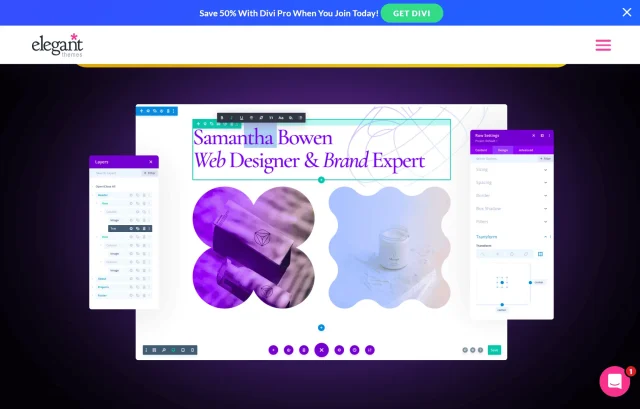
Divi isn’t just a theme; it’s a complete design framework. It uses a visual drag-and-drop builder that lets you design your site on the front end. If you are creative but can’t write a line of code, Divi gives you the power to move pixels exactly where you want them.
Key features
- Visual Builder: See changes in real-time as you edit.
- Split Testing: Built-in A/B testing to see which headline or layout gets more clicks.
- Global Elements: Change a font style once, and it updates across the whole site.
Pros
- Ultimate design freedom.
- Huge community and marketplace for child themes.
- Lifetime pricing option available.
Cons
- Code Bloat: It can be heavy. You need to optimize your images and caching to keep it fast.
- Lock-in: Once you use Divi, switching away is hard because it uses shortcodes.
Verdict
Divi is ideal if you want full creative control over your site. If you have a specific vision, whether that’s a unique homepage layout or a custom gallery style, Divi gives you the flexibility to build it without needing code.
That said, it’s more of a long-term commitment. Once your site is built with Divi, switching away can be tricky. It’s best suited to those who prioritise design flexibility over pure speed and simplicity.
5. Ashe
Section titled 5. AsheFreemium | Visuals: 8/10 | Speed: 8/10 | Customization: 7/10 | Monetization: 7/10 | Overall: 7.5/10
Ideal use case: The collaborative blog or the beginner who wants a premium look for zero dollars.
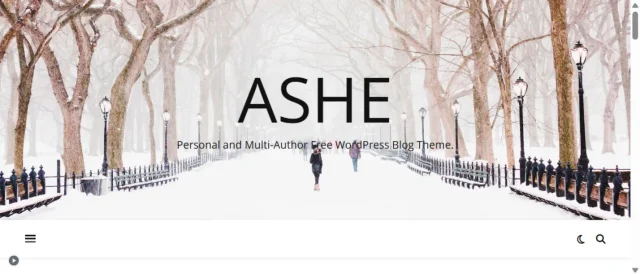
Ashe is a staple in the free theme repository. It supports multi-author setups perfectly, making it great if you have contributors. Its design is clean, minimal, and focuses heavily on the header image.
Key features
- Featured Slider: A stunning way to showcase your top 3 posts.
- Promo Boxes: Three small boxes under the header to highlight categories (e.g., “OOTD,” “Beauty,” “Travel”).
- WooCommerce Ready: Simple integration for a small shop.
Pros
- The free version is surprisingly feature-rich.
- Great support for translation (RTL ready).
- Clean code and SEO friendly.
Cons
- Customization options in the free version are limited compared to Astra or OceanWP.
Verdict
Ashe is a great starting point for new bloggers. It keeps things simple without overwhelming you, while still offering enough features to create a clean, professional-looking site from day one.
If you’re working with a tight budget, it’s a solid option that lets you launch quickly and focus your spending on things like photography or branding instead.
6. CheerUp
Section titled 6. CheerUpPremium ($59) | Visuals: 10/10 | Speed: 7/10 | Customization: 8/10 | Monetization: 9/10 | Overall: 8.5/10
Ideal use case: Luxury fashion bloggers who need their site to reflect high-end brand aesthetics.
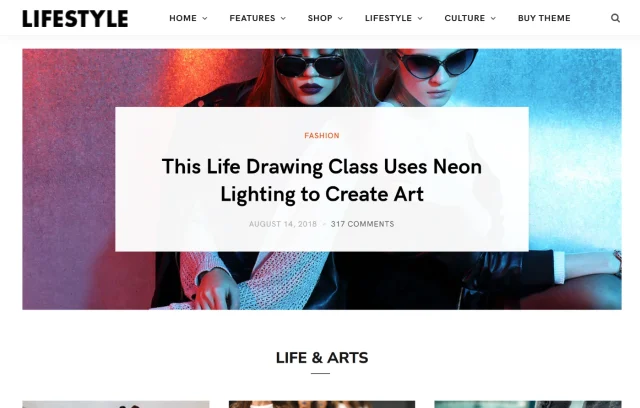
CheerUp is a “luxury” design theme. It offers tailored design options for fashion, beauty, and lifestyle that feel high-end. It comes with over 1,000+ layout combinations, meaning you can tweak the look until it fits your brand perfectly.
Key features
- Smart Loading: Uses lazy loading to ensure your heavy images don’t crash the browser.
- Social Media Integration: Best-in-class Pinterest and Instagram widgets.
- TypeKit Support: access to premium fonts.
Pros
- Beautiful, elegant aesthetic.
- High flexibility with headers and footers.
- ptimized for Pinterest sharing (crucial for fashion).
Cons
- Slightly higher learning curve for the settings panel.
Verdict
CheerUp is ideal for bloggers who want a polished, magazine-style look. Its strong typography and use of whitespace give your site a more premium feel compared to most free themes.
It takes a bit of time to set up, but once it’s dialled in, the result is a professional-looking site that can appeal to higher-end brands and support stronger monetisation opportunities.
7. GeneratePress
Section titled 7. GeneratePressFreemium | Visuals: 7/10 | Speed: 10/10 | Customization: 9/10 | Monetization: 8/10 | Overall: 8.5/10
Ideal use case: The tech-savvy blogger who prioritizes Core Web Vitals and SEO over flashy animations.
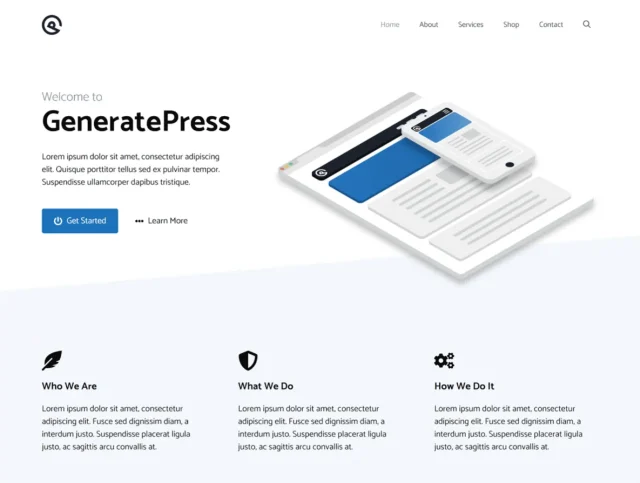
Like Astra, GeneratePress is built for speed. It is a favorite among SEO professionals. It is a “canvas” theme as it starts plain, but with its “Elements” module, you can build any design you want. It’s stable, secure, and incredibly fast.
Key features
- Block-Based Builder: Uses the native WordPress block editor (Gutenberg) for layouts.
- Micro-theme: The install size is tiny (less than 30kb).
- Accessibility Ready: Ensures your fashion blog is readable by everyone.
Pros
- The fastest theme on this list.
- Rock-solid stability; updates never break your site.
- Excellent developer support.
Cons
- Out of the box, it looks very plain. You need to style it.
Verdict
GeneratePress is a strong long-term choice, especially if performance and stability are your priority. It may look quite minimal out of the box, but that’s part of its strength.
With clean, lightweight code, it’s built to perform well in Core Web Vitals and stay reliable as your site grows. If you’re focused on SEO, speed, and long-term stability, this is one of the safest options you can choose.
8. OceanWP
Section titled 8. OceanWPFreemium | Visuals: 8/10 | Speed: 7/10 | Customization: 9/10 | Monetization: 10/10 | Overall: 8.5/10
Ideal use case: The “Entrepreneur” blogger who plans to sell products immediately.
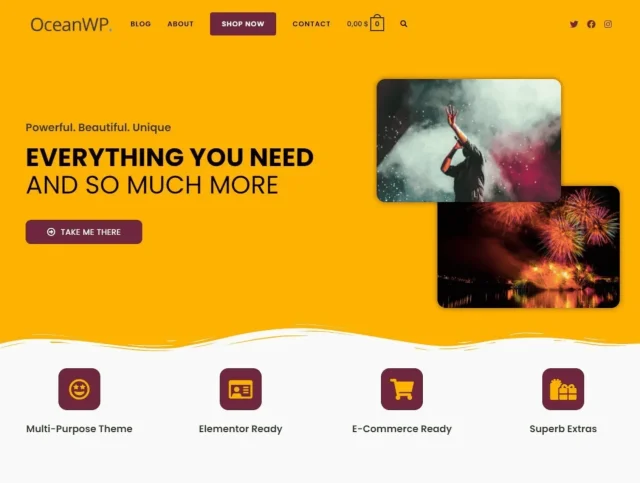
OceanWP is an e-commerce powerhouse. If your fashion blog is actually a disguise for a drop-shipping store or a clothing line, this is the theme you want. It has arguably the best free WooCommerce integration of any theme.
Key features
- Native Cart Popup: Increases sales conversions.
- Floating Add to Cart Bar: Stays visible as the user scrolls.
- Extensive Extension Library: Add features like “Sticky Header” or “Instagram Feed” via plugins.
Pros
- Huge amount of free features.
- E-commerce centric.
- Highly customizable mobile view.
Cons
- The setup wizard invites you to install many recommended plugins, which can feel bloated if you don’t need them.
Verdict
OceanWP is a strong choice if you’re planning to turn your blog into a shop. It blends content and e-commerce well, making it easy to grow from blogging into selling without needing to switch themes later on.
If you’re thinking about launching products like clothing, presets, or digital downloads, starting with OceanWP gives you the flexibility to scale without rebuilding your site down the line.
9. Olsen Light
Section titled 9. Olsen LightFreemium | Visuals: 9/10 | Speed: 8/10 | Customization: 6/10 | Monetization: 7/10 | Overall: 7.5/10
Ideal use case: The minimalist or the writer who uses photography to accent their stories.
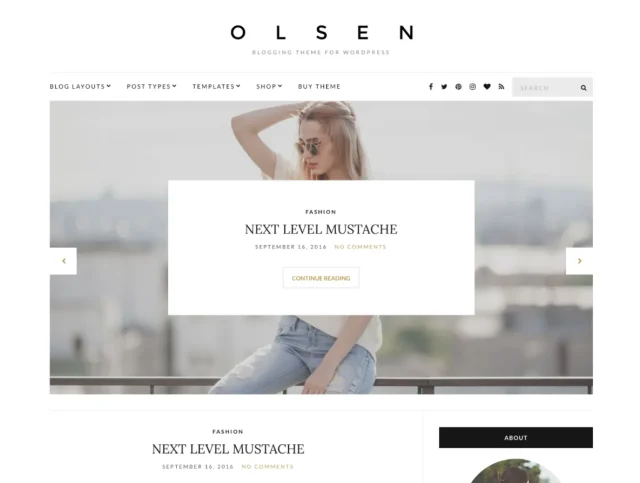
Olsen is a classic. It features a traditional “blog” layout with a sidebar, crisp typography, and plenty of white space. It doesn’t try to be a magazine or a shop; it tries to be a beautiful personal diary.
Key features
- Custom Widgets: “About Me,” “Social Icons,” and “Latest Posts” widgets designed to match the theme.
- Post Formats: Special layouts for video and audio posts.
- Live Customizer: easy editing.
Pros
- Timeless design that doesn’t date quickly.
- Very easy to set up.
- Lightweight.
Cons
- Lack of advanced features like drag-and-drop headers.
Verdict
Olsen is a great example of how simplicity can work in your favour. It’s clean, reliable, and easy to use, making it a solid option if you don’t want to deal with complex layouts or too many settings.
If you prefer a more minimal, content-focused design, Olsen gives your photography space to stand out without unnecessary distractions.
10. The Issue
Section titled 10. The IssuePremium ($89) | Visuals: 10/10 | Speed: 7/10 | Customization: 8/10 | Monetization: 9/10 | Overall: 8.5/10
Ideal use case: The “Trendsetter” who wants a site that feels interactive and modern.
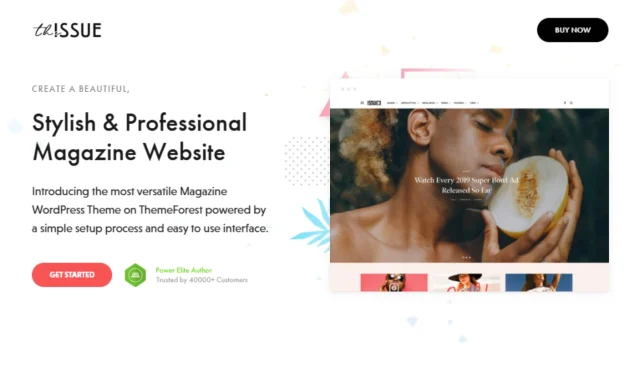
The Issue is one of the most unique themes on the market. It mimics the layout of high-end digital publications. It includes unique engagement features like “reaction” buttons on posts (Love, Funny, Sad) similar to BuzzFeed.
Key features
- Reactions: Built-in engagement tools.
- Smart Lists: Turn any post into a “listicle” automatically.
- Sponsored Posts: Dedicated styles for sponsored content to keep you compliant with ad laws.
Pros
- Unique features you don’t find in generic themes.
- Great monetization tools for sponsored content.
- Very distinctive typography.
Cons
- It has a specific “vibe” that might distract from simple photography.
Verdict
The Issue is a great choice if your goal is to build an engaged audience, not just publish content. Its built-in engagement features and social elements make it well suited to more interactive, shareable posts.
If your content is trend-led or designed to spark reactions, this theme gives you tools that would otherwise require additional plugins, helping you create a more dynamic, community-focused site.
Declutter your site like you declutter your wardrobe
Over time, your WordPress site fills up with unnecessary data. WP-Optimize clears out the clutter, improves performance, and keeps everything running smoothly.
Comparison table
Section titled Comparison tableThe fashion blog checklist for beginners
Section titled The fashion blog checklist for beginnersIf you’re setting up your site, here’s a simple checklist to help you look professional from day one and start building income.
A “Start here” or “About me” page
Section titled A “Start here” or “About me” pageIn fashion blogging, you are part of the brand. People follow you because they connect with your style, perspective, or lifestyle.
Your “About” page shouldn’t feel generic. It’s your chance to build trust and show what makes your content relevant. If you create fit-based content, it can help to include details like your height or sizing. You can also share your style preferences, what you focus on, and a bit of your story.
The clearer and more relatable this is, the easier it is for readers to trust your recommendations and come back to your content.
“Shop the look” widgets
Section titled “Shop the look” widgetsThis is where a lot of your income will come from. If someone likes an outfit, they want to be able to click and buy it straight away.
Make it easy by adding dedicated “Shop the look” sections in your posts, sidebar, or footer. This allows readers to quickly find and purchase the exact items you’re featuring without having to search for them.
Tools like LTK (RewardStyle) or ShopStyle Collective work well here and integrate smoothly with most modern WordPress themes.
A Clear disclosure policy
Section titled A Clear disclosure policyTransparency isn’t just ethical; it’s the law. If you use affiliate links or accept gifted items, you must disclose this clearly. I recommend having a dedicated “Disclaimer” page and a short sentence at the top of every sponsored post. It protects you legally and actually increases trust with your audience because it shows you are honest.
An Instagram feed in the footer
Section titled An Instagram feed in the footerYour blog and your social media should talk to each other. Since fashion is inherently visual, your website needs to pull in your latest Instagram posts automatically. This keeps your site looking fresh even if you haven’t written a new blog post in a week, and it funnels website traffic over to grow your social following.
A media kit page
Section titled A media kit pageEventually, brands will want to work with you. Don’t make them hunt for your contact info. Create a “Work With Me” page that includes a downloadable Media Kit. This simple one-sheet should outline your monthly page views, social follower counts, and audience demographics. It signals to PR agencies that you are a business professional, not just an amateur.
Email newsletter signup
Section titled Email newsletter signupSocial media algorithms change constantly (RIP organic reach), but your email list is yours forever. Include a stylish popup or an embedded form where readers can sign up for weekly roundups or exclusive sale alerts. This is your direct line to your most loyal fans, so make sure your theme supports attractive opt-in forms.
Conclusion
Section titled ConclusionChoosing the right WordPress theme for a fashion blog comes down to balancing style, performance, and usability. Your site should reflect your aesthetic, but it also needs to load quickly, work seamlessly on mobile, and support how you create and monetise your content.
Whether you go for the speed and flexibility of Astra, the editorial feel of Soledad, or the influencer-ready design of Blossom Fashion, the best theme is the one that helps your content stand out, not compete with it.
It’s also completely normal to experiment. Most bloggers don’t get it right first time, and testing different themes is part of building a site that truly fits your brand. Having reliable backups in place means you can try things out with confidence, knowing you can quickly restore your site if anything doesn’t work as expected.
Start with a solid foundation, refine as you go, and you’ll end up with a site that not only looks great but actually supports your growth.
FAQs
Section titled FAQsWhich is the best theme for fashion blogs?
There is no single “best” theme for everyone, but my testing reveals clear winners for specific goals. Soledad is the best overall for features and magazine-style layouts. Astra is the best for speed and SEO performance. Blossom Fashion is the best for influencers who need built-in social media tools. Choose the one that aligns with your primary goal: aesthetic, speed, or social growth.
Is it better to use a free or premium WordPress theme for a fashion blog?
For beginners, a free theme like Astra or Ashe is a perfect starting point to test the waters without financial risk. However, as you grow, upgrading to a Premium theme (like Soledad or CheerUp) is usually worth the investment. Premium themes often include built-in “Shop the Look” features, better customer support, and more unique layout options that help you stand out from the thousands of other blogs using free templates.
How do I make my fashion blog load faster with so many photos?
Fashion blogs are image-heavy, which can slow down your site and hurt your Google rankings. To fix this, always compress your images (using tools like TinyJPG) before uploading them. Additionally, choose a lightweight theme like GeneratePress, use a caching plugin, and consider a “Lazy Load” feature which only loads images as the user scrolls down to them.
Can I sell clothes directly on my WordPress fashion blog?
Yes! Most modern WordPress themes are “WooCommerce Ready,” meaning they integrate seamlessly with the free WooCommerce plugin. Themes like OceanWP are specifically designed for this, offering features like floating “Add to Cart” bars and quick-view product popups. You can sell your own physical clothing line, digital styling guides, or Lightroom presets.
What is the best way to monetize a fashion blog?
The most common methods are affiliate marketing (using networks like LTK or ShopStyle), sponsored posts from brands, and display advertising (like Google AdSense). To maximize earnings, look for a theme with dedicated “Advertisement” widget areas in the header, sidebar, and inside post content so you can easily place banners without coding.
Will switching my theme delete my blog posts?
No, your actual content (posts, pages, and comments) is stored in the WordPress database and won’t be deleted. However, switching themes can mess up your visual settings and widgets might move, custom menus may reset, and homepage layouts will likely need to be rebuilt. Always run a full backup with UpdraftPlus before activating a new theme so you can undo changes instantly if something breaks.
Do I need to know how to code to customize these themes?
Not anymore. Most top-tier themes now integrate with “Page Builders” like Elementor, Divi, or the native WordPress Block Editor (Gutenberg). These tools allow you to drag and drop elements, change colors, and adjust fonts using visual controls. If you can use Canva or Instagram Stories, you can customize a modern WordPress theme.
How do I show my Instagram feed on my WordPress site?
Many fashion-focused themes (like Blossom Fashion) have built-in Instagram widgets. If your theme doesn’t, you can install a free plugin like “Smash Balloon Social Photo Feed.” This lets you display your latest Insta posts in a stylish grid in your footer or sidebar, which is great for cross-pollinating your audience.
About the author
Elvira Mishra
Elvira has over four years of experience creating and designing content in WordPress. Her background spans multiple digital disciplines, including marketing, SEO, user experience, and human computer interaction.
Categories
UpdraftPlus
Get all our premium features. Direct site-to-site migration, incremental backups, back up automatically before updates and a whole lot more.
From just $70 for the year.
More stories
-

5 WordPress Web Design Tips to Improve Your Website
Good web design is about more than appearance. Explore practical WordPress web design tips to improve your website's layout, navigation, mobile responsiveness, accessibility and performance, helping you create a better experience for your visitors.
-
Best AI Website Builders Compared
AI website builders can help you design, write and launch a website in minutes. Compare the best AI-powered website builders based on ease of use, features, customisation, pricing and performance to find the right solution for your next project.
-
How incremental backups save time and storage in WordPress
Incremental backups only save the changes made since your last backup, helping you reduce storage usage, speed up backups and lower server load. Learn how they work and why they're an essential part of an efficient WordPress backup strategy.
-
Best WordPress Website Builders Compared
Discover the best WordPress website builders for every skill level. Compare features, ease of use, pricing and performance to choose the right builder for your blog, business or online store.
