WP-Optimize vs. WP Super Cache

Imagine you have the choice between two 5-star restaurants that serve equally great food, but one of them takes your order, serves you drinks and gets your meal out to you in ten minutes, while the other restaurant takes 60 minutes to even seat you at your table. Which one would you rather visit? In today’s modern world, where we are all trying to be more efficient with our time; you would almost certainly choose to eat at the first restaurant.
Choosing a caching plugin can feel overwhelming if you are not a developer. You might see terms like minification, database bloat, and static HTML files thrown around. Do not let the technical jargon scare you away from improving your site. I am going to explain everything in plain English so you can make an informed choice.
Once a user has visited your site for the first time, it is important to keep them coming back time and time again. Around 50 % of website visitors will simply abort loading your website if it takes more than three seconds to open. As such, it is vital that you make a good first impression with your website performance.
While there are over a dozen performance-boosting plugins you can use for your WordPress site, we will be comparing two of the top choices – WP-Optimize vs WP Super Cache.
Does your WordPress website need a performance-boosting plugin?
Section titled Does your WordPress website need a performance-boosting plugin?If you were an Olympic athlete, you would make sure you had the best running shoes available. The same is applicable for your website. All WordPress sites need performance-boosting plugins to help them to load as fast as possible and produce peak performance.
Do you want your website to perform at the highest possible level? If your answer is yes, then your WordPress website will require a good performance-boosting plugin.
WP-Optimize vs. WP Super Cache: Which is the better WordPress optimization plugin?
Section titled WP-Optimize vs. WP Super Cache: Which is the better WordPress optimization plugin?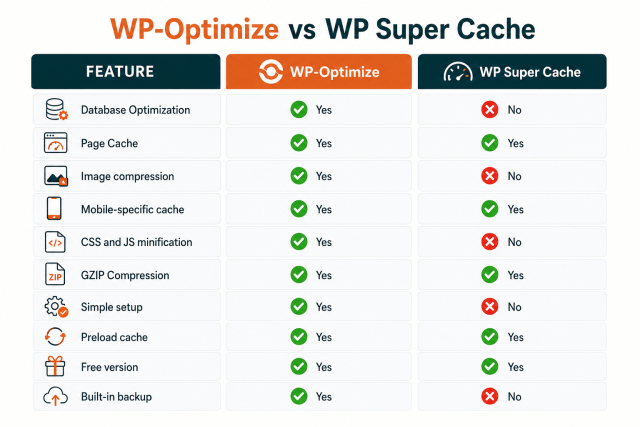
WP-Optimize
Section titled WP-OptimizeWhenever WP-Optimize is mentioned, it’s three key aspects usually come to mind – cache, clean, and compress. As one of the leading all-in-one WordPress performance-boosting plugins, WP-Optimize helps to efficiently cache your website, clean it’s database, and compress images.
WP-Optimize currently has more than one million active installations, with users from all over the world. It’s impressive reputation, coupled with its all-in-one nature makes it the obvious choice for any WordPress site owner.
The following are the primary functions of WP-Optimize.
Database cleaning
Nothing slows down your website like redundant files. These can include transients, unnecessary drafts, unpalatable comments, and revision files. Your website needs an effective performance optimization plugin that will automatically remove this unneeded content without tampering with the integrity of your website. WP-Optimize is about the only plugin that removes trackbacks and pingbacks.
Image compression
Beyond just compressing the images on your site, you get to determine the degree to which they are compressed. The image optimization feature in WP-Optimize is a cutting edge and leading image optimization platform that works well and it’s easily the best in the WordPress market. One of the best ways you can improve the speed of your site via WP-Optimize is by optimizing your images. This process, which is commonly known as ‘smush’ or ‘smushing’ allows users to optimize, compress and resize all the images on a website, potentially saving many MB per image and improving loading speeds. This feature is available on both the free and premium versions of WP-Optimize.
Lazy Loading
Simply put, lazy load describes the process where a website delays the initialization of components until such a time where they are necessary. This is done to boost the performance of the website and efficiently utilize the system resources. WP-Optimize Premium features this lazy load option and it’s arguably the best one available in the WordPress market.
Page caching
This feature allows your website to produce a separate batch of files for mobile and generate a separate cache for logged in visitors. Using page caching, WP-Optimize improves the speed and overall performance of the website.
WP Super Cache
Section titled WP Super CacheCreated by Automattic, WP Super Cache is used primarily to cache a WordPress website. It does this by generating static HTML files that your server displays to people visiting your website. Many developers consider this to be a faster option than processing WordPress PHP scripts.
The following are some features for this plugin:
Core features of WP Super Cache
Section titled Core features of WP Super Cache- Simple caching Uses PHP to serve static files which is easy to configure and very safe
- Expert caching Uses Apache
mod_rewriterules to serve files incredibly fast - Garbage collection Automatically deletes old and stale cache files from your server
- CDN integration Works with Content Delivery Networks to serve your files globally
- Preloading Builds the cache for your posts and pages before a visitor even arrives
Pricing
WP Super Cache only has a free version and can be downloaded from their WP.Org. All its features, as you have seen, are somewhat limited as they are only available on a free version. There is no option for users to upgrade when more features and tools are required.
WP-Optimize has both a free and a premium version. Usually, the free version is sufficient for the basic performance improvement you’d need for your website. The premium version starts at £49/year and comes in three packages: Starter, Business and Enterprise depending on the number of site licenses you need.
WP-Optimize vs WP Super Cache: Which is the better plugin?
Section titled WP-Optimize vs WP Super Cache: Which is the better plugin?Deciding between these two tools comes down to how you want to manage your website. I always ask my friends and clients one simple question to help them decide:
Do you want to manage five plugins or one plugin?
You should choose WP Super Cache if you are a developer who wants total control. It is also the right choice if you already have premium plugins for image compression and database management that you love using. It is a reliable workhorse that will not cost you a dime.
You should choose WP-Optimize if you want a complete performance solution. It is perfect for business owners, bloggers and beginners who want their site to run fast without learning server configuration. Having your caching, database cleaning and image compression in one dashboard reduces plugin conflicts and saves you massive amounts of time.
WP-Optimize vs WP Super Cache feature compairson
Section titled WP-Optimize vs WP Super Cache feature compairsonGet the complete optimization toolkit
Why settle for a single-feature cache plugin? WP-Optimize Premium combines caching, database cleaning, and image compression to give your site the fastest load times possible. Upgrade today and give visitors the speed they expect.
Conclusion
Section titled ConclusionThere are many takeaways to be found in the above analysis, but here are the top three:
- WP-Optimize and WP Super Cache both offer free versions of their plugin and both top rated performance-boosting plugins.
- Of the two plugins, WP-Optimize offers more features and more tools, giving a bigger boost to the optimization of your WordPress site.
While some may argue that a direct comparison is unfair as WP Super Cache doesn’t have a premium version, It should be noted that for this analysis, the free version of WP-Optimize and WP Super Cache were compared – With WP-Optimize coming out as clearly the better and more complete plugin.
About the author

TeamUpdraft
Our team consists of WordPress developers, marketers, and industry experts committed to providing you with the resources and skills you need to succeed online. Whether you’re just starting out or seeking advanced strategies, we’re here to enhance your WordPress journey and support you at every stage.
Categories
WP-Optimize
Get all our premium features. Lazy loading, pre-load key requests, Cloudfare integration. Optimize individual tables, delete unused images and more.
From just $49 for the year.
More stories
-

Direct WordPress site-to-site migration: A step-by-step guide
Learn how direct WordPress site-to-site migration works and how to move your website between hosts or domains without manually transferring files.
-

5 WordPress Web Design Tips to Improve Your Website
Good web design is about more than appearance. Explore practical WordPress web design tips to improve your website's layout, navigation, mobile responsiveness, accessibility and performance, helping you create a better experience for your visitors.
-
Best AI Website Builders Compared
AI website builders can help you design, write and launch a website in minutes. Compare the best AI-powered website builders based on ease of use, features, customisation, pricing and performance to find the right solution for your next project.
-

How incremental backups save time and storage in WordPress
Incremental backups only save the changes made since your last backup, helping you reduce storage usage, speed up backups and lower server load. Learn how they work and why they're an essential part of an efficient WordPress backup strategy.
