What is an SSL/TLS handshake and why does it matter for WordPress?

Every time someone visits your WordPress site over HTTPS, their browser and your web server exchange information before the page loads. This process is known as the SSL handshake. It usually happens in milliseconds, but it plays an essential role in establishing the secure, encrypted connection that protects data exchanged between your website and its visitors.
So, what is an SSL handshake, and what actually happens during one? In this guide, we’ll break down the SSL/TLS handshake step by step, explain why it matters for your WordPress site’s security and look at what happens when the process fails. We’ll also cover common SSL handshake errors and the checks you can make to troubleshoot them.
Key takeaways
Section titled Key takeaways- An SSL handshake, more accurately called a TLS handshake today, is the process a browser and server use to establish a secure HTTPS connection.
- During the handshake, the server proves its identity using an SSL/TLS certificate and the browser and server agree on how the connection will be encrypted.
- The handshake happens before data is securely exchanged, so its efficiency can contribute to how quickly an HTTPS connection is established.
- Modern protocols such as TLS 1.3 reduce the number of steps required during the handshake, helping secure connections to be established more efficiently.
- SSL handshake failures can be caused by expired or invalid certificates, incompatible TLS settings, server configuration problems or incorrectly configured CDNs and proxies.
The basics of secure website connections
Section titled The basics of secure website connectionsBefore looking at how the handshake works, it helps to understand what it’s actually trying to achieve. When someone types your domain into their browser, information travels across dozens of network nodes to reach your server. Without protection, anyone sitting on that network path could read the data.
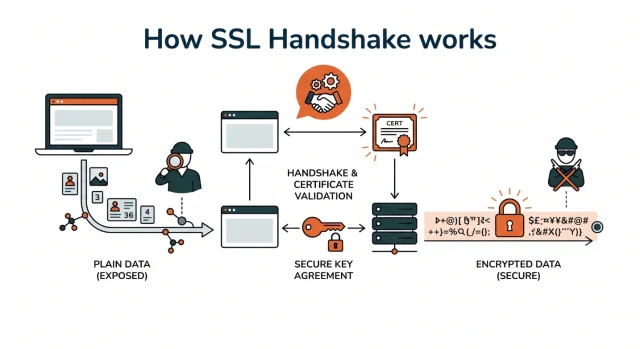
This is where encryption steps in to save the day. Encryption scrambles the data into an unreadable format. Only the sender and the intended recipient have the keys to unscramble it. To make this happen smoothly, the browser and the server have to agree on how they will lock and unlock this data.
This entire agreement process happens automatically. As a WordPress site owner, you just need to ensure you have an active security certificate installed. Your hosting provider usually handles the heavy lifting but understanding the mechanics helps you troubleshoot issues later.
What is the difference between SSL and TLS
Section titled What is the difference between SSL and TLS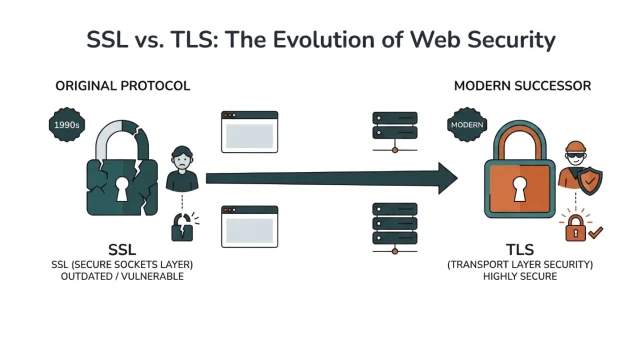
You will often hear the terms SSL and TLS used interchangeably. SSL stands for Secure Sockets Layer. It was the original security protocol developed back in the 1990s to secure web traffic.
However, the original SSL protocols eventually became outdated and were replaced by TLS, which stands for Transport Layer Security. TLS is the modern successor used to secure web traffic today.
Even though modern websites use TLS, the tech community still commonly uses SSL terminology out of habit. For example, what we call an “SSL certificate” today is used with TLS, and an “SSL handshake” is technically a TLS handshake.
Throughout this guide, we’ll continue using the term “SSL handshake” because it’s the term most people recognise and search for, even though modern websites actually use TLS.
Understanding ssl certificates and encryption keys
Section titled Understanding ssl certificates and encryption keysYou cannot have a secure connection without a verified identity and a way to lock up your data. This is where your digital certificate and your encryption keys come into play. These are the components stored on your server that make the entire background negotiation possible.
Managing these components used to be incredibly difficult and expensive. Today, most modern WordPress hosting providers offer them for free and install them automatically. Even if you do not have to install them manually, knowing how they work gives you a massive advantage when troubleshooting.
The role of a digital certificate
Section titled The role of a digital certificateThink of your digital certificate as a digital passport for your website. When a visitor arrives at your domain, their browser essentially asks your server for identification. Your server presents this digital passport to prove it is the legitimate owner of the domain.
This passport contains crucial information. It lists the domain name it belongs to and the organization that owns it. It also contains an expiration date and the digital signature of the authority that issued it.
These authorities are trusted organizations that verify domain ownership before handing out a certificate. If your server presents a passport from a trusted authority, the browser knows it is safe to proceed. If the passport is expired or self signed, the browser throws a massive red warning screen at your visitor. If you wanna know more in depth about SSL certificates you can check out our articles explaining it.
Types of certificates for WordPress sites
Section titled Types of certificates for WordPress sitesNot all digital passports are created equal. Depending on the type of WordPress site you run, you might need a different level of validation. There are three main types you will encounter in the wild.
- Domain validated certificates are the most common and verify basic ownership of the domain
- Organization validated certificates require the issuing authority to verify your actual business identity
- Extended validation certificates require a rigorous background check and are usually used by major financial institutions
For a standard WordPress blog or a basic WooCommerce store, a simple domain validated certificate is completely fine. They are usually free and can be issued in minutes.
Public and private keys
Section titled Public and private keysThe encryption itself relies on a pair of cryptographic keys. These are essentially long strings of random characters used to lock and unlock data. Your certificate contains a public key and a private key.
- The public key is shared with anyone who visits your site. It is used to lock or encrypt the data being sent from the browser to the server.
- The private key stays hidden on your server. It is the only thing that can unlock the data encrypted by the public key.
This one-way locking mechanism ensures that even if a hacker intercepts the data in transit, they cannot decipher it.
Exactly what is SSL(TLS) handshake in plain english
Section titled Exactly what is SSL(TLS) handshake in plain englishLet us strip away the code and look at this conceptually. I like to think of this process as a high security business meeting between two spies.
Imagine a spy (the browser) wants to pass a secret message to a handler (the server). Before the spy hands over the briefcase, they need to make absolutely sure the handler is who they claim to be. They also need to agree on a secret code language so nobody else in the room can understand their conversation.
This rapid verification and agreement process is exactly what happens when someone visits your website. It takes place in a fraction of a second. If the negotiation succeeds, the browser displays a locked padlock icon and the page loads safely.
Asymmetric and symmetric encryption explained
Section titled Asymmetric and symmetric encryption explainedTo fully grasp the process, you need to understand two types of encryption. The names sound complicated, but the idea is actually quite straightforward. but it is actually quite simple.
Asymmetric encryption
Asymmetric encryption uses two different keys. There is a public key that anyone can see and a private key that stays hidden on your server. If someone locks a message with the public key, only the private key can unlock it. This method is incredibly secure but requires a lot of computing power.
Symmetric encryption
Symmetric encryption uses just one single key to both lock and unlock the data. It is much faster and requires far less computing power.
The magic of the handshake is that it uses both methods. It uses the heavy asymmetric method just long enough to safely share a single symmetric key. Once both sides have that shared single key, they switch to the faster symmetric method for the rest of the browsing session.
The technical step by step process
Section titled The technical step by step processIf we look under the hood, this negotiation involves a specific sequence of messages. When a visitor lands on your WordPress homepage, here is the exact sequence of events that occurs.
We can break this down into clear chronological steps.
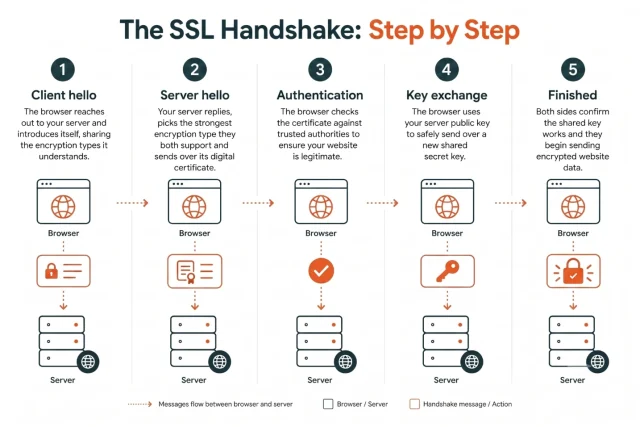
- Client hello The browser reaches out to your server and introduces itself, sharing the encryption types it understands
- Server hello Your server replies, picks the strongest encryption type they both support and sends over its digital certificate
- Authentication The browser checks the certificate against trusted authorities to ensure your website is legitimate
- Key exchange The browser uses your server public key to safely send over a new shared secret key
- Finished Both sides confirm the shared key works and they begin sending encrypted website data
Why the handshake matters for your WordPress site
Section titled Why the handshake matters for your WordPress siteYou might be thinking this is all great for server engineers, but why should a WordPress user care. The truth is that this connection process impacts almost every metric you care about as a website owner.
WordPress is a dynamic content management system. It constantly pulls data from databases, communicates with external application programming interfaces and processes user inputs. All of these interactions rely on secure, fast communication channels.
If your server struggles to complete this initial negotiation, your visitors will suffer. Let us break down the exact areas of your website that feel the impact.
1. Security and trust for your visitors
Section titled 1. Security and trust for your visitorsThe most obvious benefit is security. When the connection process works correctly, it guarantees that no malicious actor is intercepting data between you and your users.
If you run a WooCommerce store, this is absolutely non-negotiable. You cannot process credit cards or collect personal address data without a verified secure connection. Major payment gateways like Stripe or PayPal will completely block your WordPress site from using their services if your certificate is invalid.
Beyond strict technical requirements, there is a massive psychological factor. Modern web browsers are very aggressive about warning users when a connection is not secure. A giant red warning screen will instantly destroy any trust you have built with a potential customer or reader.
HTTPS protects your visitors. AIOS protects your website.
An SSL certificate encrypts data, but it can’t stop attacks on your WordPress site. AIOS Premium adds two-factor authentication, login protection and brute-force prevention to help keep attackers out.
2. Website speed and performance
Section titled 2. Website speed and performancePerformance is where the SSL/TLS handshake becomes particularly important. Before a new visitor can securely exchange data with your website over HTTPS, the browser and server need to establish the encrypted connection.
The time required to establish that connection contributes to the overall delay before a page can begin loading. If your server is slow to respond, visitors may have to wait longer before they see your content. Even relatively small delays can affect the user experience and potentially contribute to a higher bounce rate.
3. Search engine optimisation benefits
Section titled 3. Search engine optimisation benefitsGoogle uses HTTPS as a ranking signal, giving secure websites another reason to make HTTPS part of their WordPress setup.
The wider SEO picture also involves performance and user experience. Google uses Core Web Vitals to assess aspects of the experience visitors have on a page, including loading performance, responsiveness and visual stability.
A slow server or connection can add to the time it takes for a page to begin loading and may contribute to slower overall page performance. Keeping your SSL/TLS configuration, hosting environment and WordPress site optimised can therefore help provide visitors with a faster, more reliable experience.
TLS 1.2 vs TLS 1.3 for WordPress
Section titled TLS 1.2 vs TLS 1.3 for WordPressIf you check your hosting or server configuration, you may see support for different versions of TLS. Two versions you’re likely to encounter are TLS 1.2 and TLS 1.3.
TLS 1.2 was the standard for many years and remains widely supported. However, establishing a new TLS 1.2 connection typically requires two round trips between the browser and server before application data can be exchanged. The additional communication can add latency, particularly when a visitor is geographically distant from your server or using a slower network.
TLS 1.3, introduced in 2018, streamlined the handshake process. A standard TLS 1.3 handshake can establish a secure connection in one round trip, reducing the latency involved in setting up an HTTPS connection. It also supports 0-RTT (zero round-trip time) resumption, which can allow data to be sent immediately when reconnecting to a server under certain conditions.
TLS 1.3 also removed a number of older cryptographic algorithms and features, making the protocol simpler and more secure by default. For most modern WordPress sites, enabling TLS 1.3 alongside TLS 1.2 provides a good balance of performance, security and compatibility with older clients.
Here’s a quick comparison:
As a WordPress user, you should contact your hosting provider and ensure version 1.3 is active on your server. It is a free performance upgrade that requires zero coding knowledge on your end.
How to fix common SSL handshake failed errors in WordPress
Section titled How to fix common SSL handshake failed errors in WordPressEven with a well-configured WordPress site, an SSL/TLS handshake can occasionally fail. When this happens, the browser or another service may be unable to establish the secure connection it needs to communicate with your server.
The good news is that SSL handshake failures often come down to a handful of common issues, including certificate problems, incompatible TLS settings and server configuration errors. Here’s how to diagnose and fix some of the errors you may encounter.
Error 525: SSL handshake failed in Cloudflare
Section titled Error 525: SSL handshake failed in CloudflareIf you use Cloudflare with your WordPress site, you may encounter Error 525: SSL handshake failed. This means Cloudflare was able to connect to your web server, but couldn’t complete the SSL/TLS handshake with the origin server.
Possible causes include an invalid or expired SSL certificate, incompatible TLS or cipher settings, problems with the certificate chain or an incorrectly configured origin server.
Start by checking that your origin server has a valid SSL certificate and can accept HTTPS connections. You should also review the SSL/TLS encryption mode configured in Cloudflare. If you’re using Full (strict) mode, Cloudflare requires a valid certificate on the origin server.
If the certificate has expired, you may be able to renew or replace it through your hosting control panel. If the certificate appears valid but Error 525 continues, contact your hosting provider and ask them to check the server’s SSL/TLS configuration.
WordPress cURL error 35
Section titled WordPress cURL error 35Not every SSL/TLS connection problem affects the public-facing side of your website. You may encounter cURL error 35 in WordPress when your server attempts to establish a secure connection with an external service.
WordPress, plugins and themes can use cURL to communicate with external servers for tasks such as retrieving updates, making API requests and connecting to third-party services. Error 35 generally indicates that something went wrong during the SSL/TLS connection process.
Possible causes include incompatible TLS versions or cipher suites, outdated cURL or OpenSSL libraries, firewall or proxy interference and configuration problems on either server involved in the connection.
If the problem affects several external connections, check that WordPress, PHP, cURL and OpenSSL are up to date. Your hosting provider can also inspect the relevant server logs and TLS configuration to help identify where the handshake is failing.
Expired or invalid SSL certificates
Section titled Expired or invalid SSL certificatesAn expired, invalid or incorrectly configured certificate is another common cause of SSL handshake problems. SSL/TLS certificates are only valid for a specified period and need to be renewed before they expire.
For example, certificates issued by Let’s Encrypt are valid for 90 days, although they are designed to be renewed automatically. Many WordPress hosting providers handle this renewal process for you.
If automatic renewal fails, visitors may begin seeing certificate or privacy warnings when they try to access your site over HTTPS.
Check your hosting control panel to confirm that your certificate is valid, covers the correct domain and hasn’t expired. Depending on your host, you may be able to renew or reinstall the certificate from the dashboard. If you manage your own server, follow your certificate provider’s renewal procedure or ask your server administrator for assistance.
A faster handshake deserves a faster website
TLS 1.3 can establish secure connections faster. WP-Optimize Premium takes it further with advanced caching and image compression to help your WordPress pages load faster too.
Optimising your WordPress SSL handshake for speed
Section titled Optimising your WordPress SSL handshake for speedOnce your site is secure and error-free, the next step is performance. Establishing a secure connection introduces some additional network overhead, but with a modern TLS configuration and well-optimised hosting environment, it should have minimal impact on the visitor experience.
Use a content delivery network
Section titled Use a content delivery networkThe physical distance between your server and your visitors can affect connection latency. If your origin server is in London and a visitor is in Tokyo, for example, data may need to travel thousands of miles each time the browser communicates with the server.
A content delivery network (CDN) can reduce this distance by serving traffic through geographically distributed servers. Services such as Cloudflare can terminate TLS connections at an edge server closer to the visitor, reducing network latency and helping the secure connection to be established more efficiently.
Keep your server software updated
Section titled Keep your server software updatedYour hosting environment also plays an important role in website security and performance. Modern web servers and cryptographic libraries generally support newer TLS protocols and current cipher suites, while actively supported software continues to receive important security and performance updates.
Keeping PHP up to date is important too. Although PHP doesn’t perform the TLS handshake itself, newer supported PHP versions can improve the performance of the WordPress application once the secure connection has been established. You can learn more about the wider impact of your hosting environment in our guide to WordPress hosting vs web hosting.
Where possible, use actively supported versions of your server software and PHP. If your hosting provider manages these technologies for you, check which versions your plan currently supports.
Understand certificate revocation checks
Section titled Understand certificate revocation checksBrowsers need a way to determine whether an SSL/TLS certificate has been revoked before its expiry date, for example if its private key has been compromised.
OCSP (Online Certificate Status Protocol) has traditionally been used for these checks, while OCSP stapling allows a web server to provide certificate status information during the TLS connection rather than requiring the browser to request it separately from the certificate authority.
However, the way browsers handle certificate revocation continues to evolve, and different browsers use different mechanisms to identify certificates that should no longer be trusted.
For most WordPress site owners, there’s nothing you need to configure manually. Your hosting provider, certificate authority and your visitors’ browsers handle much of this process in the background. The most important thing is to use a trusted SSL/TLS certificate, keep it valid and make sure your hosting environment is properly maintained.
What happens when an SSL handshake fails?
Section titled What happens when an SSL handshake fails?When an SSL/TLS handshake fails, the browser and web server are unable to establish the secure, encrypted connection needed to load the website over HTTPS.
Instead of reaching the WordPress site, the visitor may see a connection or SSL error. The exact message depends on the browser, server configuration and whether a service such as Cloudflare is being used.
An SSL handshake can fail at different stages of the process. For example, the browser may be unable to verify the site’s SSL certificate, or the browser and server may not support compatible TLS versions or encryption methods.
For WordPress site owners, an SSL handshake failure is worth investigating quickly. If visitors can’t establish a secure HTTPS connection, they may be unable to access your website at all. Maintaining HTTPS is also an important part of securing your WordPress site.
What causes an SSL handshake failure?
Section titled What causes an SSL handshake failure?There isn’t one single cause of an SSL handshake failure. Common reasons include:
- An expired or invalid SSL certificate: If your site’s certificate has expired, is incorrectly installed or doesn’t match the domain, the secure connection may be rejected.
- An incomplete certificate chain: The server may not be providing the intermediate certificates needed for the browser to verify the SSL certificate.
- TLS version incompatibility: The browser and server need to agree on a supported version of TLS. Problems can occur when a server relies on outdated protocols that modern browsers no longer accept.
- Cipher suite incompatibility: The browser and server must also agree on an encryption method, known as a cipher suite. If they don’t share a compatible option, the handshake can fail.
- Incorrect server configuration: Changes to your hosting environment, SSL settings or web server configuration can interfere with the handshake.
- CDN or proxy configuration problems: If you use a CDN or reverse proxy such as Cloudflare, its SSL settings must be compatible with the SSL configuration on your origin server.
- Incorrect system time: SSL certificates are only valid for specific dates. An incorrect date or time on the client or server can sometimes cause certificate validation to fail.
Because the handshake happens before WordPress itself serves the requested page, an SSL handshake error isn’t necessarily caused by WordPress. Your hosting, SSL certificate, CDN or server configuration may be responsible. If you’re reviewing your wider setup at the same time, our guide to web hosting vs WordPress hosting explains how the hosting environment behind a WordPress site works.
How to fix an SSL handshake failure in WordPress
Section titled How to fix an SSL handshake failure in WordPressThe right fix depends on what’s causing the handshake to fail. Start with the simplest checks before changing your WordPress or server configuration.
- Check your SSL certificate. Confirm that the certificate is valid, hasn’t expired and has been issued for the correct domain and subdomains.
- Check the certificate chain. Make sure any required intermediate certificates are installed correctly so browsers can establish a chain of trust.
-
Check your HTTPS configuration. In WordPress, make sure the WordPress Address and Site Address use
https://where appropriate and that HTTP-to-HTTPS redirects are configured correctly. - Check your TLS configuration. Your server should support current TLS versions and compatible cipher suites. If you’re unsure how these are configured, your hosting provider can usually check them for you.
- Review your CDN or proxy settings. If you’re using Cloudflare or another CDN, check its SSL/TLS mode and confirm that your origin server also has a valid certificate.
- Consider recent changes. If the error appeared suddenly, check whether you’ve recently changed hosting providers, DNS records, CDN settings, SSL certificates or server configuration.
- Contact your hosting provider. If you can’t identify the problem from WordPress, ask your host to check the SSL certificate, certificate chain and TLS configuration on the server.
Before making significant changes to your WordPress configuration, it’s also sensible to have a recent WordPress backup available so you can restore the site if anything goes wrong.
Conclusion
Section titled ConclusionSo, what is an SSL handshake? It’s the process that allows a visitor’s browser to verify your server’s identity and establish an encrypted connection before sensitive data is exchanged. Although it usually happens in milliseconds, the SSL/TLS handshake is an essential part of keeping your WordPress site secure and giving visitors a trusted HTTPS connection.
For WordPress site owners, the most important steps are to keep your SSL certificate valid, make sure automatic renewals are working and use a hosting environment that supports modern protocols such as TLS 1.3. These simple checks can help prevent SSL handshake failures and keep secure connections running efficiently.
Once the connection itself is running smoothly, you can focus on the rest of your site’s performance. WP-Optimize combines caching, image compression and database optimisation to help speed up WordPress. For more ways to improve performance, follow our guide on how to speed up your WordPress site.
FAQs
Section titled FAQsWhat is an SSL handshake?
An SSL handshake, technically a TLS handshake on modern websites, is the process a browser and server use to establish a secure HTTPS connection. During the handshake, the browser verifies the server’s identity and both sides establish the encryption parameters needed to exchange data securely.
Is SSL the same as TLS?
Not exactly. SSL (Secure Sockets Layer) was the original protocol used to encrypt web traffic, but it has since been replaced by TLS (Transport Layer Security). Modern websites use TLS, although terms such as “SSL certificate” and “SSL handshake” are still commonly used.
What causes an SSL handshake to fail?
An SSL handshake can fail because of an expired or invalid certificate, an incomplete certificate chain, incompatible TLS or cipher settings, server configuration problems or an incorrectly configured CDN or proxy. On a WordPress site, checking your SSL certificate and hosting configuration is usually a good place to start.
What does SSL handshake failed error code 525 mean?
Error 525, “SSL handshake failed”, is a Cloudflare error that means Cloudflare couldn’t complete an SSL/TLS handshake with your website’s origin server. Common causes include an invalid or expired origin certificate, incompatible TLS settings or an incorrectly configured server.
Why is my SSL handshake slow?
A slow SSL/TLS handshake can be caused by network latency, the physical distance between the visitor and server, server performance or TLS configuration. Using TLS 1.3 and a content delivery network (CDN), alongside a well-configured hosting environment, can help reduce connection latency.
Do I need TLS 1.3 for my WordPress website?
TLS 1.3 isn’t required for a WordPress website to operate securely, as TLS 1.2 remains widely supported. However, TLS 1.3 provides a more efficient handshake and modern security defaults, so it’s worth enabling alongside TLS 1.2 when your hosting environment supports it.
Can a WordPress plugin fix a failed SSL handshake?
Usually not. The SSL/TLS handshake takes place at the server and network level before WordPress serves the requested page. Problems with certificates, TLS versions, cipher suites or server configuration generally need to be fixed through your hosting provider, CDN or server configuration rather than with a WordPress plugin.
About the author

Elvira Mishra
Elvira has over four years of experience creating and designing content in WordPress. Her background spans multiple digital disciplines, including marketing, SEO, user experience, and human computer interaction.
Categories
AIOS
Comprehensive, feature-rich, security for WordPress. Malware scanning, firewall, an audit log and much more. Powerful, trusted and easy to use.
From just $44.50 for the year.
More stories
-

5 WordPress Web Design Tips to Improve Your Website
Good web design is about more than appearance. Explore practical WordPress web design tips to improve your website's layout, navigation, mobile responsiveness, accessibility and performance, helping you create a better experience for your visitors.
-
Best AI Website Builders Compared
AI website builders can help you design, write and launch a website in minutes. Compare the best AI-powered website builders based on ease of use, features, customisation, pricing and performance to find the right solution for your next project.
-

How incremental backups save time and storage in WordPress
Incremental backups only save the changes made since your last backup, helping you reduce storage usage, speed up backups and lower server load. Learn how they work and why they're an essential part of an efficient WordPress backup strategy.
-
Best WordPress Website Builders Compared
Discover the best WordPress website builders for every skill level. Compare features, ease of use, pricing and performance to choose the right builder for your blog, business or online store.
