UpdraftPlus vs BlogVault: Which WordPress Backup Plugin Is Best?

Choosing a WordPress backup plugin isn’t just about finding one that can create a backup. Most established backup tools can do that. What really matters is how those backups are created, where they’re stored and, most importantly, how easily you can get your website back when something goes wrong.
That’s where UpdraftPlus and BlogVault start to look quite different.
UpdraftPlus gives you more control over your backup setup. You manage it from WordPress, choose where your backups are stored and can start with a permanent free version. BlogVault takes more of a managed-service approach, with backups stored on its own cloud infrastructure and managed mainly through an external dashboard.
I’ve compared the two across the areas I think matter most in practice, including backup schedules, storage, restores, performance, migrations, staging, WooCommerce and price.
My short answer? UpdraftPlus will make more sense for most WordPress sites, particularly if you want control over your backups and don’t want to pay for features you don’t need. BlogVault does have some advantages, though, especially for very busy WooCommerce stores and anyone who specifically wants a managed backup service.
Let’s take a closer look.
Key takeaways
Section titled Key takeaways- UpdraftPlus has a free version, while BlogVault offers a free trial before you need to choose a paid plan.
- UpdraftPlus lets you choose where your backups are stored, including services such as Google Drive, Dropbox and Amazon S3.
- BlogVault includes managed cloud storage as part of its service, so there’s less to configure yourself.
- Both offer scheduled backups, restores, migrations, incremental backups and staging, although some features depend on the plan you choose.
- UpdraftPlus Premium includes incremental backups, automatic pre-update backups, multiple storage destinations and more advanced scheduling.
- BlogVault has a particularly strong offering for high-volume WooCommerce stores, with real-time backups available on its dedicated WooCommerce plan.
- BlogVault makes it possible to initiate recovery externally if you can’t access WordPress.
- For most WordPress users, UpdraftPlus offers the better balance of flexibility, control and long-term value.
UpdraftPlus vs BlogVault at a glance
Section titled UpdraftPlus vs BlogVault at a glanceBefore getting into the details, here’s how the two compare across the main features.
What is UpdraftPlus?
Section titled What is UpdraftPlus?UpdraftPlus is a WordPress backup, restoration and migration plugin used on more than three million websites.
The free version gives you everything you need to set up a basic WordPress backup routine. You can create manual or scheduled backups, send them to remote storage and restore your site from within WordPress.
One of the things I like most about the way UpdraftPlus works is that you’re not forced into one storage provider.
You can use options including:
- Google Drive
- Dropbox
- Amazon S3
- Rackspace Cloud
- FTP
- S3-compatible storage
- UpdraftVault.
UpdraftPlus actually recommends storing backups remotely rather than keeping your only copy on the same server as your website.
If you need more functionality, UpdraftPlus Premium adds features such as incremental backups, automatic backups before updates, advanced scheduling, multiple storage destinations and more granular restoration options. Premium plans also now include UpdraftClone staging and UpdraftVault storage.
The nice thing about that model is that you can start with the free version and only upgrade if your site reaches the point where you actually need those extra features.
What is BlogVault?
Section titled What is BlogVault?BlogVault approaches WordPress backups slightly differently.
Rather than choosing and connecting your own primary remote storage destination, you connect your website to BlogVault and it manages the backup infrastructure for you. You then manage your backups, restores and other tools mainly through the BlogVault dashboard.
BlogVault uses incremental backups and offers features including:
- automatic backups
- one-click restoration
- website migration
- staging
- secure cloud storage
- an Emergency Connector for restoring inaccessible sites
- multisite support on selected plans
- real-time backups on its WooCommerce plan.
The exact backup frequency, retention period and other features depend on which subscription you choose. Its Personal plan, for example, provides daily backups with 30 days of retention, while Business increases that to twice-daily backups and 90 days of retention.
There isn’t a permanent free version, so you’ll need a paid subscription if you want to continue using BlogVault after the trial.
The biggest difference: control or managed convenience?
Section titled The biggest difference: control or managed convenience?For me, this is the most important difference between UpdraftPlus and BlogVault.
Both products can create good WordPress backups. What’s different is who controls the backup setup and storage.
UpdraftPlus gives you more control
Section titled UpdraftPlus gives you more controlWith UpdraftPlus, you decide where your backups go.
If you already have a Google Drive, Dropbox or Amazon S3 account, for example, you can use that as your remote backup destination. Your backup archives remain accessible to you, and you can download or move them independently of UpdraftPlus.
Premium users can go a step further and send backups to more than one remote location.
I think this approach makes a lot of sense if you:
- want direct access to your backup files
- manage websites for clients
- have an existing cloud storage setup
- need to follow a particular data retention policy
- want copies stored in multiple locations
- don’t want your backup history tied entirely to one managed service.
The trade-off is that there’s a little more to decide during setup. You need to choose and connect your storage destination rather than having that decision made for you.
BlogVault manages more of it for you
Section titled BlogVault manages more of it for youBlogVault takes the opposite approach.
Cloud storage is built into the service, so you don’t need to decide whether your backups should go to Google Drive, Dropbox, S3 or somewhere else before getting started.
For someone who simply wants to connect a website and let the backup provider manage most of the infrastructure, that’s convenient.
You can download BlogVault backups, so you’re not prevented from accessing your website data. But the automated backup history, storage and recovery platform are more closely tied to the BlogVault subscription.
Neither approach is necessarily right or wrong.
It really comes down to what you prefer:
UpdraftPlus gives you greater control and portability. BlogVault manages more of the process for you.
How flexible are the backup schedules?
Section titled How flexible are the backup schedules?How often you need to back up a website depends on how often it changes.
A small brochure website that’s updated once a month doesn’t need the same backup schedule as an active membership site or WooCommerce store processing orders throughout the day.
There’s another detail that’s easy to overlook here: your files and database don’t necessarily need backing up at the same frequency.
Your themes, plugins and images might change occasionally, while your database can change every time someone places an order, submits a form, leaves a comment or creates an account.
Scheduling backups with UpdraftPlus
Section titled Scheduling backups with UpdraftPlusUpdraftPlus lets you set separate schedules for your files and database.
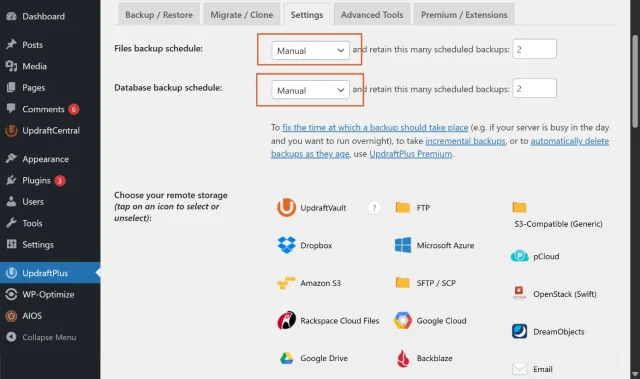
Not every part of a WordPress site changes at the same rate, so a good backup schedule shouldn’t have to treat everything the same. Being able to back up your database more frequently than your files means you can protect the data that changes most often without running unnecessary full-site backups.
The free version supports scheduled backups every 2, 4, 8 or 12 hours, as well as daily, weekly, fortnightly and monthly schedules.
So, for example, I could back up the files on a relatively static business site once a week but back up its database every day.
Premium adds more precise scheduling and incremental backups. It can also automatically create a backup immediately before WordPress core, plugin or theme updates.
That last feature is particularly useful because updates are exactly the sort of moment when you want a recent restore point available.
Scheduling backups with BlogVault
Section titled Scheduling backups with BlogVaultBlogVault handles the schedule for you according to your plan.
At the time of writing:
- Personal includes backups every 24 hours
- Business includes backups every 12 hours
- WooCommerce offers a customisable frequency starting at one hour, alongside real-time backups for important WooCommerce events.
That’s straightforward, but you have less flexibility unless you move between plans.
Which is better?
Section titled Which is better?I’d choose UpdraftPlus for scheduling flexibility.
I particularly like being able to treat the database and files differently rather than simply deciding how often to back up the entire site.
BlogVault keeps things simple, though. If the schedule included with your plan already matches what your site needs, you may not miss those extra controls.
Incremental backups and website performance
Section titled Incremental backups and website performanceBackups require server resources. That’s true whichever WordPress backup system you use, although exactly how much depends on the site, hosting environment and way the backup is created.
This becomes particularly important on large websites.
If your site contains thousands of images, for example, repeatedly processing every unchanged file would be unnecessary.
That’s where incremental backups help.
Instead of creating another complete copy of everything, an incremental backup captures what’s changed since the previous backup.
UpdraftPlus incremental backups
Section titled UpdraftPlus incremental backupsIncremental backups are included with UpdraftPlus Premium.
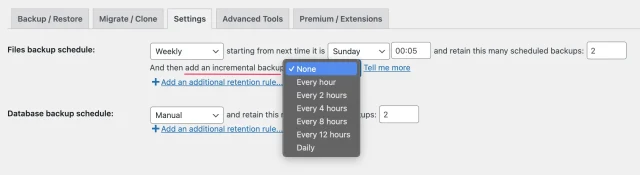
Once you’ve created a full backup, subsequent incremental backups can capture the changed files rather than repeatedly processing the entire site. UpdraftPlus specifically uses this to reduce server resources and storage requirements.
You can also split backup archives into smaller files and schedule backups for quieter periods.
BlogVault incremental backups
Section titled BlogVault incremental backupsBlogVault also uses incremental backups after the initial website sync, with more of the backup process handled through its managed service.
That’s one of BlogVault’s strengths if your priority is having the provider manage as much of the backup process as possible.
Which performs better?
Section titled Which performs better?I don’t think there’s a responsible way to declare a universal winner here.
Backup performance varies enormously depending on the size of your website, hosting resources, configuration, backup frequency and storage destination.
What I can say is that both support incremental backups.
BlogVault handles more of the infrastructure for you, while UpdraftPlus gives you more control over when backups happen, where they’re sent and how they’re configured.
Is UpdraftPlus reliable?
Section titled Is UpdraftPlus reliable?It’s worth addressing this separately because reliability is ultimately what you’re buying a backup solution for.
You may come across comparisons claiming that UpdraftPlus backups frequently fail or that restoring a website becomes difficult if the original WordPress installation is unavailable.
There’s more context to it than that.
UpdraftPlus is designed to let you keep backups away from the server hosting your website. If the original WordPress installation becomes unavailable, you can install WordPress and UpdraftPlus on a working installation, upload your existing backup archives or reconnect your remote storage, and restore the site from there.
If you have the backup files on your computer, UpdraftPlus also lets you upload those archives directly before starting the restore.
Like any backup solution, reliability also depends on factors outside the plugin itself. Your hosting resources, available storage, remote connection and backup configuration all matter.
That’s why I’d recommend periodically checking that backups are completing successfully and testing your restore process, whichever backup product you choose.
A backup isn’t much use if you only discover it can’t be restored after something has already gone wrong.
Restoring a WordPress website
Section titled Restoring a WordPress websiteThis is where the difference between the two approaches becomes particularly noticeable.
Restoring with UpdraftPlus
Section titled Restoring with UpdraftPlusYour available restore points appear in the WordPress dashboard.
When you start a restore, you don’t necessarily have to roll back everything. You can choose which components you want to restore, including:
- plugins
- themes
- uploads
- other files
- database.
That’s useful.
Imagine a plugin or theme update has caused a problem and you need to restore WordPress to a previous date, but your site has continued receiving orders or form submissions. You may only need to restore the affected component rather than rolling the database back as well and potentially losing newer data.
And because you can access the backup archives yourself, losing access to the original installation doesn’t mean losing the backup. You can import those files into a working WordPress installation and restore them there.
Restoring with BlogVault
Section titled Restoring with BlogVaultBlogVault restores are initiated through its external dashboard.
Its plans also include an Emergency Connector, designed to help recover a site even when the WordPress dashboard isn’t accessible.
That’s a genuine advantage of BlogVault’s architecture. You don’t first need to get a fresh WordPress installation running before initiating recovery through the platform.
Which is better for restores?
Section titled Which is better for restores?Honestly, I think this one depends on what you value.
UpdraftPlus gives you excellent control over what you restore and direct access to the underlying backup archives.
BlogVault has the advantage if you specifically want recovery initiated from an external managed platform.
I’d be comfortable using either approach. Personally, I value knowing that I have direct access to the backup files themselves, but I can see why BlogVault’s external recovery process would appeal to some site owners.
What about staging?
Section titled What about staging?This is another area where the two products take slightly different approaches.
UpdraftPlus staging
Section titled UpdraftPlus stagingUpdraftPlus provides staging through UpdraftClone.
You can clone your WordPress site for testing and staging in just a few clicks, without having to organise separate hosting or manually set up another WordPress installation.
UpdraftClone also lets you choose the PHP and WordPress versions for the clone, which is useful if you’re testing changes before making them live.
Staging is now included across UpdraftPlus Premium plans, with the level increasing from Basic on Personal through to Ultimate on Enterprise and Gold.
You can also use UpdraftClone with the free version of UpdraftPlus by purchasing Clone tokens separately.
BlogVault staging
Section titled BlogVault stagingBlogVault also includes one-click staging, but how long you can keep the staging site depends on your plan.
At the time of writing, Personal includes a one-day staging site, Business includes a longer staging period, and WooCommerce extends staging further.
Which is better for staging?
Section titled Which is better for staging?Both are perfectly capable options.
If staging is something you’ll use regularly, I’d look closely at exactly what’s included in the plan you’re considering rather than choosing either backup product based purely on the word “staging”.
WordPress migration
Section titled WordPress migrationBoth UpdraftPlus and BlogVault can move a WordPress website to another host or domain.
Migrating with UpdraftPlus
Section titled Migrating with UpdraftPlusUpdraftPlus also works as a WordPress migration plugin, so migration fits naturally into the same backup-and-restore workflow.
You can create a backup of the original website and restore it at the destination, including when you’re moving a WordPress site to a new domain.
One advantage here is that you don’t necessarily need to buy a subscription just because you need to move a standard WordPress site.
Migrating with BlogVault
Section titled Migrating with BlogVaultBlogVault also includes one-click website migration through its platform, including on its Personal plan.
If you’re already paying for BlogVault and like managing everything through its dashboard, having migration in the same platform is convenient.
Which is better for migration?
Section titled Which is better for migration?I wouldn’t choose between UpdraftPlus and BlogVault based on migration alone.
Both can handle it.
UpdraftPlus makes more sense if you want migration as part of a flexible WordPress backup setup, particularly because you can get started without an ongoing paid service.
BlogVault makes sense if you’re already buying into its managed platform.
UpdraftPlus vs BlogVault for WooCommerce
Section titled UpdraftPlus vs BlogVault for WooCommerceThis is the category where I think BlogVault has its clearest advantage.
WooCommerce sites can change constantly, which is why choosing an appropriate WooCommerce database backup schedule is particularly important.
Every new order can affect:
- order records
- customer information
- stock levels
- payments
- subscriptions
- refunds.
If you’re running a busy online store, even losing the changes made since this morning’s backup could mean losing important transactional data.
UpdraftPlus for WooCommerce
Section titled UpdraftPlus for WooCommerceUpdraftPlus can create complete backups of WooCommerce websites, and Premium gives you much more control over the schedule.
You can back up the database more frequently than the site’s files, use incremental file backups and automatically create restore points before updates.
For a small or moderately active WooCommerce store, that’s likely to be more than enough protection when it’s configured appropriately.
BlogVault for WooCommerce
Section titled BlogVault for WooCommerceBlogVault goes further here.
Its dedicated WooCommerce plan includes real-time backups, designed to capture important store activity as it happens. The plan also includes 365 days of backup retention and support for websites up to 100GB.
The trade-off is price. BlogVault’s standard WooCommerce price is currently $499 per year for one website, although it was advertising a 50% first-year discount when I checked.
Which would I choose for WooCommerce?
Section titled Which would I choose for WooCommerce?For most smaller WooCommerce stores, I’d still choose UpdraftPlus and configure a backup schedule around how frequently the store changes.
But if you’re processing a high volume of orders and losing even a short window of transactional data would have a serious financial impact, BlogVault’s event-based real-time backups are a genuine advantage.
That’s one of the situations where I’d consider paying the premium.
How easy are they to use?
Section titled How easy are they to use?Both products are relatively straightforward once they’re configured, but the experience is different.
Using UpdraftPlus
Section titled Using UpdraftPlusUpdraftPlus lives inside the familiar WordPress dashboard.
The basic setup looks something like this:
- Install UpdraftPlus.
- Choose your remote storage destination.
- Connect your storage account.
- Choose your file and database schedules.
- Save your settings.
There are more decisions to make at the beginning because you’re choosing how your backup system should work.
I don’t see that as a negative, though. Once it’s configured, backups run automatically and you retain control over the setup.
Using BlogVault
Section titled Using BlogVaultWith BlogVault, you create an external account, connect the website and then manage most of the backup process through BlogVault’s dashboard.
Because storage is already part of the service, there’s one less thing to configure yourself.
Which is easier?
Section titled Which is easier?I’d probably give BlogVault a slight edge for initial setup simply because more decisions are made for you.
But UpdraftPlus isn’t difficult to configure, particularly if you’re connecting something familiar like Google Drive or Dropbox.
So I’d think of this less as “easy versus difficult” and more as:
BlogVault = more managed.
UpdraftPlus = more configurable.
UpdraftPlus vs BlogVault pricing
Section titled UpdraftPlus vs BlogVault pricingPrice is where the differences become much more noticeable.
And there’s one important thing to bear in mind when comparing them: BlogVault regularly uses introductory promotions, so you need to distinguish between its promotional first-year price and its standard annual price.
Which is better for agencies and multiple WordPress sites?
Section titled Which is better for agencies and multiple WordPress sites?If you only have one website, the price difference might not be the deciding factor.
If you’re managing 10, 20 or 30 client sites, it starts to matter a lot more.
UpdraftPlus Business covers up to 10 sites, Agency covers up to 35 and Enterprise covers unlimited sites.
There’s also UpdraftCentral, which gives agencies and freelancers a central dashboard for managing multiple WordPress installations.
This combination works particularly well if your agency already has its own preferred cloud storage setup. You can standardise how client sites are backed up while retaining control over where those backups live.
BlogVault also provides multi-site management and multi-site bundles, so it may still make sense for an agency that specifically wants a managed backup platform.
But purely from a scalability and pricing perspective, UpdraftPlus is particularly compelling once you’re protecting more than a handful of sites.
Security and backup storage
Section titled Security and backup storageWhichever option you choose, there’s one backup rule I wouldn’t compromise on:
Don’t keep your only backup on the same server as your website. A good starting point is the 3-2-1 backup rule, which recommends keeping multiple copies of your data across different storage types, with at least one copy stored off-site.
If the server fails or your hosting account becomes inaccessible, keeping the only backup there rather defeats the point.
BlogVault solves this by storing backups away from your site on its own infrastructure.
You can choose from several WordPress cloud storage options. For example, you can back up WordPress to Google Drive, Dropbox, Amazon S3 and other supported destinations.
If you use your own remote storage, protect that account too. Use a strong unique password, enable two-factor authentication where available and make sure access is limited to the people who genuinely need it.
So, who should choose UpdraftPlus?
Section titled So, who should choose UpdraftPlus?I’d recommend UpdraftPlus if you:
- want a permanent free backup solution
- want to choose where your backups are stored
- prefer managing backups from WordPress
- want direct access to your backup archives
- need separate file and database schedules
- want automatic pre-update backups
- manage multiple WordPress websites
- want staging without buying a separate staging product
- want advanced features without moving your entire backup process to a managed platform
- care about keeping long-term costs down.
It’s particularly well suited to bloggers, business websites, freelancers, agencies and most WooCommerce stores.
And who might prefer BlogVault?
Section titled And who might prefer BlogVault?I’d consider BlogVault if you:
- want your backup storage and infrastructure managed for you
- prefer working from an external dashboard
- want an external recovery mechanism if WordPress is inaccessible
- want backup, staging and migration bundled into one managed service
- run a high-volume WooCommerce store where real-time backups are important
- don’t mind paying an ongoing subscription for that convenience.
UpdraftPlus vs BlogVault: My final verdict
Section titled UpdraftPlus vs BlogVault: My final verdictThere isn’t a bad product here. UpdraftPlus and BlogVault are both capable WordPress backup solutions.
The difference is really about how much control you want.
BlogVault takes more of the work off your hands. Storage is managed for you, recovery can be initiated through its external platform and its dedicated WooCommerce plan provides real-time backups. If you’re running a very busy online store or simply want someone else to manage more of the backup infrastructure, I can see the appeal.
UpdraftPlus gives you more freedom.
You decide where your backups are stored. You can access the archives yourself. You can set different schedules for your files and database. You can start completely free and add incremental backups, pre-update backups, staging, multiple storage destinations and other Premium features as your site grows.
That’s why I’d choose UpdraftPlus for most WordPress websites.
It’s flexible enough for an individual blog, powerful enough for an agency managing dozens of client sites and doesn’t force you into paying for a managed backup service if you don’t actually need one.
BlogVault’s real-time WooCommerce backups are the one area where I’d seriously consider choosing it instead, particularly for a high-volume store where losing even a small amount of order data would be costly.
For everyone else, I think UpdraftPlus gives you the better balance of control, flexibility and value.
Take control of your WordPress backups
With UpdraftPlus, you can choose where your backups are stored, create a schedule that suits your website and restore your site directly from WordPress.
FAQs
Section titled FAQsIs UpdraftPlus free?
Yes. UpdraftPlus has a free version that includes manual and scheduled backups, separate file and database schedules, remote storage and restoration.
You don’t have to enter payment details or upgrade after a trial period to continue using the free plugin.
Does BlogVault have a free version?
BlogVault doesn’t currently offer a free plan. You can try the service before purchasing, but you’ll need a paid subscription to continue using it afterwards
Is UpdraftPlus cheaper than BlogVault?
It depends on which plans and promotions you’re comparing.
UpdraftPlus Free costs nothing, while Premium currently starts at $84 per year before applicable taxes for up to two sites. BlogVault Personal has a standard price of $99 per year for one site, although BlogVault was offering a 50% first-year discount at the time this comparison was reviewed.
For multiple websites, UpdraftPlus’s Business, Agency and Enterprise licences can make the cost difference considerably larger.
Where does UpdraftPlus store backups?
You decide.
UpdraftPlus supports remote storage destinations including Google Drive, Dropbox, Amazon S3, FTP and UpdraftVault, with additional options available through Premium. Premium also lets you send backups to multiple remote locations.
Where does BlogVault store backups?
BlogVault stores backups on its managed cloud infrastructure. The retention period and other limits depend on the plan you choose. Its current plans range from 30 days of backup retention on Personal to 365 days on its WooCommerce plan.
Does UpdraftPlus include staging?
Yes. UpdraftPlus Premium plans include staging through UpdraftClone, with different staging levels depending on the plan. UpdraftClone can also be used with UpdraftPlus Free by purchasing Clone tokens separately.
Which is better for agencies: UpdraftPlus or BlogVault?
For most agencies, I’d choose UpdraftPlus.
Its Premium licences scale from 10 sites on Business to 35 on Agency and unlimited sites on Enterprise, and you retain control over where client backups are stored. Agencies can also use UpdraftCentral to manage multiple WordPress sites centrally.
BlogVault may be a better fit for an agency that specifically wants a SaaS-style managed backup service and is happy to pay accordingly.
Is UpdraftPlus better than BlogVault?
For most WordPress websites, I think UpdraftPlus is the better all-round choice because you get more control over your storage, flexible backup schedules, direct access to your backup archives, a permanent free version and competitive pricing for multiple sites.
BlogVault may be the better choice if you specifically want a managed backup service, external recovery or real-time WooCommerce backups.
About the author

Ivan Đukić
Ivan is the Product Manager for UpdraftPlus. With a background as a full-stack developer, he’s spent years building custom features, plugins, and tools. Often working side by side with product and marketing teams to bring ideas to life. Comfortable across the full lifecycle, from shaping concepts to QA and support, he found product management to be a natural next step. Today, Ivan focuses on turning complex needs into reliable, user-friendly solutions that help WordPress site owners protect and manage their websites with confidence.
Categories
UpdraftPlus
Get all our premium features. Direct site-to-site migration, incremental backups, back up automatically before updates and a whole lot more.
From just $70 for the year.
More stories
-

5 WordPress Web Design Tips to Improve Your Website
Good web design is about more than appearance. Explore practical WordPress web design tips to improve your website's layout, navigation, mobile responsiveness, accessibility and performance, helping you create a better experience for your visitors.
-
Best AI Website Builders Compared
AI website builders can help you design, write and launch a website in minutes. Compare the best AI-powered website builders based on ease of use, features, customisation, pricing and performance to find the right solution for your next project.
-

How incremental backups save time and storage in WordPress
Incremental backups only save the changes made since your last backup, helping you reduce storage usage, speed up backups and lower server load. Learn how they work and why they're an essential part of an efficient WordPress backup strategy.
-
Best WordPress Website Builders Compared
Discover the best WordPress website builders for every skill level. Compare features, ease of use, pricing and performance to choose the right builder for your blog, business or online store.
