What is DNS over HTTPS (DoH) and should you enable it for WordPress?

Every time you visit a website, the Domain Name System (DNS) helps your browser find the server behind the domain name you’ve entered. Traditionally, these DNS requests are sent without encryption, which means they can potentially be seen or interfered with by others on the network.
DNS over HTTPS (DoH) changes this by sending DNS requests through an encrypted HTTPS connection. This makes it much harder for third parties to monitor the domains you’re accessing or tamper with DNS responses.
So, what is DNS over HTTPS, and do you actually need it? In this guide, we’ll look at how DoH works, how it compares with traditional DNS and what it means for WordPress site owners.
Key takeaways
Section titled Key takeaways- DNS over HTTPS (DoH) encrypts DNS queries, helping protect them from monitoring and tampering while they travel between your device or server and the DNS resolver.
- DoH protects the DNS lookup itself. It doesn’t replace HTTPS or other WordPress security measures that protect your website and the data it sends and receives.
- DoH is commonly available through modern browsers, operating systems and DNS providers. Configuring it for a web server may require additional server-level access or configuration.
The basics of traditional DNS
Section titled The basics of traditional DNSTo understand the benefits of DNS over HTTPS, it helps to first understand how traditional DNS works. The Domain Name System (DNS) is often referred to as the phonebook of the internet.
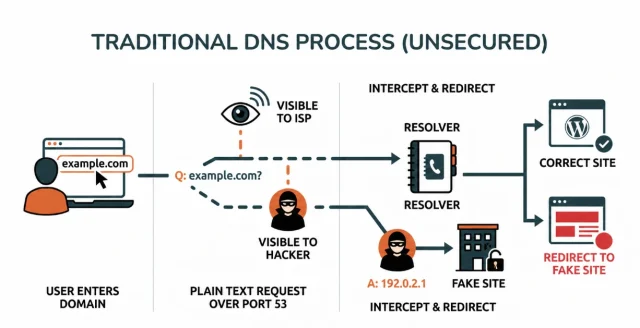
When you type a website name into your browser, your computer does not actually know how to get there. Computers communicate using IP addresses. These are long strings of numbers. The DNS system bridges this gap by translating human-readable domain names into machine-readable IP addresses.
When your browser or your WordPress server needs to fetch a resource, it sends out a query to a resolver. This resolver looks up the domain name and returns the correct IP address. Traditionally, DNS queries have generally been sent unencrypted over port 53. This means that any entity sitting between you and the resolver could easily read your request.
Because traditional DNS queries are generally unencrypted, network operators and anyone able to observe traffic between you and your resolver may be able to see the domains being requested. Unencrypted DNS can also be vulnerable to interception or tampering, potentially allowing an attacker to interfere with a DNS response and redirect traffic.
What is DNS over HTTPS and how does it work
Section titled What is DNS over HTTPS and how does it workSo, what is DNS over HTTPS exactly? DNS over HTTPS is a security protocol that encrypts your domain name queries by wrapping them inside the HTTPS protocol. Instead of sending DNS requests in plaintext, your device sends them over an encrypted HTTPS connection. DoH uses TLS, the same underlying encryption technology used to secure HTTPS websites.
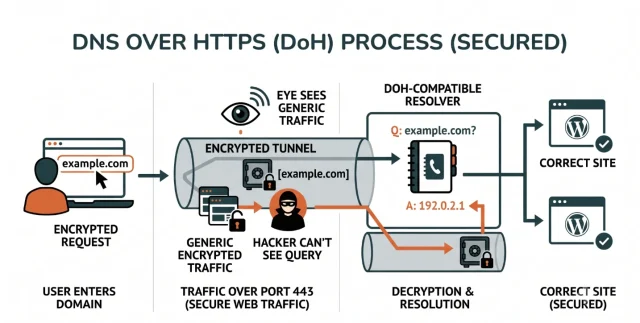
By using the HTTPS protocol, these encrypted queries are sent over port 443. Port 443 is also the standard port used for HTTPS web traffic, which makes DoH traffic more difficult to distinguish from other HTTPS traffic.
When you use this protocol, your device initiates a secure connection to a compatible resolver. The resolver decrypts the request on its end, finds the requested IP address and sends the answer back through that same encrypted tunnel. The encrypted connection helps prevent intermediaries on the network path from reading or modifying the DNS query and response. The standard was published as RFC 8484 by the Internet Engineering Task Force in October 2018.
Traditional DNS vs DNS over HTTPS
Section titled Traditional DNS vs DNS over HTTPSTo give you a clearer picture of the differences, I have broken down the core mechanics of both approaches. It is helpful to see these features side by side to understand the true value of the upgrade.
As you can see, the older method prioritizes simplicity and widespread compatibility over privacy. DoH adds privacy and security to the DNS lookup process, although it does not make all internet activity private or replace other security measures.
DNS security is only one part of protecting your WordPress site
WordPress login pages are a common target for brute force attacks. AIOS can hide your login URL, add two-factor authentication and block repeated login attempts automatically.
Benefits of DNS over HTTPS
Section titled Benefits of DNS over HTTPSDNS over HTTPS can improve the privacy and security of DNS lookups in several ways:
- Greater privacy: DoH prevents DNS queries from being sent as easily readable plaintext between your device or server and the DoH resolver.
- Protection against tampering: Encrypting DNS traffic makes it more difficult for an attacker on the network path to intercept or alter DNS queries and responses.
- Works alongside HTTPS: DoH complements HTTPS by protecting the DNS lookup that happens before a secure connection to a website or online service is established.
Should you enable DNS over HTTPS for a WordPress site
Section titled Should you enable DNS over HTTPS for a WordPress siteWhether you should enable DNS over HTTPS depends on where you want to use it. DoH is most commonly enabled on browsers, devices or networks to make DNS lookups more private. Many modern browsers already support secure DNS settings, so you may already be using DoH without having configured anything on your WordPress site.
WordPress itself doesn’t require DNS over HTTPS. However, the server hosting your WordPress site also performs DNS lookups when it connects to external services, such as APIs and other third-party services.
If you manage your own VPS or dedicated server, you may be able to configure encrypted DNS resolution at server or network level. On shared or managed WordPress hosting, DNS configuration will usually be controlled by your hosting provider, so there may be nothing you need to configure yourself.
For most WordPress site owners, DoH should therefore be viewed as an additional network privacy and security measure rather than an essential WordPress setting.
Important WordPress setup considerations
Section titled Important WordPress setup considerationsBefore enabling DNS over HTTPS for a WordPress server, there are a few practical considerations to keep in mind:
- Potential performance overhead: DoH introduces encryption and HTTPS processing that traditional DNS does not require. In practice, connection reuse and DNS caching can help minimise this overhead, so the impact will depend on your configuration and resolver.
- Troubleshooting can be more complex: Because DNS queries are encrypted, some traditional network monitoring methods may provide less visibility when diagnosing DNS-related connection problems. Administrators may need to rely on server logs or other diagnostic tools instead.
- Trust in your DNS provider: Using a service such as Cloudflare or Google means sending your DNS queries to that provider. It’s therefore important to choose a provider whose privacy, security and data-handling practices you’re comfortable with.
Making changes to your WordPress setup? Back up first.
Before making significant changes to your WordPress or server configuration, it’s good practice to have a recent backup available. UpdraftPlus lets you schedule automatic backups and restore your site if something goes wrong.
DNS over HTTPS providers to consider
Section titled DNS over HTTPS providers to considerIf you decide to use DNS over HTTPS, there are several established DNS providers to choose from. The right option will depend on factors such as privacy, performance, security filtering and the level of control you need.
- Cloudflare offers its 1.1.1.1 public DNS resolver with support for encrypted DNS, including DoH and DoT. Its standard resolver doesn’t filter content, although separate 1.1.1.1 for Families options are available for malware and content filtering.
- Google Public DNS is a widely used public DNS service with global infrastructure and support for encrypted DNS.
- Quad9 focuses strongly on security, with its recommended 9.9.9.9 service blocking domains associated with threats such as malware and phishing.
- NextDNS provides configurable DNS filtering and analytics, allowing you to customise how DNS requests are handled.
- AdGuard DNS offers several resolver options, including a default service that blocks ads and trackers and a non-filtering alternative.
The IP addresses below identify each provider’s public DNS service, but using an IP address alone does not necessarily enable DoH. Your browser, operating system, router or server must also be configured to use the provider’s DNS over HTTPS service.
Conclusion
Section titled ConclusionDNS over HTTPS makes a traditionally exposed part of browsing more private. By encrypting DNS requests, it makes it harder for others on the network to see which domains you’re looking up or interfere with those requests.
The good news for most WordPress site owners is that there isn’t anything you need to change in WordPress itself. DoH is typically handled by your browser, operating system, network or hosting environment, and you may already be using it without realising.
It’s also worth keeping DoH in perspective. It protects DNS queries, not your entire website or connection. Think of it as one piece of a wider security setup alongside HTTPS, strong access controls, regular updates, reliable backups and other steps to secure your WordPress site.
For most users, enabling DoH where it’s supported is a simple way to make everyday browsing a little more private and DNS requests more difficult to intercept or manipulate.
FAQs
Section titled FAQsWhat is the difference between DNS and DNS over HTTPS?
Traditional DNS queries are usually sent without encryption, which means they may be visible to your internet service provider or others able to monitor the network. DNS over HTTPS (DoH) sends these queries over an encrypted HTTPS connection, making them more difficult to monitor or tamper with.
Is DNS over HTTPS more secure?
DNS over HTTPS provides greater privacy and security for DNS lookups because queries are encrypted between your device or server and the DoH resolver. However, it only protects DNS traffic and doesn’t replace HTTPS, firewalls, access controls or other website security measures.
Do I need DNS over HTTPS for WordPress?
WordPress doesn’t require DNS over HTTPS to work. You may already use DoH through your browser, operating system or network, while DNS settings for your web server are often managed by your hosting provider. If you manage your own server, DoH is an additional privacy and security measure you may choose to configure.
Does DNS over HTTPS improve website speed?
DNS over HTTPS is primarily designed to improve privacy and security rather than website speed. Encrypting DNS queries introduces some additional processing, although caching and connection reuse can help minimise the impact. Actual performance will depend on factors such as your DNS provider, network and configuration.
Which browsers support DNS over HTTPS?
Major browsers including Google Chrome, Mozilla Firefox and Microsoft Edge support DNS over HTTPS. How DoH is enabled and which DNS provider is used can vary depending on the browser, operating system and network configuration.
What is the difference between DNS over HTTPS and a VPN?
DNS over HTTPS encrypts DNS queries between your device and a DoH resolver. A VPN encrypts and routes your broader internet traffic through a VPN server and can also mask your public IP address from the websites and services you access. DoH therefore provides more limited protection and isn’t a replacement for a VPN.
About the author

Elvira Mishra
Elvira has over four years of experience creating and designing content in WordPress. Her background spans multiple digital disciplines, including marketing, SEO, user experience, and human computer interaction.
Categories
AIOS
Comprehensive, feature-rich, security for WordPress. Malware scanning, firewall, an audit log and much more. Powerful, trusted and easy to use.
From just $44.50 for the year.
More stories
-

5 WordPress Web Design Tips to Improve Your Website
Good web design is about more than appearance. Explore practical WordPress web design tips to improve your website's layout, navigation, mobile responsiveness, accessibility and performance, helping you create a better experience for your visitors.
-
Best AI Website Builders Compared
AI website builders can help you design, write and launch a website in minutes. Compare the best AI-powered website builders based on ease of use, features, customisation, pricing and performance to find the right solution for your next project.
-

How incremental backups save time and storage in WordPress
Incremental backups only save the changes made since your last backup, helping you reduce storage usage, speed up backups and lower server load. Learn how they work and why they're an essential part of an efficient WordPress backup strategy.
-
Best WordPress Website Builders Compared
Discover the best WordPress website builders for every skill level. Compare features, ease of use, pricing and performance to choose the right builder for your blog, business or online store.
